Introduction
Creating clear instruction manual illustrations is a constant challenge for product teams. ManualFig is an AI instruction manual illustration generator that turns product photos, CAD screenshots, or even written step lists into clean line drawings and numbered assembly steps. It solves the problem of slow, expensive technical illustration by letting anyone generate manual-ready figures in minutes. Whether you need IFU panels, quick-start cards, or work instructions, ManualFig delivers consistent, support-reducing visuals. This review explains how ManualFig works, its key features, use cases, and whether it is the right tool for your documentation needs.
What is ManualFig?
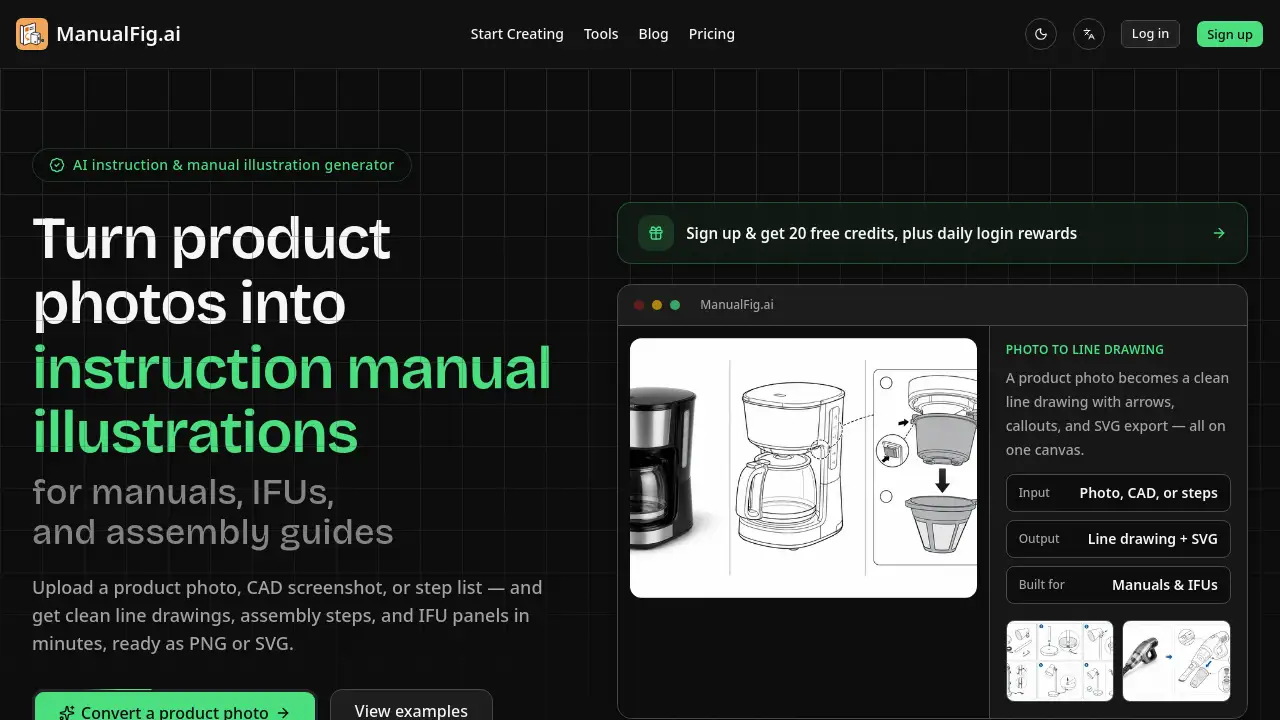
ManualFig is a web-based tool designed to convert ordinary product photos into accurate, clean line drawings that are ready for instruction manuals, assembly guides, IFU panels, and support pages. It addresses the common pain point of high costs and long turnaround times when hiring technical illustrators. The AI behind ManualFig automatically adds numbered steps, direction arrows, part callouts, warnings, and correct/incorrect comparisons. The result is a figure that a reader can follow without confusion. This product is suitable for technical writers, product managers, ecommerce sellers, and anyone producing user documentation. By using an AI instruction manual illustration generator like ManualFig, teams can keep illustration work in-house, maintain a consistent style, and export figures as PNG or SVG directly into their documents. No design skills are necessary, and the tool is free to start with no credit card required.
Key Features of ManualFig
Photo to Clean Line Drawings
Upload a product photo, CAD screenshot, or supplier image, and ManualFig removes reflections and clutter while preserving the real shape. This produces a clear line drawing for manuals and IFU panels.
Numbered Step-by-Step Panels
Each panel shows one action with arrows, part callouts, and a finished state. This feature is essential for numbered assembly instructions and helps readers verify each step.
Warnings and Correct/Incorrect Comparisons
Add hazard symbols, pinch points, polarity marks, and do/don’t diagrams. These elements are required for IFU panels and safety pages, and ManualFig generates them automatically.
Consistent Style Across Manuals
All figures share the same drawing style, whether they go into a user guide, packaging insert, or help article. This keeps branded documentation uniform.
Export PNG or SVG
Every figure can be exported as PNG (for quick drops) or SVG (for scaling). Version history is kept so you can tweak and compare without losing previous work.
Use Cases for ManualFig
Assembly Instructions
Perfect for furniture, machinery, or consumer goods. Generate numbered assembly steps with hardware callouts and anti-tip warnings.
User Manuals & Guides
Create setup, use, care, and troubleshooting figures from a step list. This works well for electronics, appliances, and software hardware.
Medical Device IFUs
Produce preparation, use, disposal, and contraindication panels that hold up during regulatory review. The tool includes correct/incorrect comparisons for safety.
Ecommerce Product Manuals
Quick-start cards and packaging inserts that reduce returns and support tickets. Convert product photos into line drawings for Amazon listings.
Technical Illustrations & Exploded Views
Generate exploded views, part callouts, installation diagrams, and SOP visuals. This is helpful for engineering documentation.
How to Use ManualFig
- Upload a photo, CAD, or step list – Start with a product photo, a CAD screenshot, a supplier image, a sketch, or even a written procedure.
- Generate the line drawing or steps – The AI automatically produces numbered assembly steps, part callouts, direction arrows, zoom details, warnings, and correct/incorrect panels.
- Tweak and export – Edit any figure using a sentence prompt, keep every version, and export as PNG or SVG directly into your documentation.
The AI instruction manual illustration generator handles the complexity, so you only need to review and finalize the output.
Target Audience for ManualFig
- Technical writers who need to produce clear illustrations quickly.
- Product managers responsible for creating assembly instructions and user guides.
- Ecommerce sellers (Amazon, Shopify) who want to reduce returns with better product manuals.
- Manufacturing and engineering teams that document work instructions and SOP visuals.
- Medical device companies that require compliant IFU panels.
- Startups and small businesses with limited budgets for professional illustration.
Is ManualFig Free?
ManualFig offers a free tier with credits to generate figures. Users can convert a photo to a line drawing, draft assembly instructions, or build an IFU panel without paying anything. No credit card is required to start. When the free credits are used up, users can upgrade to a paid plan (pricing details are available on the official website). The free tier is a risk-free way to evaluate the product.
| Plan | Price | Features |
|---|---|---|
| Free | $0 | Free credits to generate and export figures |
| Pro (if available) | Paid | Additional credits, priority support, etc. |
Exact Pro pricing is not listed in the reference; check manualfig.ai for current plans.
ManualFig's Pros and Cons
| Aspect | Pros | Cons |
|---|---|---|
| Pricing | Free to start, no credit card required | May need paid plan for heavy use |
| Ease of Use | No design skills needed; plain language editing | Limited control over fine details (AI-generated) |
| Speed | Figures in minutes, not days | May not match custom illustration for complex products |
| Output Quality | Clean, consistent line drawings for manuals | Renders better for simple products; highly reflective or transparent objects may need adjustment |
| Export Options | PNG and SVG with version history | No vector formats other than SVG |
Frequently Asked Questions about ManualFig
Can ManualFig convert any product photo into a line drawing?
Yes, it works with product photos, CAD screenshots, supplier images, and sketches. The AI removes reflections and clutter while keeping the real shape. For best results, use a well-lit, high-contrast image.
How long does it take to generate a figure?
Typically a few minutes. ManualFig is designed to be fast, allowing you to generate a figure on free credits without waiting for an illustrator.
Is it possible to edit the figures after generation?
Yes. You can edit any figure with a single sentence prompt. The tool keeps every version, so you can compare and revert changes. This makes the AI instruction manual illustration generator flexible for iterative refinement.
Can I use ManualFig for medical device IFU panels?
Yes, it includes features for hazard symbols, correct/incorrect comparisons, and safety notes. Many medical device companies use it to produce IFU panels that pass regulatory review.
What file formats are supported for export?
You can export figures as PNG or SVG. PNG is suitable for quick drops into documents, while SVG allows scaling without loss of quality.
Do I need to provide a step list for numbered assembly instructions?
You can either upload a step list or describe the steps in plain words. ManualFig will generate numbered panels automatically from the description. This is ideal for creating numbered assembly instructions without manual drawing.
ManualFig Tags
AI instruction manual illustration generator, photo to line drawing for manuals, numbered assembly steps generator, IFU panels tool, technical illustrations software, product manual creation, user guide illustrations, exploded view generator, assembly instruction maker, free manual figure tool, SVG line drawings, ManualFig review.