Introduction
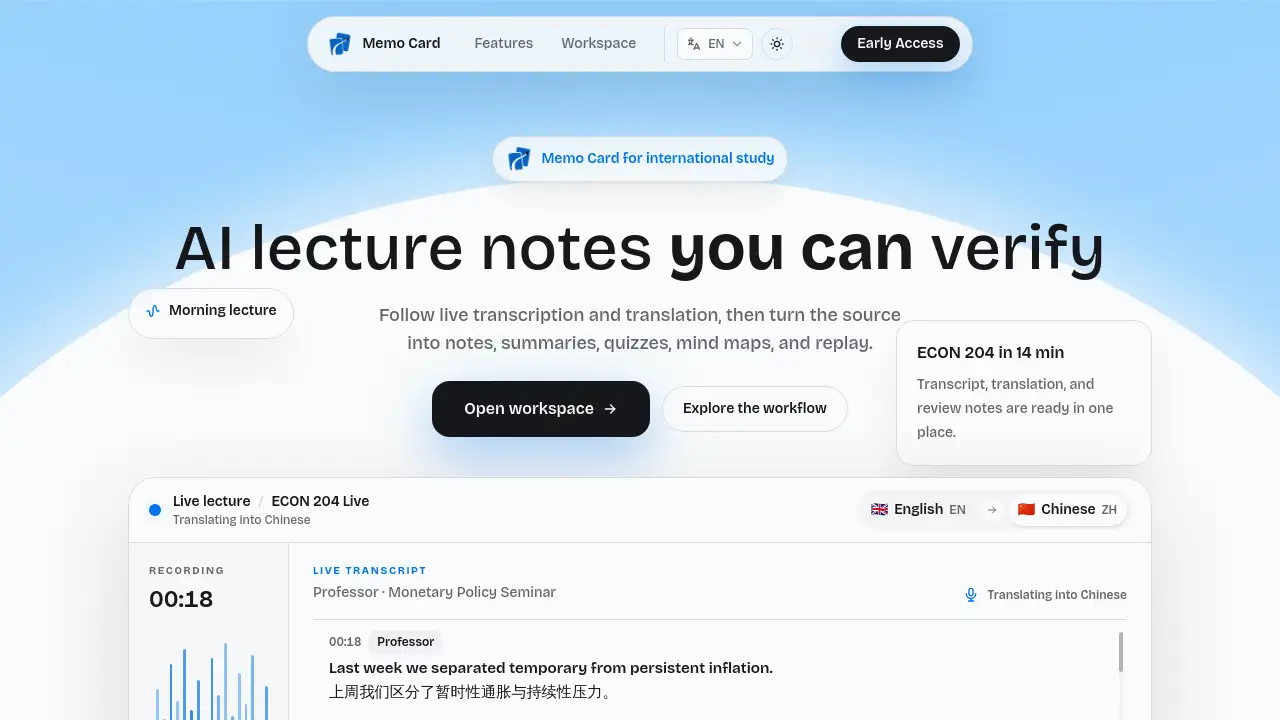
Memo Card creates AI lecture notes from live or recorded classes, combining live transcription, lecture translation, and searchable bilingual notes in one workspace. Students can follow lectures in real time, then turn the same source into structured AI lecture notes, mind maps, quizzes, and AI Tutor answers. These AI lecture notes stay connected to the original recording through timestamps, making review accurate and verifiable.
What is Memo Card?
Memo Card is a browser-based tool that converts spoken lectures into organized learning material. It provides live transcription and translation during class, then builds AI lecture notes after the session ends. The core idea is that every output comes from the actual lecture and can be traced to a timestamped moment in the audio.
Students often struggle to take good notes because lectures move fast and summaries are hard to trust. Memo Card solves this by automating transcription, structuring, and translation. Instead of an untraceable summary, users get AI lecture notes linked directly to the recording. That makes the product useful for university students, language learners, online course takers, and professionals studying from spoken content.
Memo Card matters because it creates a complete workflow. Users start in a live class, follow translated text in real time, and finish with AI lecture notes, keywords, summaries, and quizzes. Bilingual notes support non-native speakers during review, and timestamps let anyone verify the original context. The result is a reliable path from lecture capture to long-term recall, and each set of AI lecture notes reflects the class the student actually heard.
Key Features of Memo Card
Live transcription
Memo Card converts classroom audio into text while the lecturer is still speaking. This live transcription lets students keep listening, and the running transcript becomes the foundation for AI lecture notes after class. Because the transcript is timestamped, the AI lecture notes built on top of it can always be checked against the source.
Lecture translation
Original speech and translated text stay aligned on screen, helping students follow fast speakers, accents, and technical vocabulary. This feature is useful during class and remains valuable when reviewing AI lecture notes after the lesson.
Bilingual notes
AI lecture notes keep both the source transcript and the translated version together. These bilingual notes make review clearer before exams, assignments, and group discussions.
AI Tutor with course evidence
The AI Tutor answers questions using only the current lecture and cites timestamps. Students can check each explanation against the source, so AI lecture notes stay transparent and trustworthy.
Search and replay
Users can search any term in a session, open the matching timestamp, and replay the exact moment that supports their AI lecture notes at a comfortable speed.
Import, export, and control
Students can import recorded audio, export study material, and delete files when no longer needed. Data control is built into every stage of the AI lecture notes workflow.
Use Cases for Memo Card
In-person lectures
Start a live Memo Card session before class. Live transcription streams into the workspace, and the student can generate structured AI lecture notes as soon as the lecture ends.
Online courses and recordings
Upload recorded audio from an online course or a missed session. Memo Card turns the audio into AI lecture notes, translation, and a searchable archive. These AI lecture notes include summaries, keywords, and timestamped links to the original audio.
Exam preparation
Review with AI lecture notes, keyword summaries, mind maps, and quizzes. The side-by-side language view helps learners understand the material before exam day.
How to Use Memo Card
- Open Memo Card in a modern browser and sign in.
- Start a live session or upload a supported recording.
- Follow the live transcription and translation while class is happening.
- Let Memo Card structure the session into AI lecture notes with keywords, summaries, and timestamps.
- Search, replay, quiz yourself, or export the AI lecture notes and related files.
Target Audience for Memo Card
- University students who need accurate AI lecture notes for revision
- Online learners who study from recorded videos and webinars
- International students who rely on lecture translation and bilingual notes
- Professionals preparing for certifications or continuing education
- Anyone who wants timestamped, verifiable AI lecture notes instead of untraceable summaries
Is Memo Card Free?
The reference material does not list exact pricing details. Memo Card can be opened directly in a browser, and users can sign in to start a live session or upload a recording to generate AI lecture notes. For the latest pricing, free trial options, and plan features, check the official Memo Card website.
Memo Card's Pros and Cons
| Aspect | Pros | Cons |
|---|---|---|
| Workflow | One lecture becomes transcripts, AI lecture notes, quizzes, mind maps, and summaries | No mention of a desktop app for offline use |
| Verification | AI lecture notes and tutor answers link to timestamps in the source audio | Accuracy depends on audio quality, room noise, accents, and network conditions |
| Language help | Bilingual notes and translation support non-native speakers | Translated text may need manual checking for technical terms |
| Privacy | Clear deletion path for recordings, transcripts, notes, and exports | Requires an account and a browser internet connection |
Frequently Asked Questions about Memo Card
What is Memo Card?
Memo Card is a browser-based tool that generates AI lecture notes from live or recorded lectures. It combines live transcription, translation, searchable bilingual notes, quizzes, and replay. The resulting AI lecture notes stay connected to timestamps in the source audio.
Can Memo Card be used for in-person lectures?
Yes. Start a live session in class or upload a recording afterward. Room noise, accents, and network conditions can affect the quality of the transcript.
How do I verify an answer from the AI Tutor?
Every answer stays connected to timestamps in the source lecture. Open the transcript or replay the exact moment to confirm the information behind the AI lecture notes.
Can I export or delete my data?
Yes. Export or delete recordings, transcripts, translations, summaries, and AI lecture notes at any time. Account deletion is also available in the settings.
Do I need to install an app?
No. Memo Card runs in a modern browser. Sign in, then start a live session or upload a supported recording to create AI lecture notes.
Memo Card Tags
AI lecture notes, live transcription, lecture translation, bilingual notes, AI study tool, student note-taking, lecture summarizer, timestamped notes, AI Tutor, course quizzes, Memo Card review, lecture transcript app