Introduction
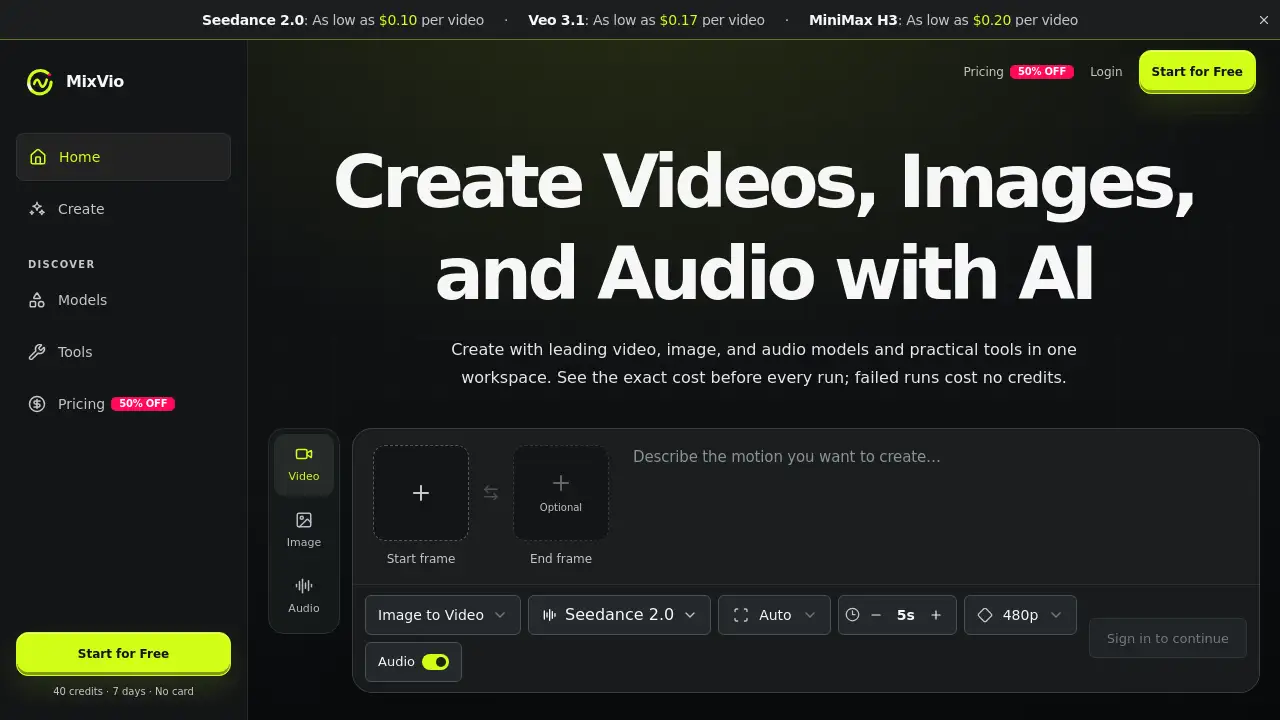
MixVio AI is an all-in-one AI video generator, AI image generator, and AI audio generator. It lets creators use leading models in one workspace, see credit costs before every run, and avoid charges when a generation fails. It is designed for fast, practical AI content creation.
What is MixVio AI?
MixVio AI is a cloud-based AI creative workspace for making videos, images, voiceovers, and music. It brings models such as Seedance, Kling, Veo, GPT Image, and Seed Audio into one place. Instead of switching between separate AI tools, users can start a project, choose a route, and generate outputs on one platform.
The product solves surprise billing in AI content creation. Every model and tool shows an integer credit cost before submission. A task reserves that quote, settles it on success, and releases reserved credits if the run fails. This makes MixVio AI practical for individuals and teams testing ideas quickly.
MixVio AI also supports reference-based workflows. Users can upload images, video, or audio on routes that accept references, such as Image to Video and editing tools. Uploads stay private to the workspace. This makes MixVio AI suitable for product visuals, short videos, multilingual voiceovers, and original music.
Key Features of MixVio AI
Multi-Model AI Video Generator
MixVio AI includes video models such as Seedance, Kling, Veo, and MiniMax H3. Users can generate short videos from text or a reference image and compare model costs before running a job.
AI Image Generator and Editor
The platform offers image generation and editing with models like GPT Image. MixVio AI helps users create product-ready images and edits inside one AI creative workspace.
AI Audio Generator for Voice and Music
MixVio AI supports voiceovers in multiple languages and original music through audio models such as Eleven v3 and Seed Audio. This makes it a practical AI audio generator for narration, ads, and social content.
Upfront Credit Quotes
Every run on MixVio AI shows the exact credit quote and dollar equivalent before submission. Users can review model costs and expected spend without guessing.
Failed Runs Cost No Credits
If a generation fails, MixVio AI keeps the task visible with a safe error message and automatically releases reserved credits. This fair credit policy reduces risk when testing new models or prompts.
Private Workspace
Uploads and generated results stay in a private workspace and are not listed publicly. Download links are short-lived and scoped to the account, supporting safer content creation.
Commercial Use on Paid Plans
Paid plans on MixVio AI include commercial use of outputs, subject to the Terms of Service. Users must have rights to every reference, face, voice, brand, and prompt they submit.
Use Cases for MixVio AI
Social Media Video Creation
Creators can use MixVio AI as an AI video generator to make short videos for TikTok, YouTube Shorts, Instagram Reels, and other platforms.
Product Image and Ad Design
Marketers and small businesses can use the AI image generator and editing tools to create product-ready images and ad variations. This can speed up campaign testing.
Voiceovers and Music for Content
Podcasters, video editors, and advertisers can use MixVio AI for multilingual voiceovers and original music. The AI audio generator supports narration and background tracks.
Prototyping Creative Ideas
Filmmakers, agencies, and designers can test storyboards, visual concepts, and short clips before full production. MixVio AI makes it easier to compare Seedance, Kling, Veo, and other models.
Educational and Explainer Content
Teachers and trainers can create explainer videos, images, and voiceovers. MixVio AI can help turn scripts or reference images into visual learning materials.
How to Use MixVio AI
- Create a MixVio AI account. New accounts receive 40 welcome credits valid for 7 days, with no credit card required.
- Choose a route for video, image, or audio. Default options include MiniMax H3 for video, GPT Image 2 for images, and Eleven v3 for audio.
- Upload reference files if the route accepts them. Check accepted formats and limits before submitting.
- Review the exact credit quote MixVio AI shows and the dollar equivalent. Select another compatible model if needed.
- Generate the content, then download the result from the private workspace. If a run fails, reserved credits are released automatically.
Target Audience for MixVio AI
MixVio AI is suitable for a range of creators and teams.
- Social media creators and influencers
- Digital marketers and advertising teams
- Small business owners and ecommerce sellers
- Video editors, filmmakers, and agencies
- Podcasters and voiceover artists
- Musicians and audio producers
- Product designers and creative teams
- Educators and trainers
Is MixVio AI Free?
MixVio AI offers a free starting point and several paid options. New accounts get 40 welcome credits valid for 7 days, with no credit card required. Every generation uses credits, and users can upgrade when credits run out. Free plan image outputs include a visible MixVio watermark, and free voiceovers include an audible MixVio disclosure. Free videos do not add a MixVio plan watermark. MixVio AI paid plan exports do not add a MixVio plan watermark.
| Plan | Price | Features |
|---|---|---|
| Free | $0 | 40 welcome credits valid for 7 days; no credit card required; watermarks on images and voiceovers; free videos have no MixVio plan watermark |
| Lite, Starter, Pro, Ultra | Varies | Paid plan exports without MixVio watermark; commercial use of outputs; subscription credits expire at the end of each billing period and do not roll over |
| Credit Packs | Varies | Purchased credit packs stay usable until their own expiry |
For current plan allowances and exact model costs, check the official MixVio AI pricing page.
MixVio AI's Pros and Cons
| Aspect | Pros | Cons |
|---|---|---|
| Pricing | Upfront credit quotes; failed runs cost no credits; free welcome credits | Subscription credits expire monthly and do not roll over |
| Features | Multi-model AI video, image, and audio creation in one workspace | Model availability and costs can change over time |
| Access | Private workspace; short-lived download links | Free plan adds watermarks to images and voiceovers |
| Commercial Use | Paid plans include commercial use of outputs | Free-plan outputs are for evaluation and not for commercial publishing |
| Ease of Use | Default models help beginners start quickly | Advanced users may need time to compare routes and model limits |
Frequently Asked Questions about MixVio AI
Is MixVio AI free to try?
Yes. Every new MixVio AI account receives 40 welcome credits valid for 7 days, with no credit card required. Every generation uses credits, so users can upgrade when the free credits run out.
How much does one AI video cost on MixVio AI?
Costs depend on the model. Veo 3.1 Lite starts at 10 credits, from $0.17. MiniMax H3 starts at 12 credits, from $0.20. Seedance 2.0 Standard starts at 26 credits, or $0.43. The Generate button shows the exact credit quote and dollar equivalent before submission.
What happens if a generation fails on MixVio AI?
The failed task stays visible with a safe error message. Reserved credits are automatically released, so users can retry or switch routes without losing credits for the failed run.
Can I upload my own images, video, or audio to MixVio AI?
Yes, on routes that accept references, such as Image to Video and editing tools. Uploads stay private to the workspace, and each route shows accepted formats and limits before submission.
Are MixVio AI uploads or results public?
No. Uploads and generated results stay in a private workspace and are not listed publicly. Providers process a request only to complete that run, and download links are short-lived and scoped to the account.
Can I use MixVio AI outputs commercially?
Paid plans include commercial use of outputs created on MixVio AI, subject to the Terms of Service. Users must have rights to every reference, face, voice, brand, and prompt they submit. Free-plan outputs are for evaluation and are not for commercial publishing.
MixVio AI Tags
MixVio AI, AI video generator, AI image generator, AI audio generator, AI creative workspace, Seedance, Kling, Veo, GPT Image, AI voiceovers, AI music, credits-based AI platform, text to video, image to video