Introduction
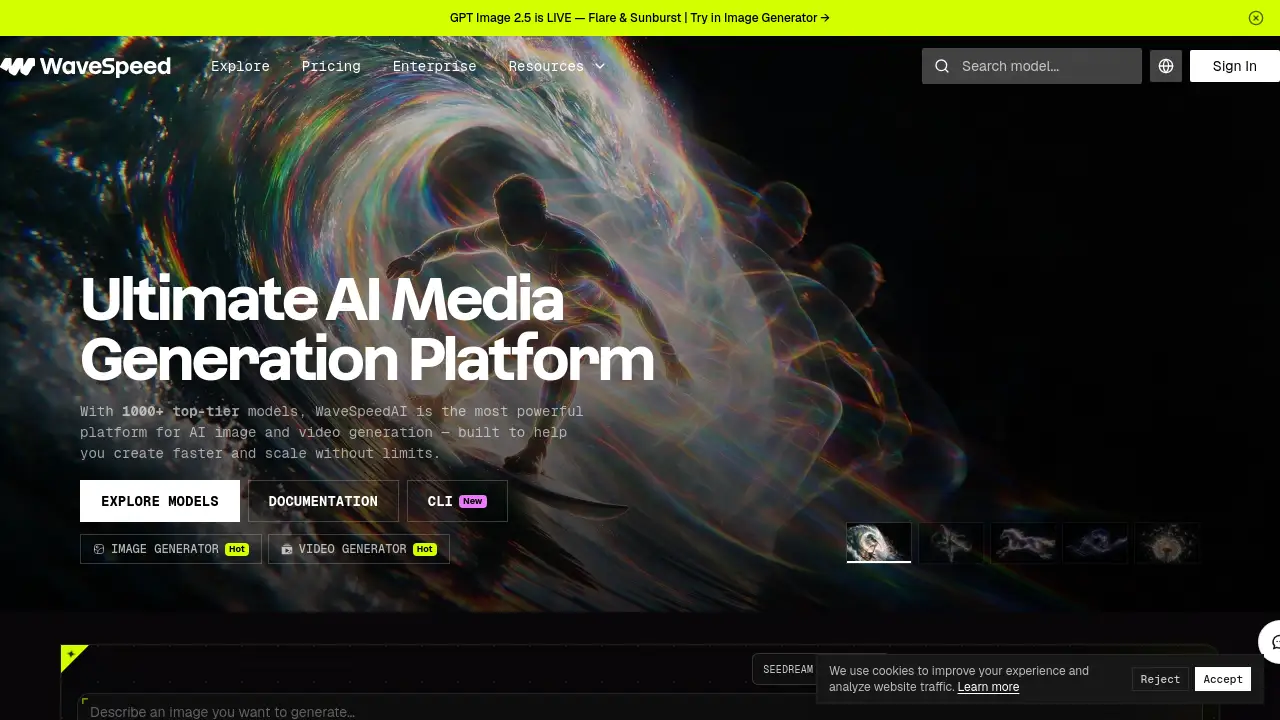
WaveSpeedAI is a unified AI media generation platform offering 1000+ image, video, and audio models. This wavespeed ai review explains its features, pricing, and practical uses.
What is wavespeed ai?
WaveSpeedAI is a cloud-based AI media generation platform that brings more than 1,000 image, video, audio, and large language models together under one account and one API key. Instead of juggling multiple subscriptions and separate tools, users can access leading models — including GPT Image 2.5, FLUX, Seedream, Kling, Wan, and MiniMax — from a single dashboard.
The platform solves a common problem in AI content creation: fragmentation. Creators and developers often need one tool for images, another for video, and a third for audio. WaveSpeedAI consolidates these into one interface and one billing system. It is designed for a wide range of users, from solo creators producing social media visuals to engineering teams building AI features into their own products.
What makes it notable is the combination of breadth and speed. According to the company, its optimized GPU clusters deliver sub-second image generation and video rendering up to four times faster than some alternatives. For anyone searching for a fast AI image and video generator with serious model variety, WaveSpeedAI is worth a closer look.
Key Features of wavespeed ai
Vast Model Library
Access over 1,000 image, video, audio, and LLM models from one unified platform. Browse collections for GPT Image 2.5, FLUX 3, Seedream, Kling, Wan, and many more without switching accounts.
Blazing Fast Inference
Generate images in under a second and render video significantly faster than many competing services. Optimized GPU infrastructure keeps turnaround times short, which matters for high-volume creative work.
Image Generator
Create AI images from text prompts using top-tier models. The image generator supports styles ranging from realistic product shots to editorial portraits and lifestyle scenes.
Video Generator
Turn prompts or still images into dynamic video clips. The video generator handles tasks like first-and-last-frame animation, motion control, video extension, and lip-sync avatars.
Developer API and CLI
Integrate any model with a single API call using Node, Python, or cURL. A command-line interface (CLI) also lets developers run models directly from a terminal or agent workflow.
Desktop App for Creators
Download the WaveSpeed Desktop app to use the full platform without writing code. It offers a no-setup environment for creators who prefer a visual workflow.
Scalable Infrastructure
Handle anything from a single image to millions of requests. The platform reports enterprise-grade infrastructure with 99.99% uptime and security options like encryption and private deployment.
Audio and 3D Tools
Generate speech, music, and sound effects, or explore 3D creation models. These tools round out the platform for multimodal projects.
Use Cases for wavespeed ai
Content Creation and Social Media
Creators can produce scroll-stopping images and short videos quickly. Fast inference helps maintain a consistent posting schedule without long render waits.
E-commerce Product Photography
Sellers can generate professional product shots, lifestyle images, and promotional videos. This reduces the cost of traditional photo shoots while keeping visual quality high.
Marketing and Advertising
Agencies can prototype ad concepts, generate variations, and scale campaigns. Access to multiple top models makes it easier to match a specific brand style.
Software and App Development
Developers can embed image, video, and audio generation into their own apps through the API. This avoids managing separate vendor relationships for each model.
Video Post-Production
Editors can use tools like video extend, upscaling, object removal, and motion control. These features streamline common editing tasks that would otherwise require specialized software.
How to Use wavespeed ai
- Create an account. Visit the WaveSpeedAI website and sign in to access the dashboard.
- Choose a tool or model. Select the Image Generator, Video Generator, or browse the full model library to find what fits the task.
- Enter a prompt or upload input. Describe the image or video you want, or provide a source file for editing, upscaling, or animation.
- Generate and review. Run the model and check the result. Adjust the prompt or settings and regenerate if needed.
- Download or integrate. Save the output directly, or connect the same model to an application through the API or CLI.
Target Audience for wavespeed ai
- Individual creators and influencers producing visual content
- Graphic designers and video editors
- Marketing teams and advertising agencies
- E-commerce sellers and product photographers
- Software developers and engineering teams
- Startups building AI-powered products
- Enterprises needing scalable, secure AI media infrastructure
Is wavespeed ai Free?
WaveSpeedAI offers a free starting point, allowing new users to sign up and test models before committing to a paid plan. Exact credit allowances and plan limits are not fully detailed in the available information, so checking the official pricing page is the most reliable way to confirm current tiers.
| Plan | Price | Features |
|---|---|---|
| Free / Trial | $0 to start | Sign-up access, limited credits to test models |
| Paid Plans | Varies | Higher usage limits, full model access, API scaling |
| Enterprise | Custom | Private deployment, security options, dedicated support |
For the latest numbers, visit the WaveSpeedAI pricing page directly.
wavespeed ai's Pros and Cons
| Aspect | Pros | Cons |
|---|---|---|
| Model Variety | 1000+ models across image, video, audio, and LLM | Large library can be overwhelming for beginners |
| Speed | Sub-second images, fast video rendering | Actual speed depends on model and load |
| Pricing | Free entry point; scalable paid tiers | Exact plan costs require checking the pricing page |
| Developer Tools | Simple API, CLI, and documentation | Requires coding knowledge for API use |
| Accessibility | Desktop app for non-coders | Desktop app availability may vary by platform |
| Scalability | Enterprise-grade infrastructure, high uptime | Enterprise features may be overkill for hobbyists |
Frequently Asked Questions about wavespeed ai
What is WaveSpeedAI used for?
WaveSpeedAI is used to generate and edit AI images, videos, audio, and 3D content. It also provides LLM access, making it a broad media generation platform rather than a single-purpose tool.
Do I need coding skills to use WaveSpeedAI?
No. The Image Generator, Video Generator, and Desktop App are built for non-coders. However, developers who want to integrate models into their own software will use the API or CLI.
How many models does WaveSpeedAI offer?
The platform advertises over 1,000 models, covering categories such as image generation, video generation, image upscaling, object removal, avatar lip-sync, speech generation, music, and 3D creation.
Is WaveSpeedAI fast compared to other platforms?
The company states its optimized GPU clusters deliver sub-second image generation and up to 4x faster video rendering than some alternatives. Real-world results can vary by model and workload.
Can businesses scale with WaveSpeedAI?
Yes. The platform is built for scale, supporting anything from single requests to millions, with reported 99.99% uptime and enterprise security options such as private deployment.
Does WaveSpeedAI offer a free trial?
A free starting point is available, letting users explore models before paying. For current credit limits and plan details, check the official pricing page.
wavespeed ai Tags
wavespeed ai, WaveSpeedAI review, AI media generation platform, AI image generator, AI video generator, 1000+ AI models, AI API for developers, AI video rendering, fast AI image generation, WaveSpeed desktop app, AI audio generation, best AI media platform