Introduction
Muse Video creates cinematic AI videos from text or images.
What is Muse Video?
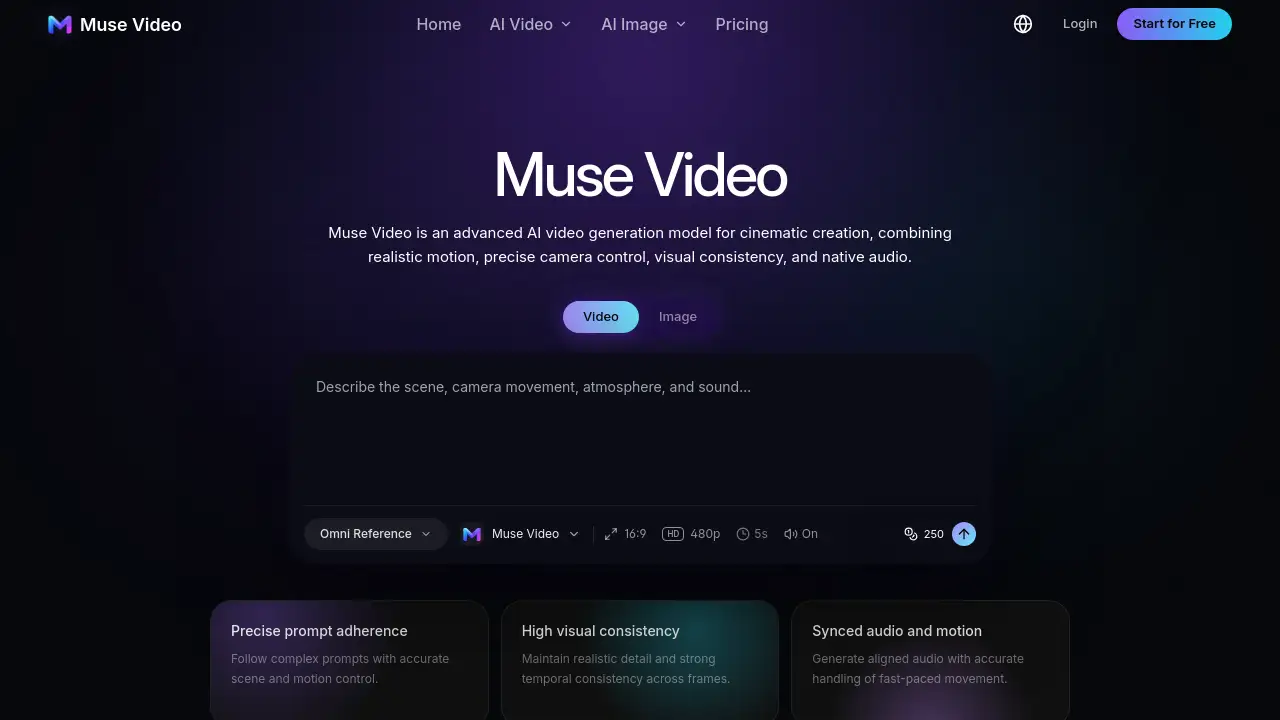
Muse Video is an advanced AI video generator and AI video generation model previewed by Meta Superintelligence Labs. It is designed to turn detailed text prompts or reference images into dynamic, high-quality video. The product focuses on prompt adherence, visual consistency, realistic motion, and native audio. It solves a common creative problem: testing a video idea without immediately organizing a full shoot. With Muse Video, creators can explore text-to-video and image-to-video workflows, shape camera movement, and review motion before committing production time. The model is described as an early preview from Meta, so final duration, resolution, and pricing details have not been published. An independent workspace gives users access to available models and settings for AI video generation today. Muse Video matters because it helps creators, marketers, filmmakers, and brands move from a written idea to a moving visual reference faster.
Key Features of Muse Video
Text-to-Video Generation
Muse Video lets users describe a subject, action, setting, and camera direction in natural language, then generate a moving visual concept. This text-to-video workflow supports fast ideation for cinematic AI videos.
Image-to-Video Workflow
Users can start from a reference image when composition, product detail, or a specific opening frame should guide the motion. This image-to-video approach helps maintain visual consistency across a shot.
Temporally Consistent Motion
Muse Video is designed to keep subjects and scenes visually coherent as a shot unfolds. This focus on temporal consistency supports more believable realistic motion.
Cinematic Camera Control
Users can use prompt language for framing, tracking, handheld movement, pacing, lighting, and atmosphere. This camera control helps shape the feel of each cinematic AI video.
Native Audio Direction
Muse Video was previewed with native audio support, allowing sound and picture to begin from the same creative instruction. Audio-video synchronization is still described as an area of active improvement.
Prompt and Visual Fidelity
The model aims to follow the requested scene more closely while preserving detail and a consistent visual direction. Strong prompt adherence helps reduce the gap between the idea and the generated clip.
Flexible Generation Settings
Users can choose supported aspect ratio, duration, resolution, and audio options exposed by the selected generation model. These settings vary by model inside the workspace.
Reusable Creation Library
Muse Video keeps prompts and generated assets together so a promising test can become a repeatable creative workflow. This helps teams compare versions and refine an AI video generation concept.
Use Cases for Muse Video
Social Media Content
Content creators can make short-form videos for Reels, Shorts, and TikTok without planning a traditional shoot for every idea. Muse Video supports quick visual storytelling and repeatable concepts.
Product Videos
Marketers and brands can create product-focused clips that test light, material, camera motion, and commercial pacing. An image-to-video workflow is useful when product details must stay consistent.
Previsualization and Storyboards
Filmmakers can explore staging, lenses, camera movement, atmosphere, and story beats while a scene is still inexpensive to change. Muse Video works as a previsualization and pitch tool.
Motion Studies and Design Prototypes
Designers can give static visual concepts movement and test how layouts, characters, or product compositions behave over time. This makes Muse Video useful for motion studies and concept prototypes.
Advertising Concepts
Teams can turn one campaign brief into multiple promotional directions and compare ideas before committing production budget. AI video generation helps with ads, launches, and A/B tests.
Creative Storytelling
Writers and creative teams can prototype several directions quickly, share a moving reference, and align on an idea before a larger production begins. Muse Video supports sound-led micro stories and animated visual worlds.
How to Use Muse Video
- Enter a prompt. Describe the video idea, including subject, scene, visual style, motion, camera direction, sound, and intended duration.
- Review the direction. Check the editable direction and reference image, then confirm which model and settings are currently available.
- Generate the video. Start the generation workflow using the supported text-to-video or image-to-video option.
- Review and export. Check motion and reference consistency, then export the strongest result for ads, social posts, product videos, or creative projects.
Muse Video is built for prompt-led and reference-led creation. Users should test a few variations because model-dependent settings can affect the final look and sound.
Target Audience for Muse Video
- Content creators making short-form social videos and visual stories
- Marketers building ads, launches, and campaign tests
- Filmmakers exploring previsualization, storyboards, and pitches
- Designers creating motion studies and concept prototypes
- Brands producing product videos and branded visual variations
- Creative teams that need fast moving references for reviews
- Social media managers who want repeatable video concepts
Is Muse Video Free?
No public pricing for Muse Video has been announced. Meta describes the model as an early preview that is coming soon to creators and Meta AI. The independent workspace referenced here may use credits, and model limits can vary. Because final duration, resolution, and pricing specifications are not published, users should check the generator for current credit requirements and available models. There is no confirmed free plan for the official Muse Video release at this time. Any free or trial access depends on the workspace and the selected model, not on a published Meta pricing page.
Muse Video's Pros and Cons
| Aspect | Pros | Cons |
|---|---|---|
| Features | Supports text-to-video, image-to-video, native audio, camera control, and prompt adherence | Final specifications and feature set may change because it is an early preview |
| Motion | Focuses on realistic motion, temporal consistency, and visual consistency | Fast-paced motion and audio-video synchronization are still being improved |
| Availability | Available through an independent workspace with selectable models | Official Muse Video release is described as coming soon to creators and Meta AI |
| Pricing | No confirmed public price yet, so users can test workspace access based on credits | Final Meta pricing is unknown, making long-term budgeting difficult |
| Creative fit | Useful for social content, product videos, ads, previz, and motion studies | Commercial rights depend on model terms, plan, source material, and local law |
Frequently Asked Questions about Muse Video
What is Muse Video?
Muse Video is an AI video generation model previewed by Meta Superintelligence Labs. It turns text prompts and reference images into moving visuals, with an emphasis on prompt adherence, visual consistency, realistic motion, and native audio.
How does Muse Video work?
Muse Video interprets a written scene description and generates a moving visual sequence from that instruction. The preview shows prompts that describe subjects, actions, camera behavior, visual style, dialogue, ambience, and sound effects.
Is Muse Video free to use?
Meta has not announced public pricing for Muse Video. The model is described as an early preview and coming soon to creators and Meta AI. The independent workspace may use credits, and limits can differ by selected model.
Can Muse Video generate videos from text?
Yes. The official preview demonstrates text-to-video generation from detailed prompts covering action, camera movement, style, dialogue, ambience, and other sound direction. This makes Muse Video a flexible AI video generator for prompt-led creation.
Can I turn an image into a video with Muse Video?
The Muse Video preview focuses on prompt-driven generation and does not publish a complete input specification. The independent workspace offers image-to-video through supported models in its catalog, which can help guide composition and consistency.
Does Muse Video generate audio?
Yes. Native audio support is part of Meta's preview. Meta also notes that audio-video synchronization remains an area of active improvement, along with physically accurate fast motion.
Muse Video Tags
Muse Video, AI video generator, cinematic AI videos, text-to-video, image-to-video, AI video generation, native audio, realistic motion, prompt adherence, visual consistency, camera control, Muse Video features