Introduction
Create beautiful photo collages by merging multiple images with AI-powered layouts and privacy-focused processing.
What is Photo Collage?
Photo Collage is an online tool that allows users to merge multiple photos into a single, aesthetically pleasing composition. It addresses the common need to combine several images, such as vacation snaps, event pictures, or social media content, into one cohesive visual story. This tool is suitable for a wide range of users, from social media enthusiasts and bloggers to small business owners and anyone looking to organize their memories creatively. Its significance lies in its simplicity and focus on user privacy, offering a streamlined alternative to complex desktop software. The ability to create a photo collage directly in a web browser makes it a convenient and accessible solution for quick visual projects.
Key Features of Photo Collage
Diverse Layout Modes
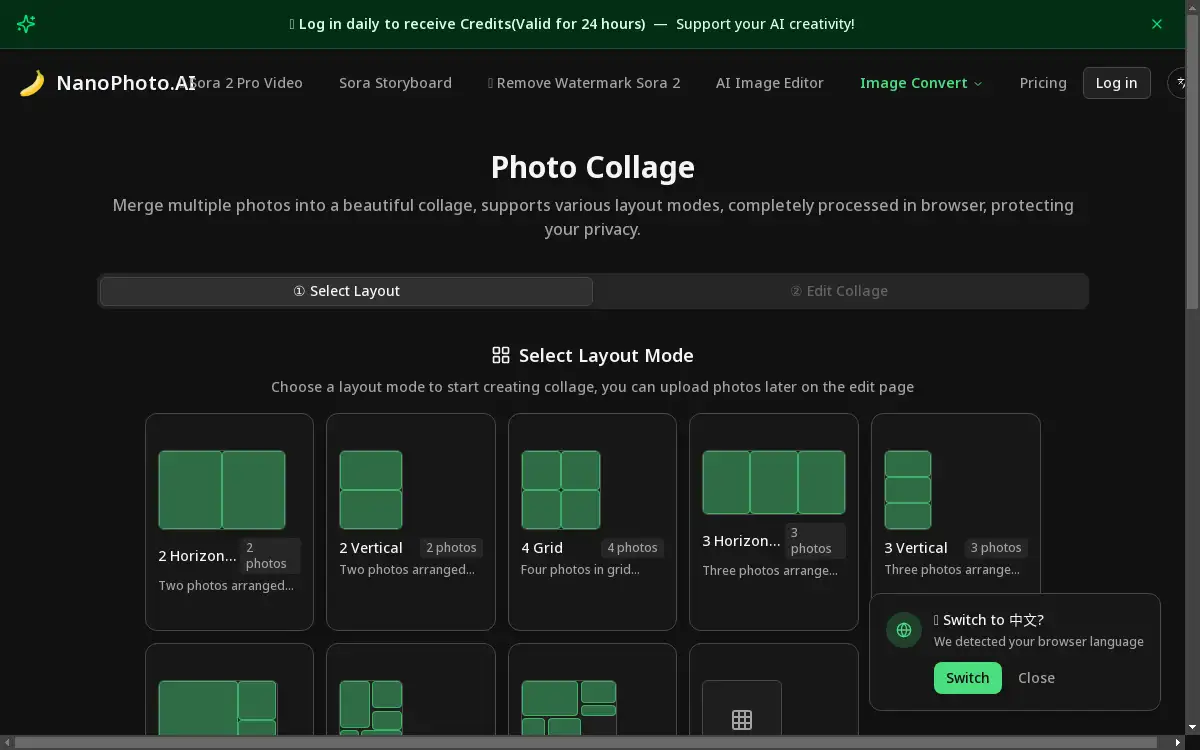
The tool provides a variety of preset layout modes including 2 Horizontal, 2 Vertical, 4 Grid, Main-Side, Pinterest Style, and Magazine Style, catering to different numbers of photos and aesthetic preferences.
Free Drag-and-Drop Layout
For ultimate creative control, the Free Layout mode allows users to manually adjust the position, size, and rotation angle of each photo by simply dragging and dropping elements on the canvas.
Browser-Side Processing
All collage creation is completely processed in browser, meaning your photos never leave your computer to be uploaded to a server, thereby protecting your privacy and ensuring data security.
Customizable Canvas and Background
Users can tailor their collage by adjusting the overall canvas size and changing the background color to match their project's theme or brand requirements.
Multi-Format Support
The tool supports a wide range of image formats such as JPG, PNG, WebP, AVIF, and HEIC, ensuring compatibility with photos from various sources, including modern smartphones.
High-Quality Export
Finished collages can be exported as high-quality PNG files, preserving detail and clarity for both digital sharing and potential printing purposes.
Use Cases for Photo Collage
Social Media Content Creation
Create eye-catching posts for platforms like Instagram or Facebook by merging multiple product shots or lifestyle photos into an engaging photo collage that tells a story.
Event Memory Compilation
Combine highlights from a wedding, birthday party, or vacation into a single Magazine Style or Grid layout to create a beautiful summary of the event.
Marketing and Presentation Materials
Small businesses can use the tool to create simple marketing graphics, product comparisons, or visual slides for presentations by arranging images in a clean, professional layout.
Personal Photo Projects
For personal use, the Free Layout mode is perfect for crafting custom digital scrapbooks, family year-in-review graphics, or artistic compositions from a series of photos.
How to Use Photo Collage
Using this tool is a straightforward process that can be completed in a few simple steps.
- Select a Layout: Begin by choosing a layout mode from the available options, such as 2 Horizontal, 4 Grid, or Free Layout, based on the number of photos you have and the desired look.
- Upload Your Photos: After selecting a layout, you will be taken to the editing page where you can upload the multiple photos you wish to merge into your collage.
- Edit and Customize: Arrange your photos within the chosen layout. In Free Layout mode, you can drag, resize, and rotate each image. You can also adjust the canvas size and background color.
- Export Your Collage: Once satisfied with the arrangement, export your final creation as a high-quality PNG image file, ready to be saved or shared.
Target Audience for Photo Collage
- Social Media Managers and Influencers
- Bloggers and Content Creators
- Small Business Owners
- Photographers and Hobbyists
- Students and Educators
- Families and Individuals organizing personal memories
Is Photo Collage Free?
NanoPhoto.AI offers a generous free plan for its Photo Collage tool, allowing users to access its core features, including various layout modes and browser-side processing, without any cost. For users requiring advanced features or higher usage limits, the platform provides affordable premium options through its Pricing page, ensuring there is a plan suitable for different needs and budgets.
Frequently Asked Questions about Photo Collage
What image formats are supported for creating a collage?
The tool supports a wide range of common image formats, including JPG, PNG, WebP, AVIF, and HEIC, ensuring compatibility with most digital cameras and smartphones.
Is my data secure when using this photo collage tool?
Yes, absolutely. Since all processing is done completely within your web browser, your photos are never uploaded to any external server, robustly protecting your privacy and data security.
Can I adjust the layout after I have started?
Yes, the tool offers flexibility. While preset layouts provide a starting structure, the Free Layout mode allows for complete manual adjustment of each photo's position, size, and rotation at any time.
What is the main advantage of the browser-side processing?
The primary advantage is enhanced privacy and speed. Your images stay on your device, which means faster processing times and the peace of mind that your personal photos are not stored on the cloud.
Are there any restrictions on the number of photos I can use?
The number of photos depends on the chosen layout mode. Preset layouts are designed for specific numbers (e.g., 2, 3, 4, 5, 6 photos), while the Free Layout mode offers more flexibility for using multiple photos.
Can I customize the background of my photo collage?
Yes, the tool allows you to fully customize your collage's background, including changing its color to fit your design theme or to ensure better contrast with your photos.
Photo Collage Tags
online photo collage, merge multiple photos, collage maker, free collage tool, browser photo editor, privacy-focused collage, image layout tool, social media collage, grid layout, pinterest style layout, magazine layout, free layout collage