Introduction
Create professional passport photos online instantly with a free AI photo maker.
What is Passport Photo Maker?
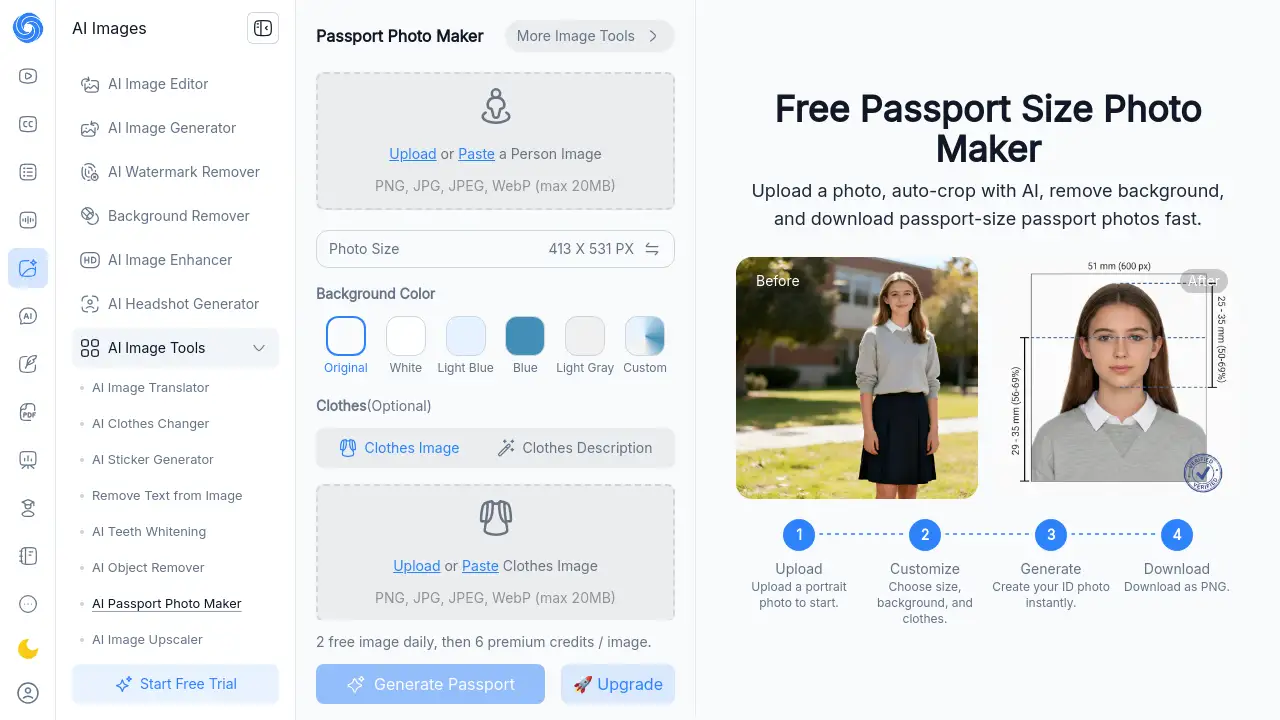
The Passport Photo Maker is a free online tool designed to create official passport, visa, and ID photos quickly and easily. It solves the common problem of needing to visit a photo studio, which can be time-consuming and expensive. This tool is suitable for anyone, from students to professionals, who needs a compliant photo for travel documents. By using artificial intelligence, it automates the entire process, ensuring the final photo meets official size and background requirements without any technical editing skills required. The ability to create a passport size photo online for free makes it a convenient and reliable solution for urgent or budget-conscious needs.
Key Features of Passport Photo Maker
AI-Powered Auto-Crop
The tool uses advanced AI to detect and intelligently crop your face to the correct proportions for an official ID photo, ensuring proper framing and composition.
Automatic Background Removal
With one click, the AI passport photo maker can remove any existing background from your uploaded photo and replace it with a solid, compliant color like white or light blue.
Support for Global Standards
It supports official photo dimensions and specifications for passports and visas from over 100 countries, removing the guesswork from creating an internationally accepted passport size photo.
No Software Installation Required
As a fully web-based tool, you can access it directly from any browser on your desktop or mobile device without downloading or installing any software.
Print-Ready Downloads
The tool generates high-resolution images that are ready to be printed at home or at a local print shop, or submitted digitally for online applications.
Use Cases for Passport Photo Maker
Last-Minute Travel Document Renewal
Ideal for travelers who realize their passport or visa photo has expired and need a compliant passport photo online quickly without leaving home.
Student Visa Applications
Students applying for study abroad programs can use this tool to create the exact visa photo specifications required by their destination country’s embassy.
Professional ID Badges
Employees or contractors who need a standardized headshot for company ID badges can produce a professional-looking photo instantly.
Family Immigration Paperwork
Families preparing extensive documentation for immigration or residency permits can create uniform, official photos for all members efficiently.
How to Use Passport Photo Maker
The process to create your official photo is straightforward and can be completed in just a few minutes.
- Upload Your Photo: Start by uploading a clear, well-lit portrait photo from your computer, phone, or by pasting an image link.
- Customize Settings: Select your target country and document type (e.g., US Passport, Schengen Visa). Choose your preferred background color and adjust any optional settings like clothing.
- Generate and Download: Click the generate button. The AI will process your image, and you can instantly download your new, compliant passport size photo in PNG format.
Target Audience for Passport Photo Maker
- Frequent travelers and tourists needing visa photos.
- Students applying for international programs.
- Professionals requiring photos for work IDs or permits.
- Immigrants and expats completing government paperwork.
- Budget-conscious individuals avoiding studio fees.
- Anyone who values convenience and speed for official photos.
Is Passport Photo Maker Free?
The Passport Photo Maker offers a free tier that provides core functionality. According to the product homepage, users can process images daily within a set limit before requiring premium credits. For detailed and up-to-date information on any premium plans or credit costs, users should check the official NoteGPT pricing page.
| Access Tier | Cost | Key Features |
|---|---|---|
| Free Tier | $0 | Create passport photos online with daily generation limits. |
| Premium (via Credits) | Variable | Unlocks higher generation limits and potentially advanced features. |
Passport Photo Maker's Pros and Cons
| Aspect | Pros | Cons |
|---|---|---|
| Cost & Accessibility | Completely free to start; no sign-up required. | Free users have a daily generation limit. |
| Ease of Use | Extremely simple, three-step process; no technical skills needed. | Limited advanced editing controls for fine-tuning. |
| Speed & Convenience | Delivers results in minutes, available 24/7 from any device. | Relies on a stable internet connection. |
| Output Quality | Automatically ensures official size and background compliance. | Final quality is dependent on the original uploaded photo's clarity and lighting. |
Frequently Asked Questions about Passport Photo Maker
Is the Passport Photo Maker really free to use?
Yes, the core service is free. You can upload a photo, use the AI to crop and adjust the background, and download a passport size photo without paying. There are daily limits on the free tier, after which premium credits may be required.
Can I use a selfie from my phone to make a passport photo?
Absolutely. The AI passport photo maker is designed to work with photos taken on smartphones. Just ensure your selfie is clear, has good lighting, and your face is fully visible. The AI will handle the cropping and formatting to meet official standards.
How do I know the photo will be accepted by authorities?
The tool is programmed with the official specifications for documents from over 100 countries. By selecting the correct country and document type, the passport photo maker automatically formats your image to the required dimensions and background. It also includes a compliance check for basic elements.
What file format will my finished photo be in?
The completed passport size photo online is provided as a high-resolution PNG file, which is a standard, high-quality format accepted for both digital submissions and professional printing.
Do I need to create an account?
No, you can use the Passport Photo Maker without signing up for an account, making the process even faster and more private.
What if I need a photo for a specific country not listed?
While the tool supports a wide range of countries, if a specific country is not listed, it is recommended to double-check its official photo requirements manually. You can often use a similar or standard size option, but verification is advised.
Passport Photo Maker Tags
passport photo maker, AI passport photo maker, passport size photo maker, passport size photo online, passport photo online, free passport photo maker, visa photo maker, ID photo creator, online passport photo, AI photo editor, official passport photo, background remover, photo crop tool, travel document photo