Introduction
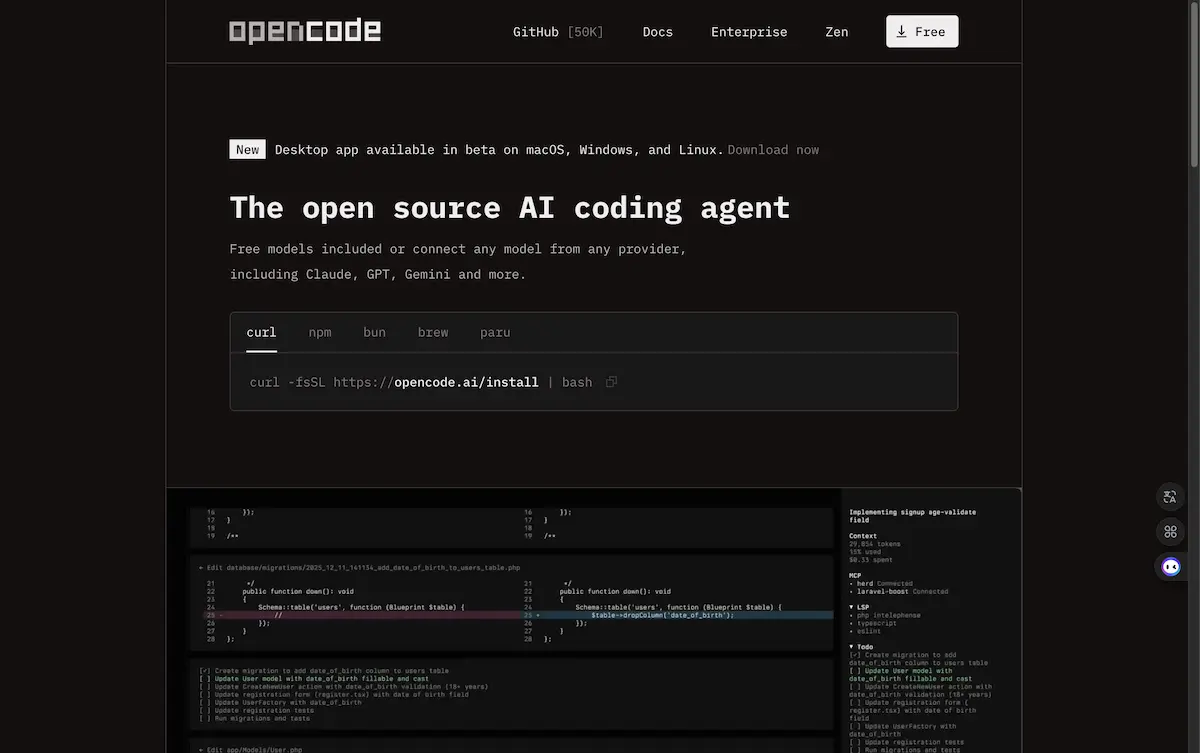
OpenCode is an open source AI coding agent designed to assist developers directly in their terminal, IDE, or desktop environment.
What is OpenCode?
OpenCode is an open source coding agent that integrates artificial intelligence directly into a developer's workflow. It functions as a powerful AI coding assistant that can help write, review, and debug code in real-time. The tool addresses the need for intelligent, context-aware coding support without compromising on privacy or flexibility. It is suitable for developers of all levels, from students learning to code to seasoned professionals working on complex enterprise projects. What sets OpenCode apart is its commitment to being an open source AI coding assistant, its model-agnostic architecture, and a strong privacy-first policy that ensures code and context data are not stored. Its significant adoption, with over 650,000 monthly developers, underscores its reliability and utility in the modern software development landscape.
Key Features of OpenCode
LSP Enabled for Intelligent Assistance
OpenCode automatically loads the correct Language Server Protocols (LSPs) for the connected Large Language Model (LLM), providing deep, context-aware code completion, error detection, and refactoring suggestions directly in the editor.
Multi-Session Project Management
Developers can start multiple OpenCode agents in parallel on the same project, allowing them to tackle different tasks or features simultaneously without context switching, significantly boosting productivity.
Shareable Session Links
Any coding session can be shared via a link, making it easy to collaborate with team members, seek help on specific issues, or maintain a reference for future debugging sessions.
Flexible Model Integration
The agent supports over 75 LLM providers through integration with Models.dev, including popular options like Claude, GPT, and Gemini, as well as local models, giving users unparalleled choice in their AI engine.
Cross-Platform Editor Availability
OpenCode is available as a terminal interface, a dedicated desktop application, and IDE extensions, ensuring it fits seamlessly into any developer's preferred coding environment, from VS Code to the command line.
Privacy-First Architecture
Built for sensitive environments, OpenCode operates on a fundamental principle of not storing user code or context data, ensuring that intellectual property remains secure and private.
Use Cases for OpenCode
Daily Coding and Autocompletion
Developers use OpenCode as an intelligent pair programmer to write new functions, generate boilerplate code, and receive smart autocompletion suggestions, speeding up the initial development phase.
Code Review and Debugging
The AI coding assistant can analyze existing code to identify potential bugs, suggest optimizations, and explain complex logic, acting as a first-pass reviewer before human colleagues.
Learning and Understanding New Codebases
When onboarding to a new project or exploring an unfamiliar open-source library, OpenCode can help explain what specific code blocks do, making the learning curve less steep.
Refactoring and Optimization
The agent can suggest ways to refactor code for better performance, readability, or adherence to best practices, helping maintain high code quality over time.
How to Use OpenCode
- Install the Agent: Choose your preferred method of installation from the OpenCode documentation, whether it's the CLI tool, desktop app, or an IDE extension for editors like VS Code.
- Configure Your LLM: Connect OpenCode to your chosen AI model. You can use free included models, log in with a provider like Anthropic for Claude Pro, or connect to any of the 75+ supported providers via Models.dev.
- Initialize in Your Project: Navigate to your project directory in the terminal or open your project in your IDE. Launch the OpenCode agent within that context.
- Start Coding with AI: Begin writing code. OpenCode will provide inline suggestions, answer questions about your code, and help debug errors based on the full context of your project.
- Manage Sessions: For complex tasks, you can launch multiple agent sessions. You can also generate shareable links to any session for collaboration.
Target Audience for OpenCode
- Software Developers and Engineers seeking AI-powered productivity tools.
- Students and Coding Bootcamp Participants learning programming languages and best practices.
- Development Teams looking for a standardized, privacy-conscious AI assistant for their workflow.
- Open Source Contributors working on public and private repositories.
- Tech Leads and Architects who need to quickly prototype or review code across large codebases.
Is OpenCode Free?
OpenCode is fundamentally an open source project, which means its core agent software is free to use, modify, and distribute. Users can leverage free AI models with the agent or connect their own paid API keys from providers like OpenAI or Anthropic. For teams and enterprises seeking optimized performance, OpenCode offers "Zen," a premium service that provides access to a handpicked set of validated and benchmarked AI models specifically tuned for coding agent tasks, ensuring consistent, high-quality output.
Frequently Asked Questions about OpenCode
Is my code private with OpenCode?
Yes. OpenCode operates on a strict privacy-first principle. It does not store your code, project context, or any data sent to the LLM on its servers. Your data remains on your local machine or within your configured environment.
Can I use OpenCode with any programming language?
OpenCode's effectiveness is enhanced by its LSP integration. It works best with languages that have robust Language Server Protocol support, which includes most popular languages like Python, JavaScript, Java, Go, and Rust.
What AI models can I use with this open source coding agent?
You can use a wide variety of models. This includes free models that come with OpenCode, your own accounts with major providers (Claude, GPT-4, Gemini), models from niche providers via Models.dev, and even locally run models on your machine.
Does OpenCode work in my preferred IDE?
OpenCode is designed for flexibility. It is available as a terminal CLI, a standalone desktop application, and through IDE extensions. You should check the official documentation for specific extension availability for your editor.
How does the multi-session feature work?
The multi-session feature allows you to launch several independent OpenCode agents within the same project. Each session maintains its own conversation context with the AI, letting you work on a bug fix in one session while asking for help on a new feature in another.
What is OpenCode Zen?
OpenCode Zen is a curated model service. It provides access to a select set of AI models that the OpenCode team has rigorously tested and benchmarked for optimal performance in coding agent tasks, removing the guesswork from model selection.
OpenCode Tags
OpenCode, open source coding agent, AI coding assistant, LSP enabled, multi-session coding, AI pair programmer, code review tool, developer productivity, privacy-first AI, Claude integration, GPT coding, Gemini for developers, terminal AI, IDE extension, Models.dev, open source AI, programming assistant, debug with AI, Zen models