Introduction
Animate photos to video with Photo Animate AI, bringing life to still images.
What is photo animate?
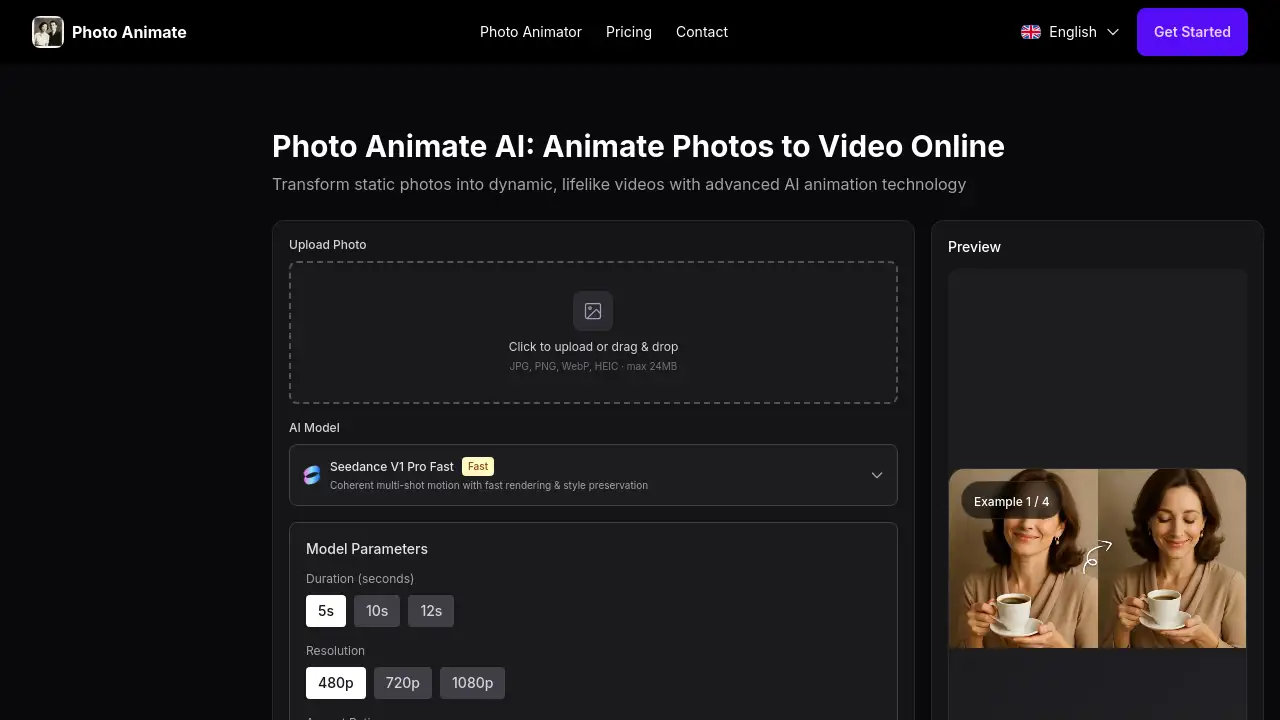
Photo Animate is an AI picture animator designed to turn static photos into short, realistic videos. It solves the problem of static memories by adding subtle, natural motion like blinking and smiling to portraits. This tool is particularly useful for anyone looking to bring photos to life, from individuals wanting to animate old family photos to creators needing moving pictures AI for digital projects. Its focus on preserving the original feeling and authenticity of a photo makes it stand out for emotional and practical use cases.
Key Features of photo animate
Natural Portrait Motion
The AI generates subtle, believable facial movements such as blinking, smiling, and gentle head turns, making portraits look more lifelike without appearing exaggerated.
Old Photo Friendly Workflow
Photo Animate works effectively with restored or enhanced vintage images, black and white photos, and old family archives, helping to animate old photos while respecting their original character.
Simple AI Workflow
The process to create a photo to video AI result is streamlined into three easy steps: upload a photo, describe the desired motion, and generate and download the finished clip.
Supports Meaningful Scenarios
The tool is built for long-tail, emotionally resonant use cases like creating memorial videos, making ancestors talk AI for family history, and turning old memories into videos for storytelling.
Use Cases for photo animate
Revitalizing Family History
Users can bring old family photos to life, transforming faded wedding pictures or childhood snapshots into warm, shareable videos that help preserve family stories.
Creating Memorial Tributes
It allows for the respectful animation of deceased loved ones photos, adding subtle motion for remembrance projects and helping families keep memories vivid.
Enhancing Creative Content
Creators can use this moving pictures AI to add gentle animation to portraits, artwork, or selfies for more engaging social media content, digital art, and storytelling projects.
Building Educational Materials
Teachers and historians can employ the make ancestors talk AI feature to create talking portrait clips for classroom projects or documentary-style family history presentations.
How to Use photo animate
Using Photo Animate to animate a photo is a straightforward process designed for users without advanced editing skills.
- Upload Your Photo: Start by uploading a portrait or old photo to the platform. The tool works best with clear, front-facing images.
- Describe the Motion: Choose from preset natural expressions like a subtle smile, a blink, or a talking portrait direction to define how you want the image animated.
- Generate and Download: Preview the AI-generated video clip. If the motion looks natural and satisfactory, simply download the finished video file for sharing or use in other projects.
Target Audience for photo animate
- Families and Genealogists: Individuals looking to preserve and share family history by animating old family photos and creating video archives.
- Content Creators and Digital Artists: Social media managers, artists, and storytellers who need an image to video AI tool to create engaging, animated portrait content.
- Educators and Historians: Professionals who want to create dynamic, talking historical figures or family ancestors for educational or documentary purposes.
- Anyone with Cherished Memories: Individuals wishing to add a new dimension to portraits of loved ones or turn old memories into videos for personal reflection and sharing.
Is photo animate Free?
The reference information does not specify detailed pricing plans or a free tier. For the most accurate and current information regarding any free trials, subscription plans, or pricing, users should visit the official Photo Animate website.
photo animate's Pros and Cons
| Aspect | Pros | Cons |
|---|---|---|
| Ease of Use | Very simple, three-step image to video AI workflow requiring no technical skills. | Limited creative control compared to professional animation software. |
| Output Quality | Focuses on natural portrait motion that keeps the photo's original feeling and authenticity. | Results may vary depending on the quality and condition of the original uploaded photo. |
| Use Case Focus | Excellent for specific, meaningful tasks like animating old family photos and memorial projects. | May not be suited for complex animation needs beyond subtle facial movements. |
| Accessibility | Designed for a broad audience, from families to creators, with an intuitive interface. | Pricing and free access details are not clearly stated on the provided homepage. |
Frequently Asked Questions about photo animate
What kind of photos work best with Photo Animate?
Photo Animate works best with clear, front-facing portraits. For optimal results when you animate old photos, especially black and white ones, using a restored or enhanced image first is recommended.
Can I use Photo Animate to make a picture blink and smile?
Yes, a core feature of this AI picture animator is to add believable micro-movements like gentle blinking and subtle smiling to portraits, making them appear more lifelike.
Is Photo Animate suitable for animating pictures of deceased relatives?
Yes, the tool is designed for respectful and subtle animation, making it a considerate choice for creating memorial videos and animating deceased loved ones photos for family remembrance.
What is the "make ancestors talk AI" feature?
This feature allows you to create a talking portrait-style video clip from a still image, which can be used for family history storytelling, educational projects, or documentary tributes.
How long does it take to animate a photo?
The process is typically very fast. After uploading your photo and selecting the desired motion, the AI generates a preview within minutes, allowing for quick download.
Do I need any special software to use Photo Animate?
No, Photo Animate is a web-based tool. You only need an internet connection and a browser to upload photos, create animations, and download your videos.
photo animate Tags
photo animate, animate photos to video, AI picture animator, bring photos to life, photo to video AI, animate old photos, old family photos, moving pictures AI, image to video AI, natural portrait motion, make ancestors talk AI, animate deceased loved ones photos