Introduction
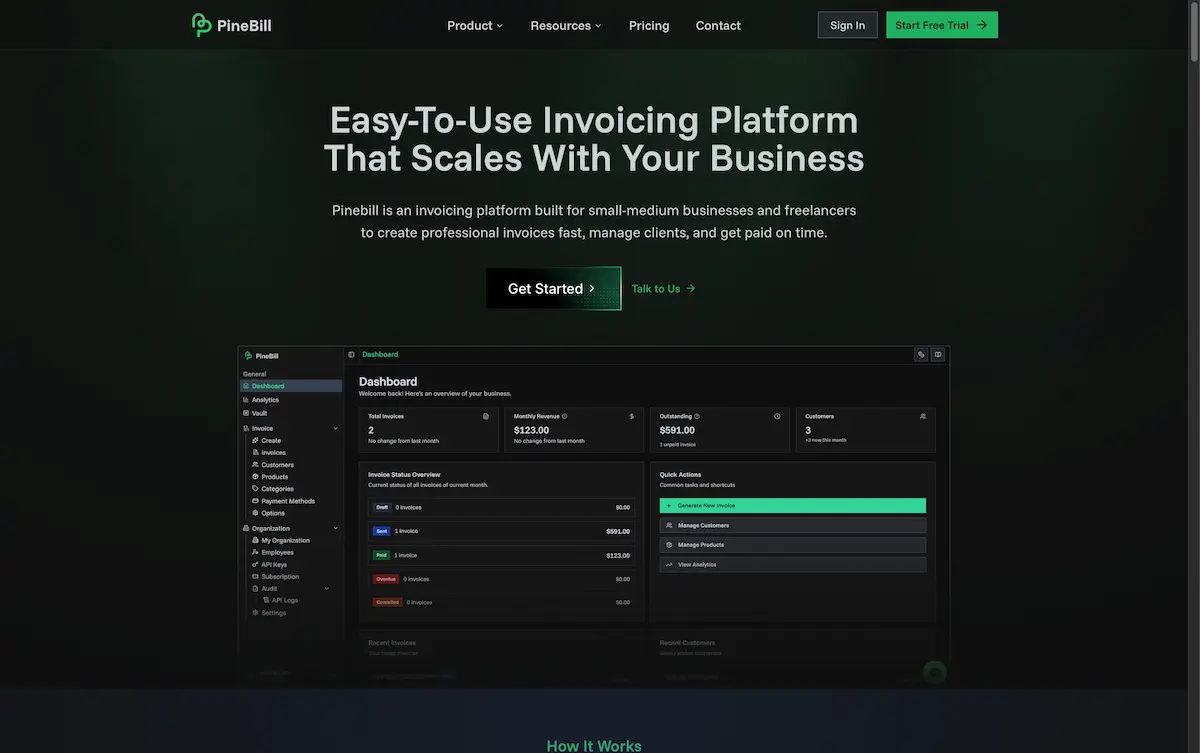
PineBill is a professional invoicing platform designed for small businesses and freelancers.
What is PineBill?
PineBill is an all-in-one invoicing software that helps small businesses, freelancers, and contractors create professional invoices, get paid faster, and keep their finances organized. This invoicing platform solves the common pain points of manual billing, client management, and payment tracking by offering a streamlined, centralized solution. It is specifically built to scale with a growing business, making it suitable for solo entrepreneurs, small-to-medium businesses, and even large organizations looking for robust invoice management. For users seeking efficient invoicing software, PineBill provides the tools to automate billing workflows and gain valuable financial insights.
Key Features of PineBill
Invoice Management
The platform provides end-to-end billing lifecycle management, including flexible invoice modes, multi-currency support, and status tracking to ensure you have complete control over every invoice.
File Vault
PineBill offers secure storage with a hierarchical file structure, powerful search, and file previews, allowing for organized and safe management of all client documents and invoice attachments.
Reporting & Analytics
Gain data-driven insights with features like sales analytics, conversion metrics, and payment timing analysis, which help you understand your business performance and cash flow.
Security & Compliance
The platform maintains enterprise-grade security with AES 256-bit encryption, role-based access control, and audit logging to protect sensitive financial data and ensure compliance.
Multi-language & Currency Support
Cater to a global clientele by creating invoices in 12 different languages and accepting payments in multiple currencies, simplifying international business transactions.
Developer-Friendly API
Integrate PineBill’s invoicing capabilities directly into other applications using a comprehensive, well-documented RESTful API for custom workflows and automation.
Use Cases for PineBill
Freelancers and Solo Entrepreneurs
Independent professionals can use this invoicing software to quickly generate professional invoices, track billable hours, and manage retainer agreements without complex accounting knowledge.
Small Business Operations
Small businesses benefit from streamlined client management, recurring billing for subscriptions, and detailed analytics to monitor sales and improve payment collection rates.
Industry-Specific Billing
Businesses in construction, legal, consulting, and creative fields can utilize specialized templates for job costing, progress billing, trust accounting, and project-based invoicing.
Teams and Agencies
Growing teams can collaborate efficiently using the platform’s role-based permissions, shared file vault, and tools for managing multiple clients and projects from a single dashboard.
How to Use PineBill
- Sign Up and Set Up: Start by creating an account on the PineBill website. You can add your business details, logo, and preferred invoice templates during the initial setup.
- Create an Invoice: Use the intuitive dashboard to create a new invoice. Add client details, line items, taxes, and payment terms. The platform supports instant PDF generation.
- Send and Track: Send the invoice directly to your client via email from within PineBill. The system will track the invoice status (sent, viewed, paid) and send automated payment reminders.
- Manage Clients and Files: Store client information and related documents in the secure File Vault. Use the search and organizational features to quickly find what you need.
- Review Analytics: Regularly check the Reporting & Analytics section to review key metrics like paid vs. overdue invoices, revenue trends, and client payment history.
Target Audience for PineBill
- Freelancers and independent contractors
- Small to medium-sized businesses (SMBs)
- Consultants and professional service providers
- Creative agencies and studios
- Legal and construction firms with specific billing needs
- Developers and tech teams looking to integrate billing via API
Is PineBill Free?
PineBill offers a 14-day free trial with no credit card required. After the trial, it operates on a tiered subscription model. The following table outlines the available plans:
| Plan | Price (Monthly) | Key Features |
|---|---|---|
| Solo | $29/month | 100 invoices/month, 1 team member, 10GB storage, basic analytics, email support. |
| Pro | $79/month | 1,000 invoices/month, 5 team members, 100GB storage, advanced analytics, priority support. |
| Enterprise | Custom Pricing | Unlimited invoices and team members, 1TB storage, advanced analytics, dedicated support. |
Annual billing is available, offering savings of 20-30% compared to monthly payments.
PineBill's Pros and Cons
| Aspect | Pros | Cons |
|---|---|---|
| Ease of Use | Intuitive interface and quick invoice creation. | Advanced reporting may have a learning curve for new users. |
| Features | Comprehensive toolset including file vault and multi-currency support. | The Solo plan has limits on invoices and team members. |
| Pricing | Transparent tiered plans; good value for teams on Pro plan. | The entry-level Solo plan may be costly for very low-volume users. |
| Scalability | Plans clearly scale with business growth from Solo to Enterprise. | API access and higher limits are reserved for higher-tier plans. |
| Security | Strong enterprise-grade security and compliance features. | - |
Frequently Asked Questions about PineBill
Does PineBill offer a free plan?
PineBill does not have a permanent free plan but offers a full-featured 14-day free trial for all new users to test the platform without requiring a credit card.
What security measures does PineBill have?
The platform uses industry-standard AES 256-bit encryption for data, provides secure sharing with expiring links, and includes role-based access control and audit logging for comprehensive security.
Can I create invoices in different currencies?
Yes, PineBill’s invoicing software includes multi-currency support, allowing you to create and send invoices in various currencies to cater to an international client base.
Is there a limit on how many invoices I can send?
Yes, limits depend on your subscription plan. The Solo plan allows 100 invoices per month, the Pro plan allows 1,000, and the Enterprise plan offers unlimited invoicing.
Can I integrate PineBill with other software?
Yes, PineBill provides a well-documented RESTful API that allows developers to integrate its invoicing and client management functionalities into other business applications and custom workflows.
Who is PineBill best suited for?
This all-in-one invoicing platform is ideally suited for freelancers, small-to-medium businesses, contractors, and professional service providers across industries like consulting, legal, creative, and construction.
PineBill Tags
invoicing software, invoice platform, PineBill review, small business invoicing, freelance invoicing, get paid faster, online invoicing, billing software, invoice management, multi-currency invoicing, secure invoicing, client management