Introduction
A tool to instantly publish websites, PinMe is ideal for AI-generated pages, demos, and landing sites.
What is PinMe?
PinMe is a streamlined deployment tool that allows developers and creators to publish static websites and frontend applications in seconds. It solves the common problem of complex deployment workflows, eliminating the need for cloud account setup, server configuration, and domain management. This service is particularly suitable for individuals and teams who need to share prototypes, AI-generated web content, project demos, or simple landing pages quickly and without overhead. The core value of PinMe lies in its simplicity and speed, enabling users to go from a local folder to a live, shareable URL almost instantly. This makes it a valuable asset for rapid iteration, client presentations, and testing new ideas on the web.
Key Features of PinMe
Instant Publish
With PinMe, you can go live in seconds without needing an account, configuring a domain, or waiting for builds to process, making rapid deployment effortless.
Custom Domain Support
Users can configure and publish their site to a custom domain, allowing for a professional presence at an address like your-own-domain.com.
Secure and Verifiable Deployments
All published content is cryptographically verified, ensuring deployment integrity and making each published site tamper-resistant and trustworthy.
Free to Start
The platform offers a free starting tier, with clear pathways for optional upgrades and flexible payment options as needs grow.
No Server Maintenance
PinMe operates without requiring users to manage or maintain any server infrastructure, removing a significant technical burden.
Simple Command-Line Interface
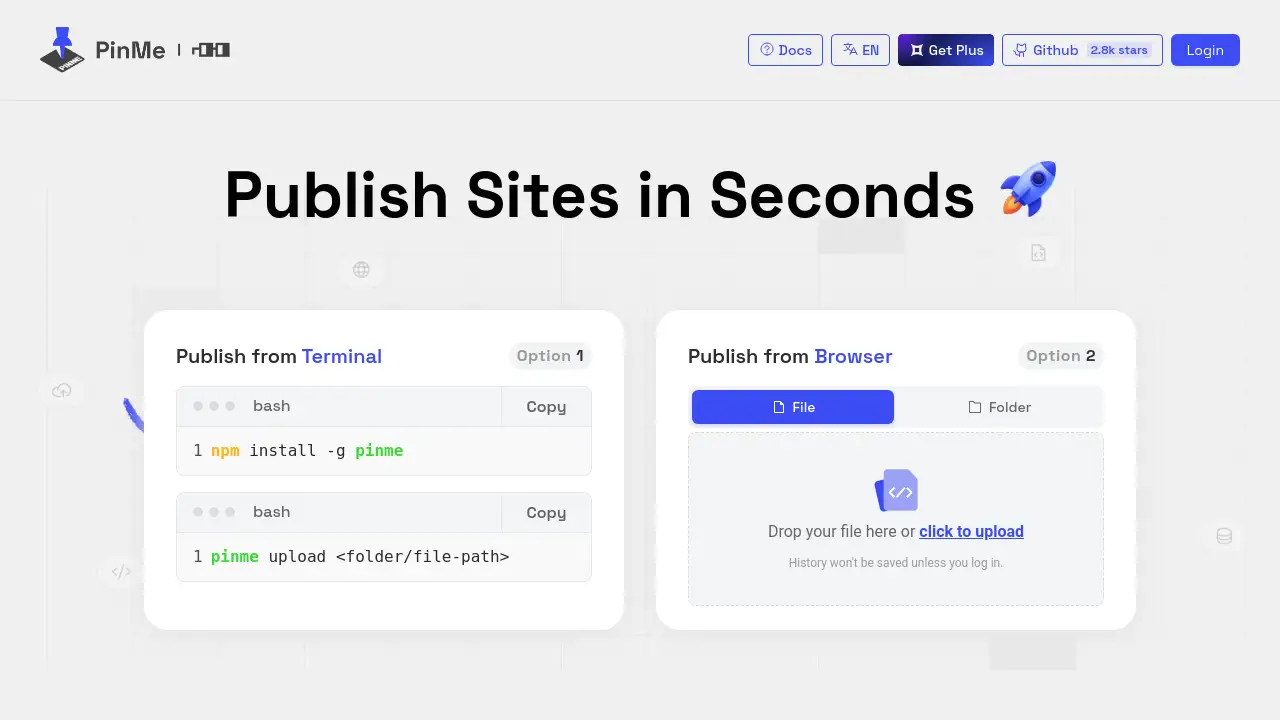
The tool is accessed via a straightforward CLI, requiring just two commands to install the package and upload a folder or file for publishing.
Use Cases for PinMe
AI-Generated Web Pages
Quickly host and share web pages or applications generated by AI tools, providing an immediate way to showcase AI capabilities and outputs.
Project Demos and Prototypes
Ideal for developers and designers who need to share a working demo or a minimum viable product (MVP) with stakeholders or for user testing.
Landing Sites and Microsites
Rapidly create and publish simple, focused landing pages for product launches, events, or marketing campaigns without a full development cycle.
Educational Tutorials and Examples
Easily publish code examples or tutorial projects for students or peers, providing a live reference that complements instructional material.
How to Use PinMe
Using PinMe is a straightforward two-step process focused on command-line efficiency.
- Install the CLI Tool: First, install the PinMe command-line interface globally on your system using npm:
npm install -g pinme. - Publish Your Site: Navigate to your project directory in the terminal and run the upload command with the path to your build folder or specific file:
pinme upload <folder/file-path>. Your site will be processed and a live URL will be provided.
For a graphical interface, users can also drag and drop files directly onto the PinMe homepage upload area. It is important to note that publishing history is typically only saved if you are logged into the service.
Target Audience for PinMe
- Frontend Developers and Engineers seeking a frictionless way to deploy static sites and demos.
- AI Researchers and Hobbyists who generate web-based content and need instant hosting.
- Product Managers and Marketers requiring quick landing page deployment for campaigns.
- Educators and Students looking to easily share coding projects and web examples.
- Startups and Small Teams that need to validate ideas with live prototypes without infrastructure complexity.
Is PinMe Free?
PinMe operates on a freemium model. Users can start publishing sites for free, which is excellent for testing, personal projects, and low-traffic demos. The official homepage mentions "optional upgrades and flexible payment options," suggesting that advanced features, higher bandwidth, or custom domain support on certain plans may be part of paid tiers. For precise details on current pricing and plan features, visitors should check the official PinMe website.
PinMe's Pros and Cons
| Aspect | Pros | Cons |
|---|---|---|
| Ease of Use | Extremely simple two-step CLI process; no configuration needed. | Primarily CLI-focused, which may be less accessible for non-developers. |
| Speed | Instant publish capability with near-zero deployment time. | – |
| Cost | Free to start, lowering the barrier to entry. | Full pricing structure for upgrades is not detailed on the main page. |
| Infrastructure | No server management or maintenance required. | Limited to static site hosting; not for dynamic, database-driven applications. |
| Features | Offers custom domain support and cryptographically secure deployments. | Publishing history is not saved unless logged in, which could be inconvenient. |
Frequently Asked Questions about PinMe
What exactly can I publish with PinMe?
PinMe is designed for static frontend files. You can publish any website built with HTML, CSS, JavaScript, and assets from frameworks like React, Vue, or Svelte (after building), as well as simple landing pages and AI-generated web content.
How does the "secure and verifiable" feature work?
PinMe uses cryptographic hashing to verify the integrity of your published files. This means the content you upload is given a unique digital fingerprint. If anyone tries to alter the deployed files, the fingerprint will not match, proving the content has been tampered with, which enhances trustworthiness.
Do I need to create an account to use PinMe?
No, you can use the basic instant publish feature without an account. However, to access features like saving your deployment history, you will need to log in.
Can I use my own domain name with PinMe?
Yes, PinMe supports custom domain configuration. This allows you to point your own domain (e.g., www.yourcompany.com) to the site you publish through their service.
Is there a limit on the number of sites I can publish for free?
The reference information confirms it is free to start but does not specify limits on the number of projects or bandwidth for the free tier. For detailed limits, checking the official website's pricing or terms page is recommended.
What happens to my site if I stop using PinMe?
Since deployments are typically static and hosted through the service, if you cancel your account or remove a site, the live URL would likely become inaccessible. It is advisable to keep local backups of all your source files.
PinMe Tags
PinMe, publish sites, instant publish, static site hosting, frontend deployment, AI web pages, project demo hosting, landing page publisher, custom domain hosting, secure deployment, no server deployment, CLI tool, web development tool, free site hosting