Introduction
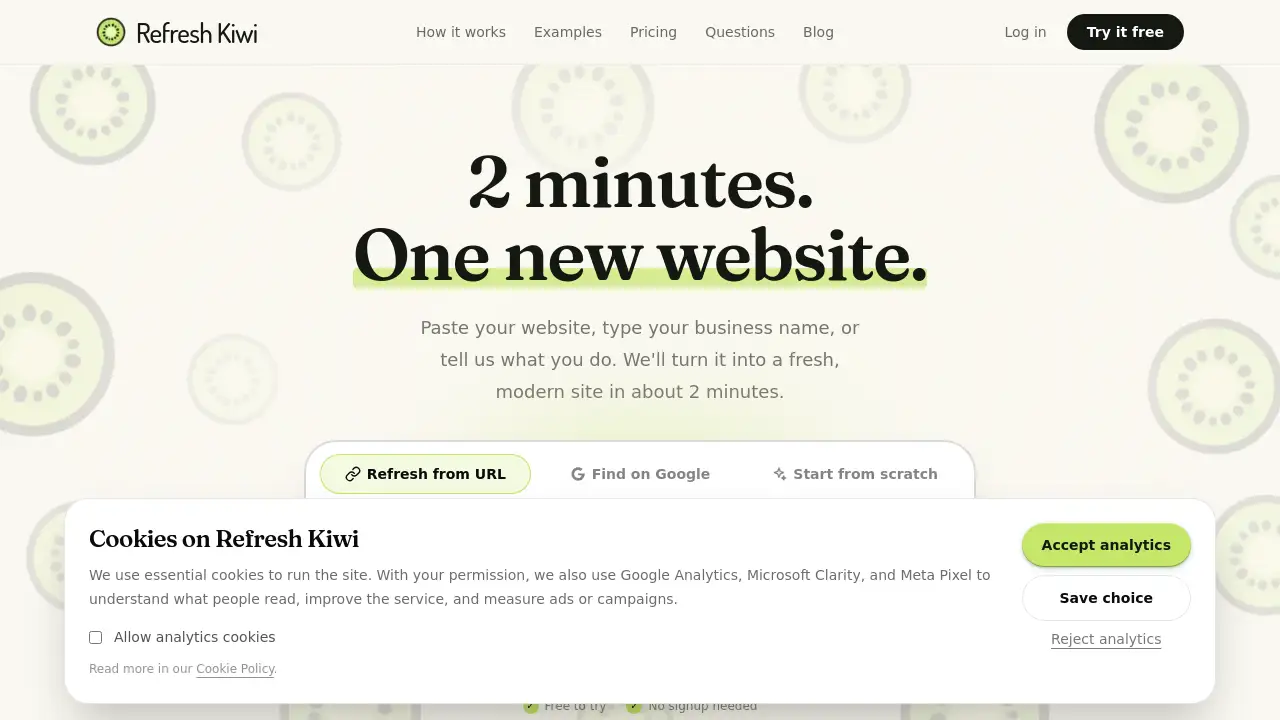
Refresh Kiwi is a website generator that helps business owners create a modern small business website without coding. It builds a fresh site in about two minutes. Users can paste a website address, find a business on Google, or describe their work by voice. No signup is needed to try Refresh Kiwi. This Refresh Kiwi review covers the website redesign features and explains who can benefit from this website builder.
What is Refresh Kiwi?
Refresh Kiwi is an automated website redesign service and website builder. It solves the problem of outdated layouts, confusing navigation, and missing online pages. A small business website should look professional, load clearly, and guide visitors toward action. Many local business owners cannot wait weeks for a traditional design process. Refresh Kiwi fills that gap by generating a complete site from existing content. The tool turns URLs, Google listings, and spoken descriptions into words, layout, colors, and buttons. This makes it a practical website builder for people who value speed and simplicity. Refresh Kiwi is especially useful for a website redesign that must not disrupt a live business.
Key Features of Refresh Kiwi
Three Simple Ways to Start
Users can paste an existing website URL, search for their business on Google, or talk into the microphone. Refresh Kiwi accepts all three inputs and creates a site from whichever source is easiest. This makes Refresh Kiwi a flexible website builder for different online situations.
Fast Website Generation in About Two Minutes
The homepage says the tool turns input into a fresh, modern site in about two minutes. This speed makes Refresh Kiwi an attractive website redesign option. A small business website can move from dated to current in one short session.
No Coding or Complicated Builder
There is no code editor and no drag-and-drop website builder. Users do not arrange blocks or manage technical settings. Refresh Kiwi handles the website redesign process automatically. This is ideal for people with no technical background.
Plain English and Voice Editing
Kiwi Pro allows unlimited edits. Users can type or say a request such as, “Change the opening hours.” Refresh Kiwi then updates the site. This voice and text editing feature makes Refresh Kiwi a unique website builder for small business website owners.
Current Website Stays Live
If users paste a URL, Refresh Kiwi creates a separate version. The original live site remains untouched until the owner switches. This lowers the risk of a website redesign. Business owners can compare the old and new versions before going live.
Free Trial Without Signup
The free trial lets users see a generated site immediately. No account or credit card is needed. A free account keeps the site for 7 days and includes 3 free changes. This makes it easy to test Refresh Kiwi as a website builder.
Simple Transparent Pricing
Kiwi Pro costs US$11 per month. It includes hosting, unlimited plain English or voice edits, a custom domain, and extra pages. There are no credits, no tokens, and no complicated tiers. This simple plan suits a small business website that needs predictable costs.
Use Cases for Refresh Kiwi
Updating an Outdated Website
A plumber, cafe, or salon with an old website can use Refresh Kiwi for a website redesign. The tool reads the existing URL and creates a fresh version. The result is a cleaner small business website with clearer service details.
Building From Scratch
Entrepreneurs without a website can type or say a few sentences about their services. Refresh Kiwi builds a complete small business website from that description. This helps new businesses get online without hiring a designer.
Turning a Google Listing Into a Website
Some businesses only have a Google listing. Refresh Kiwi can use that listing as a starting point. It creates a fuller website redesign with extra pages and contact buttons. This is a useful upgrade for local services.
Adding a Simple Website for Local Professionals
Accountants, clinics, and builders often need a basic online presence. Refresh Kiwi gives them a clean layout, trust signals, and clear calls to action. This makes the website builder a good match for service-based industries.
How to Use Refresh Kiwi
Using Refresh Kiwi is straightforward. The process is simple enough for people who have never managed a website builder before.
- Go to the Refresh Kiwi homepage.
- Choose one of three doors: paste a URL, search for the business on Google, or type and speak a description.
- Wait about two minutes while Refresh Kiwi generates the site.
- Review the new small business website and ask for any changes.
- Upgrade to Kiwi Pro when ready to put the site online.
This simple flow makes Refresh Kiwi a practical website redesign tool and a useful website builder for small business website owners.
Target Audience for Refresh Kiwi
- Plumbers, electricians, and builders
- Salons and barbershops
- Cafés and restaurants
- Clinics and health professionals
- Accountants and financial advisors
- Entrepreneurs launching a new small business website
- Anyone who wants a simple website builder without a learning curve
- Anyone who needs a fast website redesign without hiring a designer
Is Refresh Kiwi Free?
Refresh Kiwi has a free trial and a paid plan. The free trial lets users see a generated website without signing up. A free account keeps the site for 7 days and includes 3 free changes. Kiwi Pro costs US$11 per month. It puts the website online and includes unlimited plain English or voice edits. Refresh Kiwi hosts the site and allows users to connect their own domain. There are no contracts. This clear pricing structure makes Refresh Kiwi a straightforward website builder for small business website projects.
| Plan | Price | Features |
|---|---|---|
| Free trial | US$0 | See your new website without signup, keep it for 7 days, 3 free changes |
| Kiwi Pro | US$11/month | Hosting, unlimited edits, custom domain, extra pages, cancel anytime |
Refresh Kiwi's Pros and Cons
| Aspect | Pros | Cons |
|---|---|---|
| Ease of use | No coding and no complicated website builder | Limited control for advanced design needs |
| Speed | Creates a website in about 2 minutes | Output depends on the quality of the input |
| Pricing | Free trial and one simple paid plan | Monthly fee is required to go live |
| Safety | Existing website stays live until switch | May not suit complex custom websites |
| Editing | Unlimited plain English and voice edits | No granular layout control |
Frequently Asked Questions about Refresh Kiwi
Does Refresh Kiwi really take only 2 minutes?
Yes. According to the product page, most users see a new website in about two minutes after choosing one of the three starting points. This makes Refresh Kiwi a fast website redesign tool.
Will Refresh Kiwi change my existing website?
No. If a user pastes a website URL, Refresh Kiwi creates a separate version. The original site stays live until the owner decides to switch. This makes the website builder low-risk.
Do I need an old website to use Refresh Kiwi?
No. Users can start from a Google listing or from a few spoken or typed sentences. Refresh Kiwi builds a small business website from scratch if needed.
Is Refresh Kiwi a website redesign service or a website builder?
It can be both. It refreshes an existing site when a URL is provided. It also builds a new site from a description. Refresh Kiwi is not a drag-and-drop website builder.
What is included in Kiwi Pro?
Kiwi Pro includes hosting, unlimited plain English or voice edits, a custom web address, extra pages, and the option to cancel anytime. The price is US$11 per month.
What if I don't like the generated website?
Then it costs nothing. Users can walk away, try a different starting point, or ask for changes during the free trial.
Refresh Kiwi Tags
Refresh Kiwi, website generator, website redesign, website builder, small business website, free website maker, AI website generator, modern website, easy website creator, no-code website builder, online business website, website refresh tool