Introduction
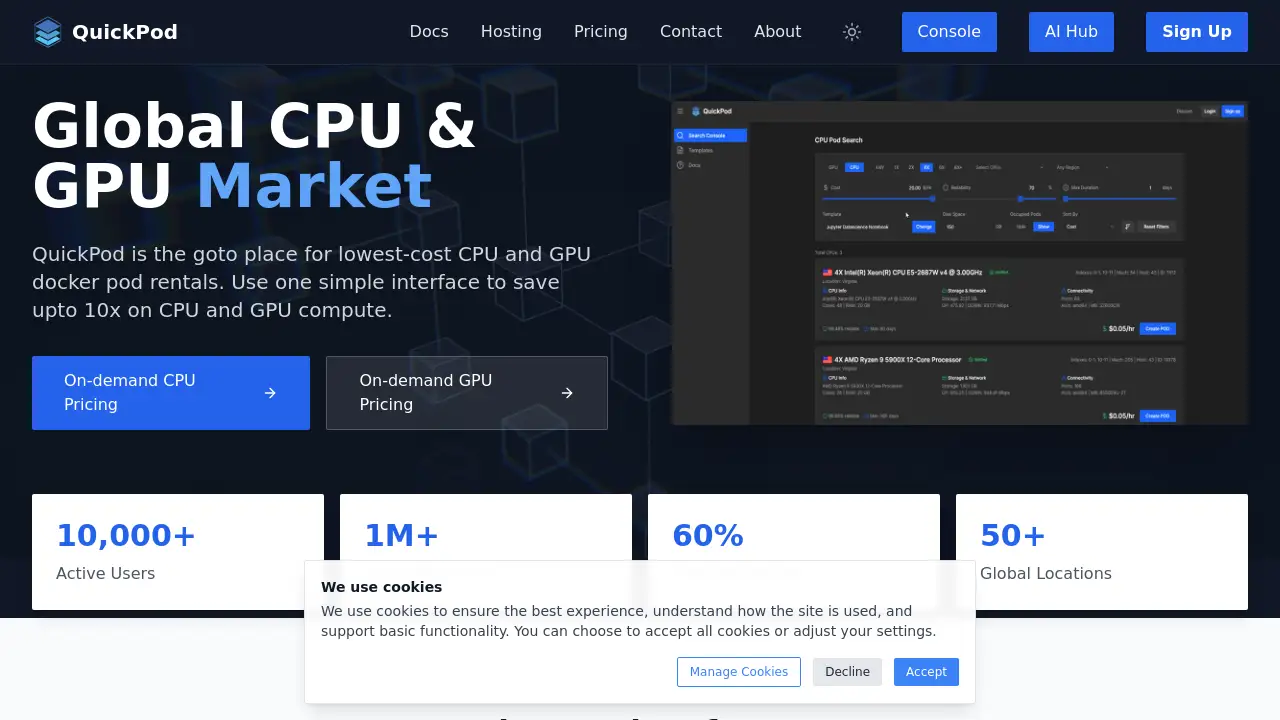
QuickPod is a cloud platform that makes GPU rental simple, fast, and affordable. Instead of buying costly hardware, teams can book GPU rental capacity on demand and use it through a streamlined console. QuickPod offers Jupyter-ready environments for TensorFlow, PyTorch, or any other AI framework, so users can begin training quickly. According to the homepage, customers can save up to 80% on typical GPU rental fees. The service also reports more than 10,000 active users, over one million GPU hours served, and availability in 50+ global locations. For anyone exploring cloud GPU options, QuickPod aims to reduce complexity while keeping performance high.
What is QuickPod?
QuickPod is a compute marketplace where users rent CPU and GPU Docker pods by the hour. It solves familiar problems in the GPU rental market, such as high prices, scarce capacity, and long setup times. The platform provides instant access to machines in many regions, so customers only pay for active time.
This GPU rental model fits modern AI workflows. Researchers who need accelerators for machine learning projects can launch a machine in minutes. Startups can test products without purchasing physical servers. Teams with short rendering or simulation tasks also gain from flexible capacity.
One console makes it easy to compare prices, deploy resources, and track usage. Because smart scheduling reduces waste, QuickPod can offer cheap GPU rental without sacrificing quality. As demand for AI hardware grows, flexible GPU rental becomes increasingly important, and QuickPod is built for that need.
Key Features of QuickPod
Smart Resource Allocation
Advanced algorithms distribute tasks to the best available CPU or GPU host, which raises utilization and lowers cost for every GPU rental session.
Enterprise Security
QuickPod includes fault tolerance and redundancy in its architecture. This gives teams confidence when running production-grade GPU rental workloads.
Real-time Analytics
Live dashboards show utilization, uptime, and spending. Real-time analytics help users forecast cloud GPU costs and keep budgets under control.
Jupyter-Ready Environments
A user can launch a GPU rental instance with a pre-configured Jupyter server, then open notebooks for TensorFlow or PyTorch without extra setup.
Global Network of Locations
With nodes spread across 50+ locations, users can choose regions close to their data. This geographic choice strengthens the value of every GPU rental deployment.
Simple Console Interface
A single dashboard manages provisioning, billing, and monitoring across the GPU rental workflow.
Use Cases for QuickPod
Training Machine Learning Models
Teams fine-tune models for natural language processing or computer vision. Hourly GPU rental keeps these experiments affordable at scale.
Running Interactive Notebooks
Students and data scientists can launch a Jupyter notebook in seconds, which helps with learning, prototyping, and sharing findings.
Handling Testing and CI Workloads
Engineering groups use on-demand GPU rental for automated tests of AI applications, then shut instances down when the job finishes.
Simulation and Media Rendering
GPU rental also covers rendering, simulation, and large-scale data processing outside machine learning.
How to Use QuickPod
Starting a new GPU rental session on QuickPod is straightforward:
- Go to the QuickPod console and sign up.
- Select a CPU or GPU rental instance from the catalog.
- Choose your framework, such as TensorFlow or PyTorch.
- Launch the machine and open the Jupyter notebook.
- Monitor the dashboard and stop the machine when you are done.
The dashboard displays live GPU rental prices before launch, so there are no hidden surprises. This workflow is one of the friendliest GPU rental experiences among similar low-cost services.
Target Audience for QuickPod
- AI startups that need affordable GPU rental for product development.
- Researchers using PyTorch or TensorFlow for academic studies.
- Data scientists who prefer Jupyter notebooks.
- Students learning machine learning and deep learning.
- Engineering teams needing cloud GPU capacity for CI pipelines.
- Independent developers who want flexible GPU rental hours without long contracts.
Is QuickPod Free?
QuickPod doesn’t advertise a free plan on its homepage. Rather, it works as a pay-as-you-go service, charging only for CPU or GPU rental time actually consumed. Prices change based on hardware class, region, and session duration, so users should confirm rates before launching instances.
| Plan | Price | Features |
|---|---|---|
| Free Tier | Not announced | The homepage does not list one |
| On-Demand GPU | Pay as you go | Jupyter support, Docker pods, global regions, real-time analytics |
This GPU rental model suits variable workloads because users can easily scale up or down. For up-to-date cost details, visit QuickPod’s official pricing page.
QuickPod's Pros and Cons
| Aspect | Pros | Cons |
|---|---|---|
| Pricing | Saves up to 80%; hourly GPU rental keeps budgets flexible | No clear free tier; market prices can fluctuate |
| Ease of Use | Jupyter-ready setup removes installation work | Beginners may still need some command-line knowledge |
| Global Availability | Strong coverage across 50+ locations | Hardware choices can differ by region |
| Security | Built with fault tolerance and redundancy | Certifications are not fully detailed on the homepage |
Frequently Asked Questions about QuickPod
Can I run TensorFlow or PyTorch on QuickPod?
Yes. QuickPod provides Jupyter environments that support TensorFlow, PyTorch, or any other AI framework. This flexibility is useful when comparing GPU rental providers.
How quickly can I launch a machine?
Once your account is active, launching a new GPU rental instance usually takes less than a minute.
Do I need a long-term contract?
No. Sessions are on-demand, so users can stop at any time. This is a major advantage of on-demand GPU rental.
Is there a free trial for QuickPod?
QuickPod does not clearly mention a free trial on its homepage. Interested users should contact the team or check the console for trial credit availability.
Can I monitor my cloud GPU usage?
Yes. The dashboard includes real-time analytics for compute utilization and estimated costs on each machine.
Does QuickPod support other AI frameworks?
Yes. Because each machine runs in a Jupyter environment, additional libraries and frameworks can be installed easily.
QuickPod Tags
GPU rental, cloud GPU, on-demand GPU, Jupyter for machine learning, TensorFlow hosting, PyTorch cloud, GPU cloud instances, AI compute, Docker pod rental, CPU rental, deep learning infrastructure, affordable GPU pricing