Introduction
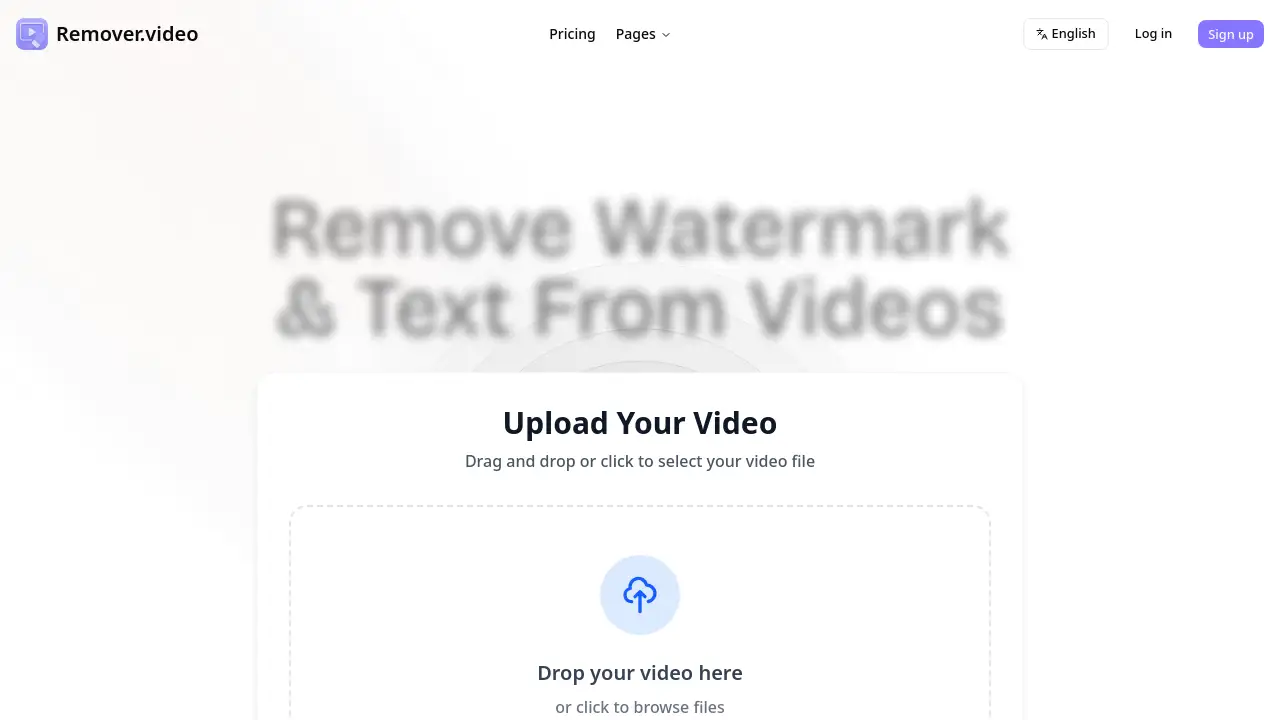
Remover.video is a free online tool that uses AI-powered technology to remove watermarks, text overlays, and logos from videos without blur.
What is Remover.video?
Remover.video is a web-based video editing tool designed to clean up video content by removing unwanted visual elements. It solves a common problem for content creators and social media users: the presence of distracting watermarks, text captions, or logos that can make videos look unprofessional or hinder repurposing. This AI-powered tool specifically excels at removing these elements without degrading the original video quality with blur. It is suitable for anyone who needs to remove text from video or remove watermark from video online free for platforms like TikTok, Instagram, YouTube, and Snapchat. The tool matters because it offers a quick, accessible, and professional-grade solution that was previously only available in complex desktop software, making high-quality video editing more democratic.
Key Features of Remover.video
AI-Powered Removal Technology
The core technology uses advanced artificial intelligence to intelligently identify and remove watermarks and text, filling in the background seamlessly to preserve the original video quality.
Blurless, High-Quality Output
Unlike basic editors that simply blur unwanted elements, this free online tool is engineered to remove them cleanly, ensuring the final video maintains its original sharpness and integrity.
Support for All Social Media Formats
The tool is optimized for videos from TikTok, Instagram Reels, YouTube Shorts, Snapchat, and other platforms, automatically handling various aspect ratios and resolutions.
Simple, No-Settings Interface
Users can remove watermark from video online free without needing to adjust complex parameters; the process involves just uploading the video and letting the AI handle the processing.
Fast Processing and Free Download
Videos are processed quickly, and the resulting watermark-free video can be downloaded immediately at no cost, with no additional watermarks added by the service.
Use Cases for Remover.video
Repurposing Social Media Content
Creators can remove TikTok watermark or Instagram text to cleanly repost their videos on different platforms, maximizing the reach of their content without platform-specific branding.
Cleaning Professional Presentations
Businesses and educators can use it to remove text from video recordings, such as accidental on-screen notifications or outdated logos, for a more polished final product.
Enhancing Personal Video Projects
Individuals editing vacation videos or personal clips can remove watermark from video that were added by other editing apps, creating a cleaner, more personal viewing experience.
Preparing Content for Compilations
Users creating compilations or mashups can strip away original watermarks and text from various source videos to create a cohesive and branded final piece.
How to Use Remover.video
Using Remover.video is a straightforward, three-step process:
- Upload Your Video: Visit the Remover.video website. Drag and drop your video file into the upload area or click to browse and select it from your device. The tool supports multiple video formats.
- Process the Video: Click the continue button. The AI-powered tool will automatically analyze the video and remove the detected watermarks, text, or logos. No manual selection or settings are required.
- Download the Result: Once processing is complete, preview the clean video. If satisfied, click the download button to save the high-quality, blur-free video to your computer at no cost.
Target Audience for Remover.video
- Social Media Content Creators and Influencers
- Digital Marketers and Social Media Managers
- Video Editors and Hobbyists
- Small Business Owners creating promotional content
- Educators and Students making instructional videos
- General users who want to clean up personal videos
Is Remover.video Free?
Based on the available information, Remover.video is presented as a free tool. The homepage repeatedly emphasizes "free online tool" and "completely free," with no mention of paid plans or subscriptions in the provided content. Users can upload, process, and download their videos without an upfront cost.
| Plan | Price | Key Features |
|---|---|---|
| Free | $0 | AI-powered removal of watermarks, text, and logos; blurless output; support for social media formats; fast processing; free download. |
For the most current information, users should check the official Remover.video website.
Remover.video's Pros and Cons
| Aspect | Pros | Cons |
|---|---|---|
| Cost & Accessibility | Completely free to use with no hidden fees or watermarks on output. | Pricing model for advanced features (if any) is not detailed on the homepage. |
| Ease of Use | Extremely simple, three-step process with no complex settings or learning curve. | May offer less manual control compared to professional desktop editing software. |
| Technology & Quality | Uses advanced AI for clean, blurless removal that preserves original video quality. | Effectiveness can depend on the complexity of the watermark and video background. |
| Functionality | Excels at its core task of removing watermarks and text quickly and efficiently. | Appears focused on a single task (removal), not a full suite of video editing features. |
Frequently Asked Questions about Remover.video
Is Remover.video really free to use?
Yes, according to the product homepage, Remover.video is a free online tool. Users can upload videos, remove watermarks and text, and download the processed result without any payment.
What kind of elements can this AI-powered tool remove?
The tool is designed to remove text overlays, logos, and platform-specific watermarks commonly found on videos from TikTok, Instagram, Snapchat, YouTube, and other social media.
Does removing a watermark affect the video quality?
The tool promotes blurless watermark removal technology, meaning it aims to fill in the removed area intelligently to match the background, preserving the original video quality as much as possible.
What video formats are supported?
While specific formats are not listed, the homepage states it supports "multiple video formats" and is optimized for all major social media platforms, suggesting compatibility with common formats like MP4, MOV, etc.
Can I use this to remove a TikTok watermark?
Absolutely. Removing a TikTok watermark is one of the primary use cases highlighted. The tool's AI is trained to recognize and cleanly remove the distinctive TikTok watermark from videos.
Is there a limit on video file size or length?
The provided reference information does not specify any limits on file size or duration. For the most accurate details on limitations, users should refer to the tool's interface or official website.
Remover.video Tags
remove watermark from video, free online tool, AI-powered tool, remove text from video, TikTok watermark remover, blurless watermark removal, video editor online, remove Instagram watermark, social media video tool, clean video, repurpose content, remove logo from video