Introduction
Producing professional audio usually requires a studio or voice actors. Seed Audio AI voice generator offers a faster, more flexible way to create spoken content. It turns text into realistic speech and allows users to clone voices from audio samples. This tool helps creators, marketers, and educators generate natural AI audio without complex equipment. In this article, we will explore the features, use cases, and pricing of Seed Audio to see if it fits your content workflow.
What is seed audio?
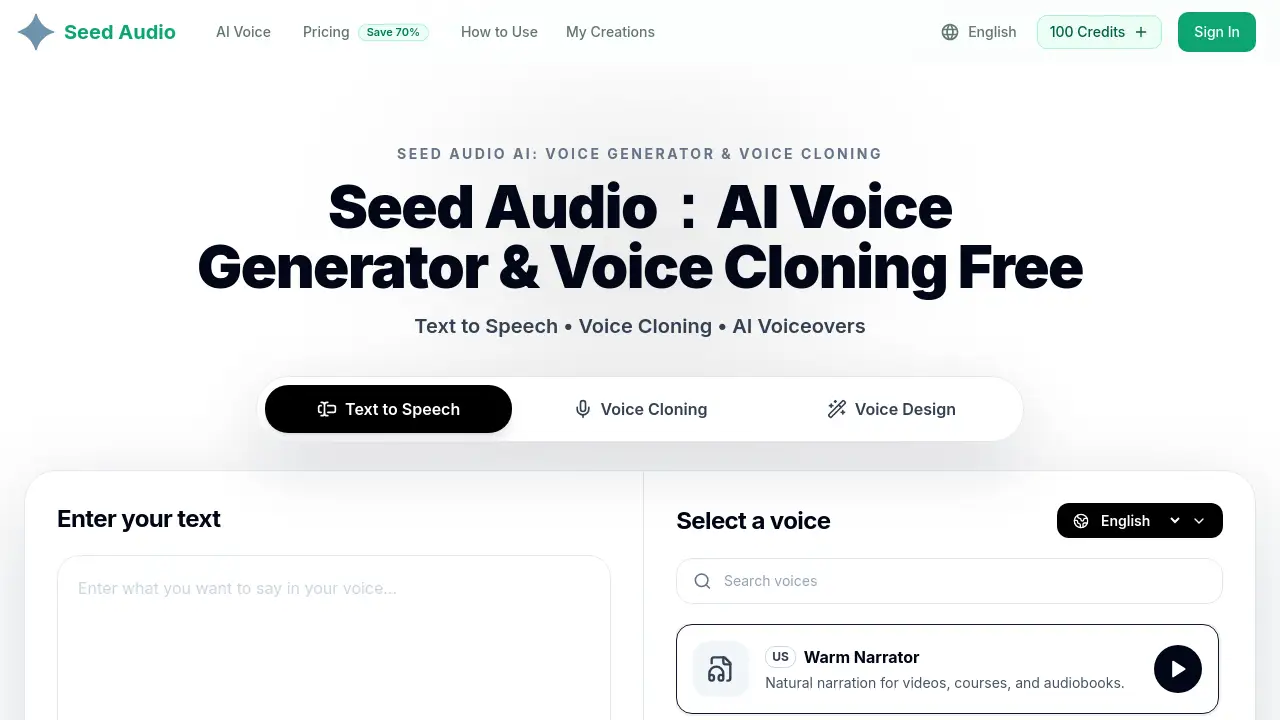
Seed Audio is a browser-based platform designed for AI voice generation and voice cloning. It allows users to paste a script and turn it into lifelike speech within minutes. Alternatively, users can upload a clean voice sample to create a custom AI voice that matches the original speaker's tone and personality. This product solves the common problem of expensive and time-consuming audio production. It is suitable for YouTubers, podcasters, e-learning developers, and marketing teams who need consistent voiceovers. By combining text to speech and voice cloning in one place, Seed Audio makes it easier to produce professional audio content.
Key Features of seed audio
Text to Speech
The core of Seed Audio is its highly realistic text to speech engine. Users can paste any script, select a pre-made voice, and generate clear, natural AI speech for voiceovers, tutorials, and social videos.
AI Voice Cloning
The AI voice cloning feature lets users upload a clean recording to create a custom voice. The system analyzes the speaker's tone, rhythm, and personality to replicate it accurately. This is useful for maintaining brand voice across projects.
Voice Direction Controls
Seed Audio provides controls to guide the delivery. Users can adjust tone, pacing, emotion, style, and audience notes. This helps the generated speech fit the specific scene or message.
Fast Audio Creation
The platform focuses on speed. It generates usable voiceover drafts quickly. Creators can revise specific lines without re-recording the entire script, which keeps production moving smoothly.
Use-Case Ready Voices
The platform includes voices designed for specific content types. Users can find suitable voices for YouTube, podcasts, audiobooks, e-learning, product demos, ads, and character dialogue.
Online Workflow
Everything happens in a web browser. Users can generate, preview, refine, and download audio without any recording booth or editing software. This makes AI audio generation accessible to anyone.
Use Cases for seed audio
YouTube Voiceovers
Creators can produce engaging realistic voiceovers for YouTube videos. The Seed Audio AI voice generator allows for quick script changes and style adjustments to match the video's tone.
Podcast Intros and Narration
Podcasters can create professional introductions, outros, and narration segments. The voice cloning feature ensures a consistent host voice even when recording remotely.
E-Learning Courses
Course developers can generate clear narration for educational content. Text to speech capabilities make it simple to update course material without recording new audio sessions.
Commercial Ads
Marketing teams can produce voiceovers for product demos and advertisements. The voice direction controls allow for the specific emotional tone required for commercial messages.
Audiobooks
Authors can convert their manuscripts into spoken audio efficiently. Seed Audio supports long-form narration, making audiobook production more affordable.
How to Use seed audio
- Choose a workflow: start with text to speech by pasting a script, or select voice cloning to upload an audio sample.
- Select a use-case ready voice or the custom cloned voice you created.
- Use the Voice Direction Controls to adjust tone, pacing, emotion, and style.
- Preview the generated audio. Edit the script or adjust controls and generate again if needed.
- Once satisfied, download the production-ready audio file. Paid plans include unlimited downloads.
Target Audience for seed audio
- YouTubers: For quick and consistent video voiceovers.
- Podcasters: To create intros, outros, and narration.
- E-Learning Developers: For clear course narration.
- Marketing Teams: To produce ad and product demo audio.
- Authors: For converting books into audiobooks.
- Video Editors: To add voiceovers to various projects.
Is seed audio Free?
Yes, Seed Audio offers a free tier to start generating audio. For higher usage, they provide annual subscription plans with more credits. The pricing is based on an annual commitment.
| Plan | Price | Credits/Year | Key Features |
|---|---|---|---|
| Basic | $7.9/month | 12,000 credits | Text to speech, voice cloning, unlimited downloads, commercial use license |
| Professional | $16.7/month | 48,000 credits | All Basic features, higher value for regular creators |
| Enterprise | $29.9/month | 120,000 credits | All Professional features, designed for teams and businesses |
seed audio's Pros and Cons
| Aspect | Pros | Cons |
|---|---|---|
| Features | Combines text to speech and voice cloning in one platform. | Advanced features may require higher-tier plans. |
| Usability | Browser-based, no software installation needed. Simple three-step workflow. | Requires a stable internet connection. |
| Pricing | Competitive annual cost with a free tier available. | Lower-tier plans have limited yearly credits. |
| Flexibility | Voice direction controls for customized output. | Voice cloning quality depends on the clarity of the sample. |
Frequently Asked Questions about seed audio
Can I use Seed Audio for commercial projects?
Yes, paid plans include a Commercial Use License. This allows users to generate realistic voiceovers for YouTube, ads, audiobooks, and other commercial content.
How does the AI voice cloning feature work?
To clone a voice, upload a clean recording of a person speaking. The AI voice generator analyzes the speech and creates a custom voice that keeps the original tone and rhythm.
What is a credit in Seed Audio?
A credit is a unit used for AI audio generation. Each time you generate a preview or download an audio file, it typically uses a set number of credits. The Basic plan offers 12,000 credits per year.
Can I adjust the emotion of the generated speech?
Yes, Seed Audio provides Voice Direction Controls. Users can adjust tone, pacing, emotion, and style to fit the specific scene.
Is there a limit on downloads?
Paid plans offer unlimited downloads of generated audio files. Users can export the same project multiple times without losing additional credits.
What type of voices are available in Seed Audio?
Seed Audio offers use-case ready voices tailored for different content types, including YouTube, e-learning, ads, and audiobooks. Users can also create custom voices using voice cloning.
seed audio Tags
Seed Audio, AI voice generator, text to speech, voice cloning, realistic voiceovers, AI audio generation, YouTube voiceover, podcasting tool, e-learning audio, commercial voiceover, artificial intelligence voice, audio content creation