Introduction
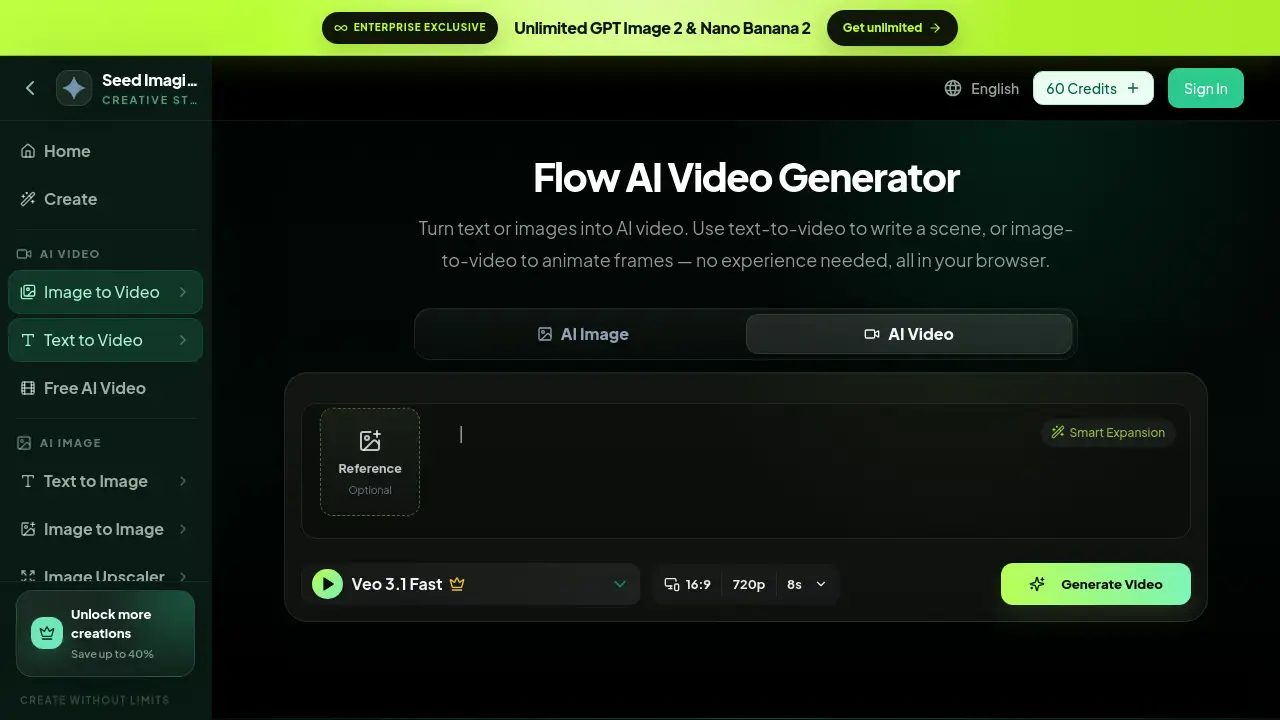
Flow AI Video Generator is a browser-based ai video maker that creates videos from text or images. It helps content creators, marketers, and hobbyists generate motion clips without editing timelines or using complicated software. This ai video maker supports both text to video and image to video modes, and every new account receives free credits on signup. Users can write a scene, upload a reference image, and produce an AI-generated video in seconds.
What is ai video maker?
An ai video maker is an online video creation tool that uses artificial intelligence to generate moving footage from a description or an image. Flow AI Video Generator solves a common problem: most people do not have time to learn complex video editors. Instead, they can type a prompt and let the AI video generator handle the heavy lifting. The tool runs entirely in a web browser, so no installation is needed.
This matters because short-form content is important for social media, education, and business communication. Flow AI Video Generator gives users a practical way to create useful clips quickly. It is part of the Seed Imagine platform, which also provides AI image tools, image upscaling, and background removal. The Flow AI video maker focuses on video generation and offers two main workflows: text to video and image to video.
Key Features of ai video maker
Text to Video Creation
Users can enter a detailed prompt and choose options like aspect ratio and resolution. The Flow AI video maker then turns the written scene into a short motion clip. This text to video mode is simple and accessible.
Image to Video Animation
Users can upload a reference image and animate it with AI. This image to video workflow is useful for bringing still photos to life. The system generates motion that matches the original visual content.
Browser-Based Workflow
No software download is required. The entire ai video maker runs online, making it easy to start a project from any computer or device with an internet connection.
Smart Prompt Expansion
A smart expansion option can help improve short prompts by adding more detail. This feature supports users who are new to an AI video generator and want better results with less manual editing.
Adjustable Video Settings
Users can choose formats like 16:9, set resolutions such as 720p, and select durations around 8 seconds. This level of control helps the online video creator produce clips that fit different social platforms.
Free Credits on Signup
New accounts come with free credits, so users can test video generation without paying. This makes the ai video maker an approachable option for beginners who want to explore generative video tools.
Use Cases for ai video maker
Social Media Clips
Creators can make short videos for Instagram, TikTok, and YouTube Shorts. The ai video maker’s text to video mode is useful for quickly testing content ideas and producing shareable visuals.
Product Demonstrations
Marketers can turn product descriptions into short animated videos. Using the image to video mode, they can animate product photos and create simple advertising clips without a production team.
Storytelling and Concept Visualization
Writers, filmmakers, and creative directors can visualize scenes before production. The AI video generator helps them create rough motion references from story ideas and concepts.
Personal Creative Projects
Hobbyists can turn personal images into fun animations. Flow AI Video Generator supports creative exploration with its browser-based workflow and free trial credits.
How to Use ai video maker
- Go to the Flow AI Video Generator page on Seed Imagine.
- Choose text to video or image to video mode.
- Type a prompt or upload a reference image.
- Select settings such as aspect ratio, resolution, and duration.
- Generate the video and preview the result.
This simple workflow makes the ai video maker easy to use, even for people without video editing experience. The online video creator adds convenience because everything happens in the browser.
Target Audience for ai video maker
- Social media creators
- Digital marketers and advertisers
- Small business owners
- Educators and course creators
- Freelance designers
- Creative agencies
- Beginners exploring AI video generation
Is ai video maker Free?
Flow AI Video Generator offers free credits on signup. That means users can create their first AI videos without entering a long-term commitment. Paid plans are available for users who need more credits and access to additional AI creation tools.
| Plan | Price | Features |
|---|---|---|
| Free | $0 | Free credits on signup, access to text to video and image to video modes, basic generation options |
| Paid Plans | Varies | More credits, unlimited generation options, access to other Seed Imagine AI tools |
Current pricing details and plan features can be checked on the official Seed Imagine pricing page.
ai video maker's Pros and Cons
| Aspect | Pros | Cons |
|---|---|---|
| Ease of Use | Simple prompt-based workflow, no editing skills required | Limited control over fine animation details |
| Accessibility | Works entirely in browser, free credits available | Generation time may depend on platform capacity |
| Output Length | Good for short-form social content | Not designed for long-form video production |
| Creative Options | Supports both text to video and image to video modes | Video duration and resolution options are limited |
Frequently Asked Questions about ai video maker
Do I need video editing skills to use this ai video maker?
No. Users only need to type a prompt or provide an image. The AI handles the video creation process, so no timeline editing or rendering knowledge is required.
What is the difference between text to video and image to video?
Text to video creates a scene from a written description. Image to video animates a reference image or photo that the user provides. Both modes are available in Flow AI Video Generator.
Can I use Flow AI Video Generator for free?
The platform gives free credits on signup, so users can try the tool without paying. Paid plans are available for users who need more generation capacity.
What device do I need to use this ai video maker?
Any device with a modern web browser can access the online AI video generator. There is no need to install special software.
How long are the generated videos?
The tool currently shows options around 8 seconds at 720p resolution. That works well for short social media posts and quick visual concepts.
What kind of videos can I make?
Users can create cinematic scenes, product animations, talking head style clips, dance videos, and other short content. The ai video maker is flexible enough for many creative prompts.
ai video maker Tags
ai video maker, text to video, image to video, AI video generator, Flow AI Video Generator, free AI video, online video creator, AI video creation tool, text prompt to video, image to video animation, short video generator, Seed Imagine AI tools