Introduction
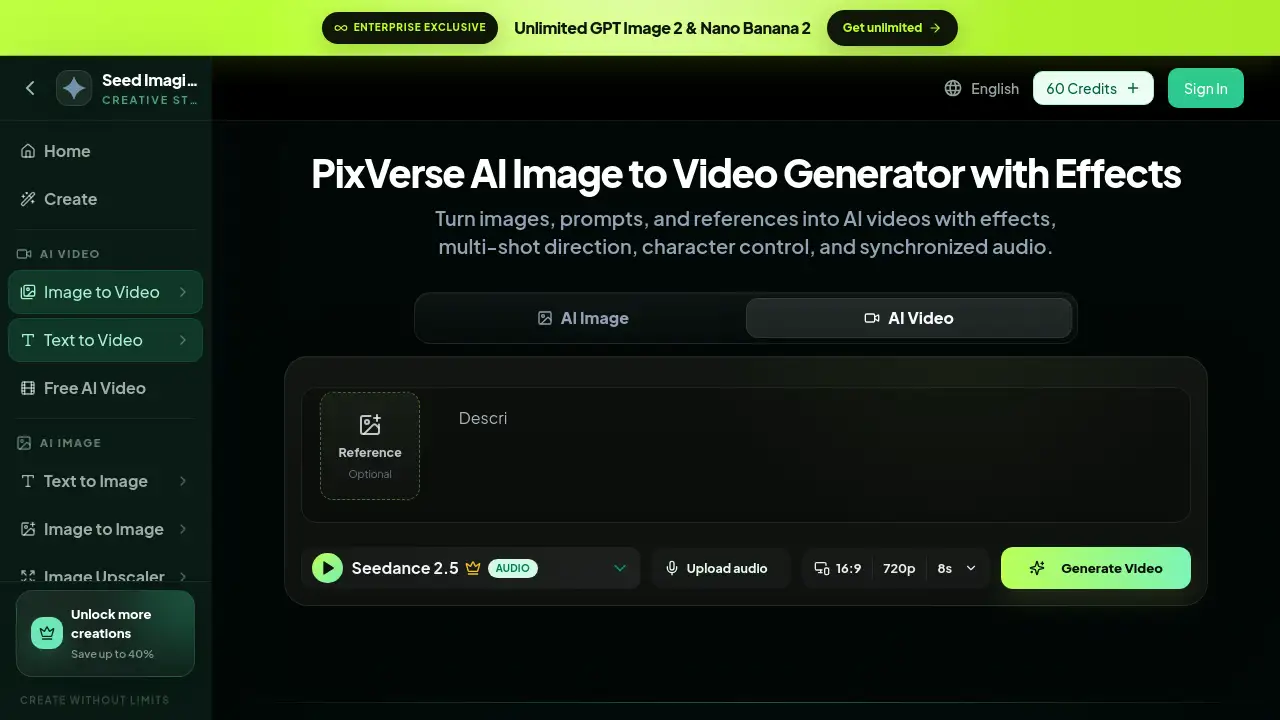
PixVerse AI Image to Video Generator is an AI-powered tool that turns still images, text descriptions, and reference characters into animated video clips. The PixVerse AI Image to Video Generator helps creators add effects, lip sync, native audio, and multi-shot direction without needing complex video editing software. It offers a simple, browser-based workflow for making content that looks polished and professional.
What is PixVerse AI Image to Video Generator?
As an AI video generator, PixVerse AI Image to Video Generator uses deep learning models to create motion from a single image or a short text prompt. Instead of shooting footage or animating frame by frame, users can upload a reference photo, describe the desired action, and let the system generate a video clip that follows the instruction. The tool solves a common problem for creators: producing quality video content fast without a production team. It matters because social media, e-commerce, and advertising increasingly demand video, and an AI video generator makes video creation accessible to everyone.
Key Features of PixVerse AI Image to Video Generator
Image to Video Conversion
Upload a reference image and add a prompt to generate a short animated clip. This image to video workflow works well for product showcases, character poses, and scene transitions.
Text to Video Creation
Type a detailed description of a scene or action, and the AI turns the text into moving visuals. This text to video mode is useful when no source image exists.
Character Reference Control
Provide a photo of a character, and the AI video generator keeps the character's appearance consistent across shots and actions. This is helpful for storytelling and multi-scene projects.
Multi-Shot Control
Plan and generate multiple connected shots so the video follows a clear sequence. This allows creators to make longer, story-driven clips with better structure.
Native Audio and Lip Sync
Add synchronized audio, and make characters speak with matching lip movements. The PixVerse AI Image to Video Generator includes native audio support for talking character clips and narration.
Video Extension
Take an existing video clip and extend it with new frames. This helps when a shot is too short and needs more duration without a visible break.
AI Video Effects
Apply AI-powered style effects for anime, cinematic looks, transformations, and product reveals. These effects make videos feel customized for the content type.
Use Cases for PixVerse AI Image to Video Generator
Product Marketing Clips
Turn product photos into splash reveals or dynamic showcase videos for e-commerce listings and social media ads.
Anime and Character Content
Animate anime-style images or original character artwork with transformations and power moments that capture attention.
Cinematic Storytelling
Create atmospheric scenes such as a snowy cabin or rainy street using text to video prompts with a cinematic look.
Talking Head Videos
Use lip sync and native audio to generate a talking character clip from a single portrait image, useful for explainers or social content.
Fashion and Lifestyle Loops
Convert fashion photos into motion loops with fluid movement, which suits brand stories and influencer content.
How to Use PixVerse AI Image to Video Generator
Using the PixVerse AI Image to Video Generator is straightforward:
- Choose the image to video mode on the creation page.
- Upload a reference image or character photo (optional).
- Write a clear prompt describing the motion, effect, or scene.
- Select settings such as aspect ratio, resolution, and duration.
- Click generate and wait for the AI video generator to process the clip.
The entire workflow happens in the browser, so there is no need to install software or use a high-end editing suite.
Target Audience for PixVerse AI Image to Video Generator
- Content creators and influencers
- Social media managers
- E-commerce sellers and brands
- Anime and digital artists
- Small business marketing teams
- Video editors who want fast AI video tools
- Educators and storytellers
Is PixVerse AI Image to Video Generator Free?
The platform uses a credit-based system for the PixVerse AI Image to Video Generator. It includes a free AI video tool for users who want to try basic generation, and a sign-in page offers credits for new users. Paid plans provide more credits and access to premium features like unlimited image generation and faster processing. For exact pricing and plan details, the official pricing page on the website is the best source.
| Plan | Price | Features |
|---|---|---|
| Free Trial / Starter | $0 or limited credits | Basic image to video generation, standard quality |
| Paid Plans | Varies | More credits, faster generation, premium features |
PixVerse AI Image to Video Generator's Pros and Cons
| Aspect | Pros | Cons |
|---|---|---|
| Features | Multiple creation modes, lip sync, native audio, video extension | Advanced features may require practice |
| Ease of Use | Simple browser workflow, no software install | Prompt quality affects output quality |
| Pricing | Credit system allows flexible use | Free credits are limited |
Frequently Asked Questions about PixVerse AI Image to Video Generator
Can I create a video from a single image with PixVerse AI?
Yes, the PixVerse AI Image to Video Generator lets users upload a reference image and animate it with a text prompt, making it easy to produce video clips from still photos.
Is PixVerse AI video generator free to use?
The platform offers a free AI video tool with limited credits. For more generation time and premium features, users can purchase a paid plan on the official pricing page.
Does PixVerse AI support text to video?
Yes, the tool includes text to video generation, where users type a prompt and the AI creates a video scene from the text, even without an image.
Can I use PixVerse for lip sync and audio?
Yes, the tool supports native audio and lip sync, so users can make characters speak with synchronized mouth movements in their generated clips.
What settings can I adjust in PixVerse AI video creation?
Users can adjust aspect ratio, video resolution, and duration. The default setting shown on the platform is 16:9, 720p, and 8 seconds per clip.
Is PixVerse AI good for anime videos?
Yes, the AI video generator handles anime and character content well, including transformations, action scenes, and reference-based character actions.
PixVerse AI Image to Video Generator Tags
PixVerse AI, AI video generator, image to video, text to video, AI video effects, character reference video, lip sync AI, native audio video, AI video tools, PixVerse tutorial, free AI video generator, video extension AI