Introduction
Upscayl AI Image Upscaler is a browser-based tool for turning low-resolution photos into sharper, larger images. It serves product images, portraits, vintage photos, and digital art. Users can upload up to 10 images at once, choose a scale from 2x to 8x, and use optional face correction. The tool also provides measured before-and-after comparisons that show how an AI image upscaler improves image resolution while keeping natural details.
What is Upscayl AI Image Upscaler?
This tool is an AI image upscaler available on Seed Imagine. It solves a common problem: small images that look blurry when enlarged. Instead of simply stretching pixels, the AI analyzes the image and adds detail while increasing image resolution. That makes the tool useful for anyone who needs high-quality visuals from low-resolution source files.
The product suits ecommerce sellers who need clear product images, photographers working with portraits, designers who handle digital art, and families restoring vintage photos. It matters because online stores, print materials, and design projects often require larger files than the original images can provide. With this image upscaler workflow, users can inspect edges, textures, and color boundaries before publishing their images. The goal is not just a bigger file, but a cleaner presentation that supports the original visual intent.
Key Features of Upscayl AI Image Upscaler
Batch Upload Up to 10 Images
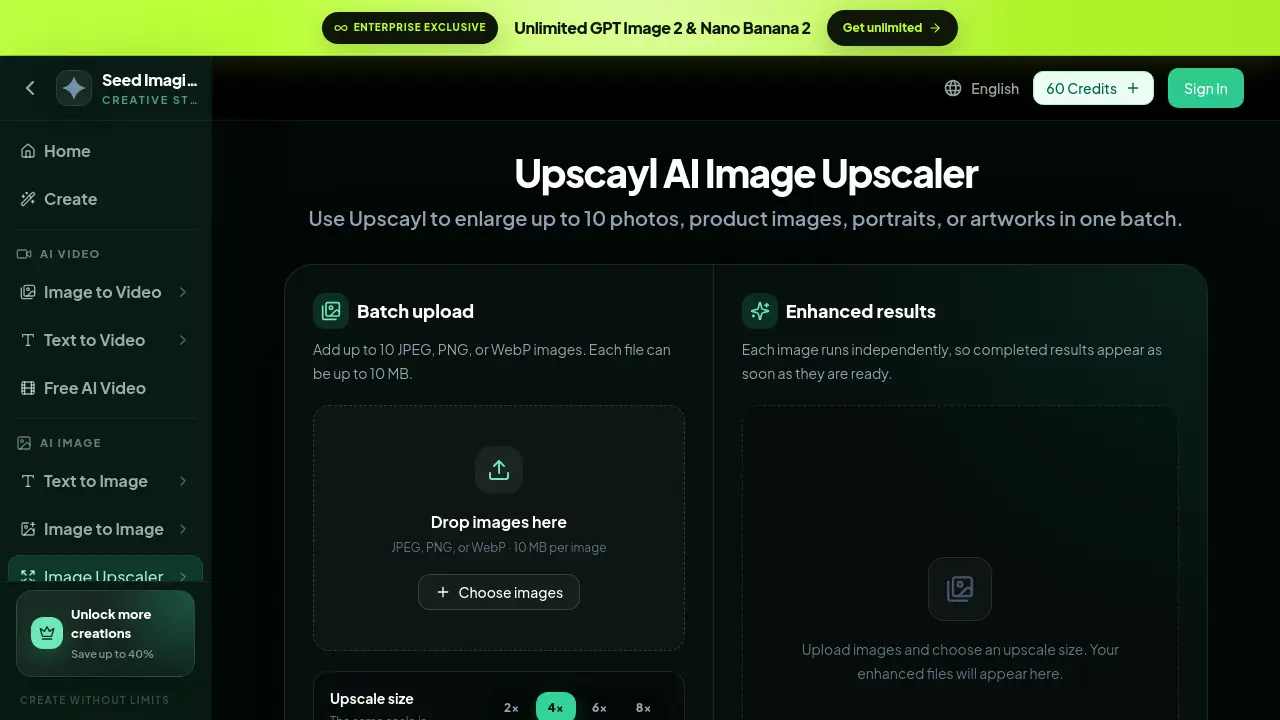
The tool accepts up to 10 JPEG, PNG, or WebP images in one batch. Each file can be up to 10 MB, so users can process multiple low-resolution photos without repeating steps. The drag-and-drop area also shows accepted formats, which makes preparation easier for users.
Multiple Upscale Sizes
Choose 2x, 4x, 6x, or 8x to increase image resolution. The same upscale size is applied to every image, which makes the AI image upscaler workflow predictable and easy to manage. Users can start with a smaller scale for simple jobs and use a larger scale for detailed artwork.
Face Enhancement for People Photos
Enable face correction when working with portraits and people. This feature helps keep facial edges, hair strands, and fabric texture natural after enlarging an image. It is a useful option for portrait photographers and family photo projects.
Measured Before and After Comparisons
The product page includes real comparisons for ecommerce, portraits, vintage photos, and digital art. Each example lists source resolution, output resolution, and file size so users can judge quality in detail. These comparisons make it easier to understand what a specific upscale size can do.
Independent Image Processing
Each image runs separately in the batch. Completed results appear as soon as they are ready, so users do not need to wait for the whole batch to finish. This keeps the workflow smooth for users who upload several large files at once.
Use Cases for Upscayl AI Image Upscaler
Ecommerce Product Images
Online sellers can use this image upscaler to create clearer product images. The tool improves product outlines, small highlights, and the separation between the object and background. A 4x upscale is often enough for standard product pages.
Portrait Photography
Portrait photographers can enlarge portraits while keeping skin transitions and hair details natural. The face enhancement option is especially helpful for low-resolution photos of people. This makes the tool useful for client galleries and print orders.
Vintage Photo Restoration
Old family photos are often small and damaged. The 2x upscale option can enlarge them and preserve a natural photographic look. It is a practical starting point for restoration projects.
Digital Art and Illustration
Artists can upscale digital art without losing curved edges, layered shapes, or fine line work. The 4x scale is a practical starting point for illustrations. This helps when preparing artwork for prints, portfolios, or online display.
How to Use Upscayl AI Image Upscaler
- Go to the Upscayl tool on Seed Imagine.
- Upload images by dragging and dropping files. Use JPEG, PNG, or WebP files up to 10 MB each.
- Choose an upscale size: 2x, 4x, 6x, or 8x.
- Turn on Enhance faces if the batch includes portraits.
- Start the upscaling process. Download each enhanced result when it appears.
For best results, start with the highest-quality source file available. The final image resolution depends on the scale you choose.
Target Audience for Upscayl AI Image Upscaler
- Ecommerce sellers and online store owners
- Photographers and portrait editors
- Graphic designers and digital artists
- Vintage photo collectors and restoration hobbyists
- Marketing teams producing print or social media assets
- Content creators who need sharper thumbnails and web images
- Anyone who needs higher image resolution for print or web
Is Upscayl AI Image Upscaler Free?
The Upscayl image upscaler is available through Seed Imagine's credit-based system. The product page does not list a permanent free plan, but new users can sign in and receive 60 credits. Paid plans are available for users who need more creations, and Seed Imagine advertises savings of up to 40% on paid plans. Exact pricing for this image upscaler should be checked on the official pricing page.
| Plan | Price | Features |
|---|---|---|
| Starter / Trial | 60 credits after sign-in | Access to the Upscayl image upscaler, batch upload, upscale sizes |
| Paid Plans | Credit-based | More creations, access to GPT Image 2 and Nano tools, save up to 40% |
Upscayl AI Image Upscaler's Pros and Cons
| Aspect | Pros | Cons |
|---|---|---|
| Pricing | Credit-based; 60 credits for sign-in; savings up to 40% | Exact cost is not listed on the product page |
| Features | Batch upload, 2x–8x upscale, face enhancement | Some features may require an account |
| Output Quality | Real before-and-after comparisons for multiple image types | Quality depends on the source file |
Frequently Asked Questions about Upscayl AI Image Upscaler
Can Upscayl handle low-resolution photos?
Yes. The tool is designed for low-resolution photos and can enlarge them by 2x, 4x, 6x, or 8x while preserving useful details. It is a practical option for everyday image tasks.
How many images can I upload?
You can upload up to 10 images in one batch. Supported formats are JPEG, PNG, and WebP, and each file can be up to 10 MB.
Does Upscayl improve faces?
Yes. The optional face enhancement mode is made for portraits and photos of people. It helps maintain facial edges, hair strands, and light transitions when images are enlarged.
What is an AI image upscaler?
An AI image upscaler is software that uses artificial intelligence to increase image resolution without simply stretching pixels. It adds plausible detail so the enlarged image looks cleaner and sharper.
Do I need design experience to use Upscayl?
No. The workflow is simple: upload images, choose an upscale size, enable face enhancement if needed, and start. The interface is clear enough for beginners.
Does Upscayl have a free plan?
There is no clear permanent free plan on the product page, but Seed Imagine offers 60 credits after sign-in. Paid credit packages are available for more creations.
Upscayl AI Image Upscaler Tags
Upscayl AI Image Upscaler, AI image upscaler, upscale image resolution, low-resolution photos, product images upscaling, portrait upscaler, digital art upscaler, batch image upscaler, AI image enhancer, photo upscaler online, face enhancement AI, vintage photo upscaler