Introduction
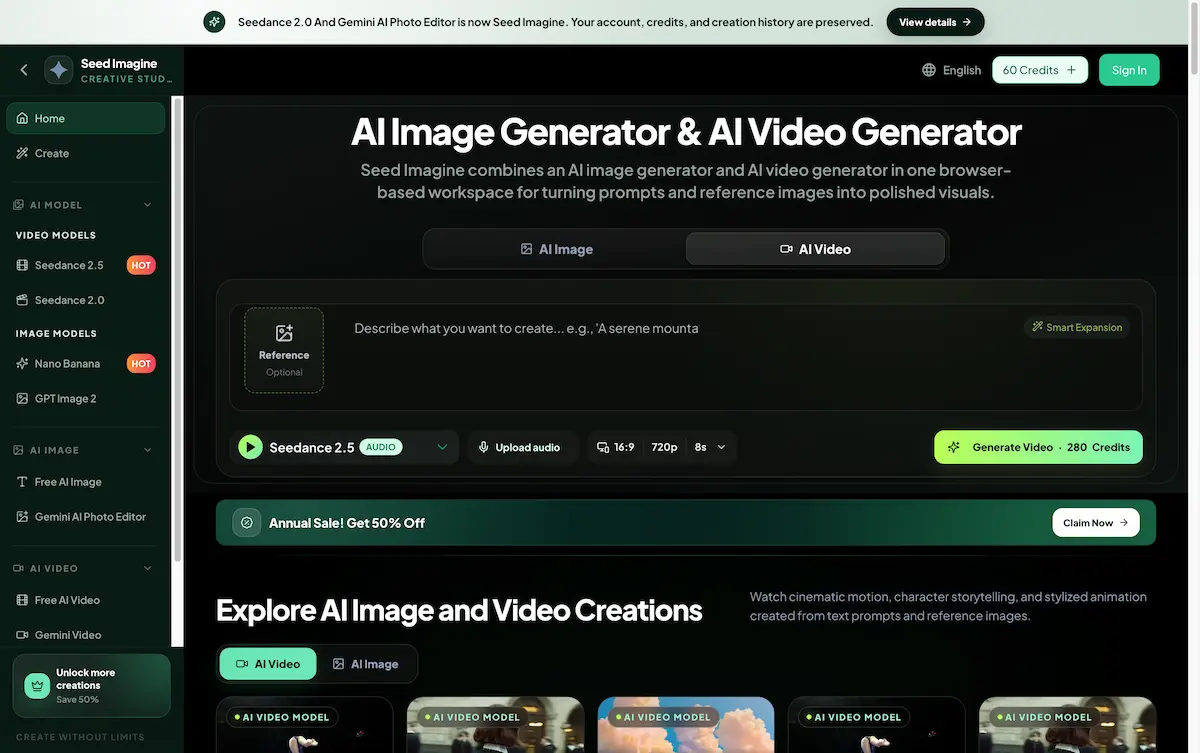
Seed Imagine is an online workspace combining an AI image generator and AI video generator for creating visuals from text prompts and reference images.
What is seed imagine?
Seed Imagine is a browser-based creative platform that lets users generate both images and short videos from simple text descriptions or uploaded photos. Formerly known as Seedance 2.0 and Gemini AI Photo Editor, the rebranded service brings together leading AI models into a single, unified interface. The core problem Seed Imagine solves is the need for multiple, separate tools. Instead of jumping between different applications for image creation, video generation, and photo editing, users can handle all these tasks in one place. This makes it an ideal tool for content creators, marketers, e-commerce designers, and anyone who needs to produce polished visual content quickly without design or video editing skills. By offering a free tier with daily credits, Seed Imagine makes AI-powered image and video creation accessible to a wider audience.
Key Features of seed imagine
AI Image Generator
Turn written prompts into high-quality images, from photorealistic scenes to illustrations and concept art. Choose from different models and style settings to match the project. This creative AI tool is built for fast visual prototyping.
AI Video Generator
Describe a scene or action to generate a short video clip directly from text. Adjust resolution, duration, and aspect ratio to fit different platforms. This is a powerful online AI video generator for quick motion content.
AI Photo Editor
Upload a reference photo and use text instructions to change backgrounds, remove objects, adjust styles, or add new elements. This feature simplifies AI image editing without needing complex software.
Image-to-Video Generator
Bring still photographs to life by animating them with motion. Upload an image as the starting frame, describe the desired movement, and the tool generates a video scene. This text-to-video tool is ideal for creating dynamic social media posts.
Multiple AI Models
Access several leading image and video generation models in one workspace. Compare quality, speed, style, and credit cost for each project without switching platforms.
Flexible Output Controls
Set precise aspect ratios, resolutions, video lengths, and aspect ratios to create content specifically sized for ads, product pages, social posts, or presentations.
Use Cases for seed imagine
AI Product Photography
Create professional-looking product images with studio-quality lighting and branded backgrounds for online stores, catalogs, and advertisements, without the need for a physical photoshoot.
Character Design and Style Variations
Turn rough sketches or 2D character art into polished illustrations or 3D-style figures. Generate multiple style variations for games, animation projects, or collectibles.
Social Media Content
Generate eye-catching images and short videos for social posts, stories, and ads in various formats. The batch processing feature helps maintain a consistent visual style across a campaign.
Photo Restoration and Colorization
Restore old or damaged black-and-white photos by adding natural color and sharpening details, creating digital keepsakes ready for printing or sharing.
How to Use seed imagine
- Describe Your Idea: Type a text prompt into the input box, or upload a reference image to guide the AI image and video generator.
- Choose Your Mode: Select whether you want to generate an image or a video. Pick an AI model, aspect ratio, and resolution from the available options.
- Generate and Review: Click the generate button. The seed imagine platform will process your request, and you can view the result in a few seconds to minutes, depending on the settings.
- Refine and Download: Review the output. You can edit the prompt, change a setting, and generate a new version. Once satisfied, download the image as PNG or JPEG, or the video in a standard format.
Target Audience for seed imagine
- Content creators and social media managers
- E-commerce designers and product photographers
- Independent filmmakers and animators
- Startup founders and marketing teams
- Graphic designers and creative directors
- Anyone needing quick, AI-generated visuals without technical skills
Is seed imagine Free?
Seed Imagine offers a free tier that provides users with a daily batch of credits. Creating images and videos consumes credits, with the amount depending on the chosen model, resolution, and video length. For those needing more creations, paid plans are available with larger monthly or yearly credit allowances. A one-time credit pack that never expires is also an option. For detailed pricing, visit the official pricing page at seedimagine.com.
| Plan | Price | Features |
|---|---|---|
| Free | $0 | Daily free credits, access to core features |
| Pro | Not listed | Larger monthly/yearly credit allowances, one-time packs available |
seed imagine's Pros and Cons
| Aspect | Pros | Cons |
|---|---|---|
| Ease of Use | No design skills required; simple text prompts | Limited advanced manual controls for fine-tuning |
| Features | Combines image and video generation in one workspace | Credit costs can vary significantly by model and settings |
| Pricing | Free tier available with daily credits | Higher usage can require paid plans |
| Accessibility | Works entirely in a browser, no app download | Requires a stable internet connection |
Frequently Asked Questions about seed imagine
What is Seed Imagine?
Seed Imagine is a browser-based AI image generator and AI video generator. It allows users to create images and videos from text prompts and reference photos, all within one unified workspace.
Can I try Seed Imagine for free?
Yes. You can start with a free account that provides a fresh batch of daily credits. These credits can be used to generate images and videos, allowing you to test the online AI video generator and other features.
How does the AI video generator work?
You can either describe a scene with a text prompt, and the AI will generate a short video clip. Alternatively, you can upload a still image to animate it. Both methods work in the same interface.
Do I need any design skills to use Seed Imagine?
No. The platform is designed to be used with plain English text prompts. You do not need Photoshop, video editing, or any other technical skills to create polished visuals.
What file formats are available for download?
Images can be downloaded as PNG or JPEG files at high resolution. Videos are available in standard formats suitable for sharing online.
How do the credits work?
Each generation costs a certain number of credits. Free users receive a set amount daily. Paid plans offer a larger allowance, and one-time credit packs never expire, giving users ongoing access to the creative AI tool.
seed imagine Tags
AI image generator, AI video generator, text to image, image to video, online video creator, AI photo editor, creative AI tool, seed imagine, content creation tool, AI product photography, text-to-video tool, photo restoration AI