Introduction
SiteTo.App is a no-code website to app converter.
What is SiteTo.App?
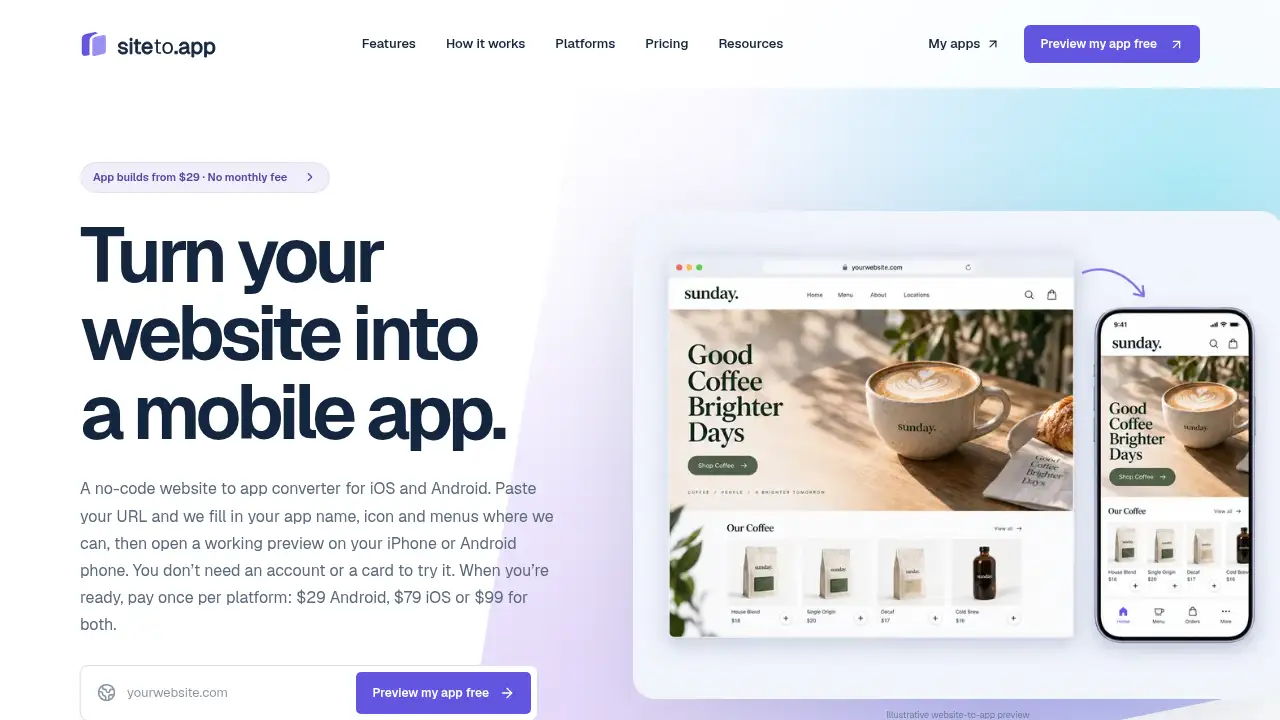
SiteTo.App is a no-code website to app converter for iOS and Android. It places an existing mobile-friendly website inside a native app shell with a branded icon, launch screen, header, side menu, and bottom tabs. Users keep their current website tools and update content in one place, while customers get a familiar home-screen shortcut. This website to app approach is designed for stores, booking sites, member areas, content communities, cafés, and local services that want a mobile app without custom development. It matters because it offers a free phone preview before payment, one-time build pricing, and publishing through the user’s own Apple and Google developer accounts. The tool does not require coding to set up the basic app; an optional JavaScript snippet can hide parts of a site inside the app.
Key Features of SiteTo.App
No-Code Website to App Converter
As a no-code website to app converter, SiteTo.App reads a URL and fills in the app name, icon, and menus where possible. This reduces setup work and lets non-technical users start a website to app project from one dashboard.
Branding and Native Navigation
Users can add their own app icon, launch screen, header, side menu, and bottom tabs. These native navigation elements help customers reach key pages such as shop, bookings, or member areas quickly.
Free Phone Preview Before Payment
SiteTo.App lets users open a working preview on an iPhone or Android phone before paying. The preview helps check menus, key pages, sign-in, checkout, and other important journeys; no account or card is needed to try it.
Website Content Updates in One Place
Because the app displays the existing website, ordinary content updates carry through when customers load or refresh a page. Users can keep publishing products, posts, or pages with their current website tools and avoid rebuilding pages inside a separate app builder.
Push Notifications with Firebase
Users can connect their own Firebase project and send push notifications with a title, text, optional image, and link. Tapping the notification opens the linked page in the iOS or Android app.
One-Time iOS and Android Builds
SiteTo.App offers one-time builds for Android, iOS, or both, with no monthly subscription. Android builds are provided as an AAB for Google Play or an APK, while iOS builds are signed and uploaded to TestFlight in the user’s Apple account.
Publishing Through User Accounts
Users publish from their own Apple and Google developer accounts, so the store listing and relationship stay with them. SiteTo.App supports the build and upload process, but Apple and Google still review every app.
Use Cases for SiteTo.App
Online Stores
Returning shoppers can open a branded app from their home screen and browse the latest products already managed on the website. The website to app setup keeps the existing checkout and store content in place.
Cafés and Local Businesses
A café can place its menu and existing online ordering pages within easy reach. Push notifications can invite regular customers back when there is something new.
Booking and Service Sites
Studios, salons, clinics, and service providers can give customers a direct route to schedules, booking pages, and service information. Native tabs and menus make frequent actions easier to find.
Content and Member Communities
Publishers and membership sites can offer a home-screen shortcut to articles, resources, and conversations. The app builder approach keeps content management on the existing website.
How to Use SiteTo.App
The no-code website to app converter workflow is simple:
- Enter the website URL. SiteTo.App reads the site and fills in the app name, icon, and menus where possible.
- Customize the app icon, launch screen, header, menus, and bottom tabs in the dashboard.
- Scan a code to open the preview on an iPhone or Android phone; users may need to install the preview app first.
- Check key pages and customer journeys, including sign-in, checkout, and booking flows.
- Choose Android, iOS, or both and pay once; then publish from the relevant developer accounts.
Target Audience for SiteTo.App
- Small and local businesses with mobile-friendly websites
- Online stores that want a home-screen shortcut for repeat shoppers
- Cafés, restaurants, and service providers with menu or booking pages
- Studios, clinics, and appointment-based businesses
- Content publishers and membership communities
- Teams seeking a low-cost iOS app and Android app without coding
Is SiteTo.App Free?
SiteTo.App has a free preview option, not a free full app build. Users can start with a URL and preview a working app on a phone without an account or card. Paid builds are one-time purchases per platform; developer accounts and app store fees are separate.
| Plan | Price | Features |
|---|---|---|
| Free preview | $0 | Enter a URL, auto-fill app name, icon and menus where possible, and open a working phone preview; no account or card needed |
| Android build | $29 one-time | Android app build for Google Play, branding, native header, menus and tabs, push notifications from own Firebase, APK and AAB downloads, later rebuilds, support |
| iOS build | $79 one-time | iOS app build for the App Store, branding, native header, menus and tabs, push notifications from own Firebase, TestFlight upload, later rebuilds, support |
| iOS + Android | $99 one-time | Both app builds, all listed build features, and a $9 saving compared with buying separately |
Apple charges $99 per year for an Apple Developer account, and Google Play charges $25 once; these fees are paid directly to the stores.
SiteTo.App's Pros and Cons
| Aspect | Pros | Cons |
|---|---|---|
| Pricing | One-time builds from $29, with no monthly subscription | Developer account and store fees are separate |
| Setup | No coding is needed for basic app setup and branding | Hiding parts of a site inside the app requires an optional JavaScript snippet |
| Preview | Free phone preview before payment, with no account or card needed | The preview does not guarantee app store approval |
| Content | Website updates carry through without a new build for ordinary content changes | New icons, names, or launch screens need a new build |
| Platforms | Supports iOS and Android builds and publishing through user accounts | Works best with mobile-friendly websites; complex native features may not fit |
| Store review | Native navigation, tabs, and push notifications can support review readiness | Apple and Google decide approval; Apple Guideline 4.2 can affect website-only apps |
Frequently Asked Questions about SiteTo.App
Is SiteTo.App a no-code website to app converter?
Yes. SiteTo.App is a no-code website to app converter that places a mobile-friendly website inside a native iOS and Android app shell. Users can add branding, menus, tabs, and push notifications without rebuilding the site.
Can users preview an app before paying?
Yes. A working preview can be opened on an iPhone or Android phone before payment, and no account or card is needed to try it. The preview lets users check key pages and journeys before choosing a one-time build.
Does SiteTo.App work with WordPress, Shopify, Webflow, Wix, and Squarespace?
SiteTo.App is designed for mobile-friendly websites, including sites built with WordPress, Shopify, Webflow, Wix, and Squarespace. Users should test pages, sign-in, checkout, and other important flows in the preview before paying.
How do push notifications work?
Users connect their own Firebase project in the app settings and build the app. After that, they can write a notification in the dashboard and send it to people who have allowed notifications; tapping it opens the linked page in the app.
Will Apple approve an app built with SiteTo.App?
No one can promise App Store approval. Apple applies the same guidelines to every app, and apps that only repackage a website can be rejected under Guideline 4.2. Native navigation, push notifications, and a site that works well in the app can help, but the user submits from their own account and handles Apple’s messages directly.
What does SiteTo.App cost, and are there monthly fees?
SiteTo.App charges one-time build fees: $29 for Android, $79 for iOS, or $99 for both. There is no monthly subscription for the build, although Apple and Google developer account fees are separate and paid directly to those stores.
SiteTo.App Tags
no-code website to app converter, website to app, app builder, no coding app builder, iOS app builder, Android app builder, push notifications, one-time app build, website app, mobile app for website, app store publishing, Firebase push notifications