Introduction
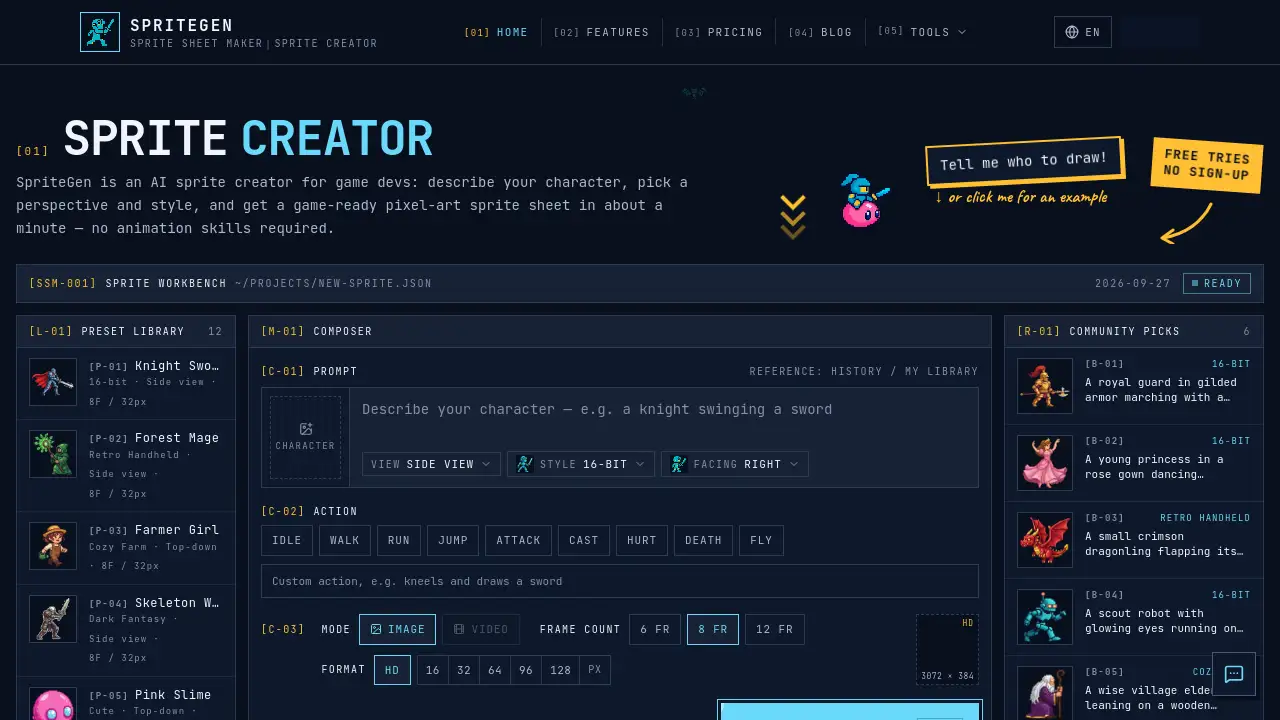
SpriteGen is an AI sprite creator for game developers who need character sprite sheets fast. This online sprite creator turns a short text description into a game-ready pixel-art sprite sheet, so users can move from idea to animation preview without pixel-art or animation skills. It is aimed at indie developers, game jam teams, and creators prototyping 2D characters.
What is SpriteGen?
SpriteGen is a free online sprite creator and AI sprite sheet generator. It lets users describe a character and an action, choose a perspective and visual style, and receive a transparent PNG sprite sheet in about one minute. The tool solves a common bottleneck in 2D game development: creating consistent character animation frames. Instead of hand-pixeled every pose or using generic AI image tools that output single images, SpriteGen focuses on animated sprite sheets. It suits solo developers, small studios, and anyone who needs quick character sprites for a game engine. Because output is game-ready, the AI sprite creator can fit into prototyping, game jams, and rapid asset iteration.
Key Features of SpriteGen
AI Character Description to Sprite Sheet
Users type a character and action, such as "a knight swinging a sword," and the AI sprite creator generates a matching sprite sheet. The tool reads both the character and the action before applying the chosen camera view and style.
Live Animated Preview
After generation, the platform shows a smooth animated loop of the character. This lets users see the animation before downloading, reducing guesswork in the sprite sheet generator workflow.
Drop-in PNG Output
SpriteGen returns a transparent PNG sprite sheet with evenly spaced frames. The output is designed to drop straight into a game engine, making it a practical AI sprite sheet generator for 2D projects.
Multiple Styles and Camera Views
The sprite creator includes 12 built-in styles across pixel art and illustrated groups. Pixel art options include 16-bit, retro handheld, cozy pixel, dark pixel, and cute pixel, while illustrated styles cover modern cartoon, classic cartoon, action anime, soft anime, chibi, flat vector, and 3D toon. Users can also pick from four camera views.
Flexible Frame and Cell Options
Generated sheets can have 6, 8, or 12 frames. Six- and eight-frame sheets sit in one row, while 12-frame sheets use a 4x3 grid. Users can choose HD cells or pixel-art cells from 16 to 128 px.
Credit-Based Pricing and Commercial License
SpriteGen uses credits rather than a mandatory subscription. Four credits generate one sprite sheet with a transparent background. Commercial use is included on every plan, including free tries, according to the product page.
Use Cases for SpriteGen
Indie Game Prototyping
Indie developers can use the online sprite creator to test character movement and combat ideas without waiting on full animation assets. A game-ready sprite sheet can be imported into a game engine for early builds.
Game Jams and Rapid Prototypes
Game jam teams often have limited time. SpriteGen helps teams create pixel-art sprites and illustrated characters in minutes, which is useful when a playable prototype needs animated characters quickly.
Placeholder Animation for Larger Projects
Studios can generate temporary sprite sheets to block out timing, scale, and camera perspective. Later, artists can replace them or use them as reference for final pixel-art animation.
How to Use SpriteGen
- Open the SpriteGen tool and describe the character and action. For example, "a robot running" or "a mage casting a spell."
- Choose a camera perspective and a visual style. If the description names a style, SpriteGen may select it automatically.
- Set the mode, frame count, format, and pixel size. Options include 6, 8, or 12 frames and HD or pixel-art cells.
- Generate the sprite sheet. Most generations finish in about one minute.
- Watch the live animated preview, then download the transparent PNG sprite sheet and import it into a game engine.
Target Audience for SpriteGen
- Indie game developers building 2D games
- Game jam participants and rapid prototypers
- Solo creators who need character sprites without animation skills
- Small studios that want fast placeholder or production-ready sprite sheets
- Artists and designers exploring pixel-art or illustrated character styles
- Educators and students learning game development workflows
Is SpriteGen Free?
SpriteGen offers free tries and credit-based plans. Visitors can try AI generation for free without an account, behind a security check. Four credits generate one sprite sheet, and a transparent background is included. The table below summarizes the pricing information from the product page.
| Plan | Price | Features |
|---|---|---|
| Free | $0 | Free tries without an account, optional sign-in, daily check-in credits after sign-up, commercial use included |
| Starter | $16/month | 300 credits per month (~75 sprite sheets), transparent PNG sheets, all 12 styles and 4 camera views, commercial license, standard email support |
| Pro | $42/month | 800 credits per month (~200 sprite sheets), everything in Starter, priority support |
| 300 Credits Pack | $19.90 one-time | 300 credits, no expiry, one-time top-up |
The product page also notes that signed-in generations skip the security check, and the sprite sheet maker for packing custom frames is free with no limits.
SpriteGen's Pros and Cons
| Aspect | Pros | Cons |
|---|---|---|
| Pricing | Free starter credits, credit-based top-ups, no mandatory subscription | Free tries are limited; monthly plans may be more than occasional users need |
| Features | AI-generated animation, live preview, 12 styles, 4 camera views | Output is focused on PNG sprite sheets, not full animation rigs |
| Output | Transparent PNG, evenly spaced frames, HD or pixel-perfect cells | Frame counts are limited to 6, 8, or 12 |
| Accessibility | No pixel-art or animation skills required; sign-in optional for free tries | Best results may require prompt iteration and style selection |
| Licensing | Commercial license included on all plans, including free tries | Users should still review final assets for project-specific needs |
Frequently Asked Questions about SpriteGen
What is SpriteGen best used for?
SpriteGen is best used for creating character sprite sheets for 2D games, prototypes, and game jams. It works as an AI sprite creator and AI sprite sheet generator that turns text descriptions into animated PNG sheets.
Do I need pixel-art or animation experience?
No. The online sprite creator is designed for users without animation skills. Users describe the character and action, pick a style and perspective, and the tool handles the sprite sheet generation.
What output formats does SpriteGen provide?
SpriteGen provides a transparent PNG sprite sheet. Users can choose 6, 8, or 12 frames, and the sheet uses either one row or a 4x3 grid. Cell options include HD or pixel-art cells from 16 to 128 px.
Can I use SpriteGen sprite sheets commercially?
Yes. The product page states that every generated sprite sheet can be used in commercial games and other products, on any plan, including free tries. This makes the sprite sheet generator suitable for indie commercial projects.
Is SpriteGen free to use?
Yes, there is a free starting option. Visitors can try AI generation without an account and pass a security check. After free tries run out, users can sign up for starter credits and claim more daily with check-in.
How long does a sprite sheet take to generate?
Most generations finish in roughly one minute. Actual time may vary based on prompt complexity, selected style, and current demand.
SpriteGen Tags
AI sprite creator, sprite sheet generator, AI sprite sheet generator, online sprite creator, pixel art sprite sheet, game-ready sprite sheet, transparent PNG sprite sheet, pixel-art sprite, character sprite, game engine assets, 2D game animation, sprite creator free