Introduction
BudgetPixel Studio makes video repurposing simple.
What is BudgetPixel Studio?
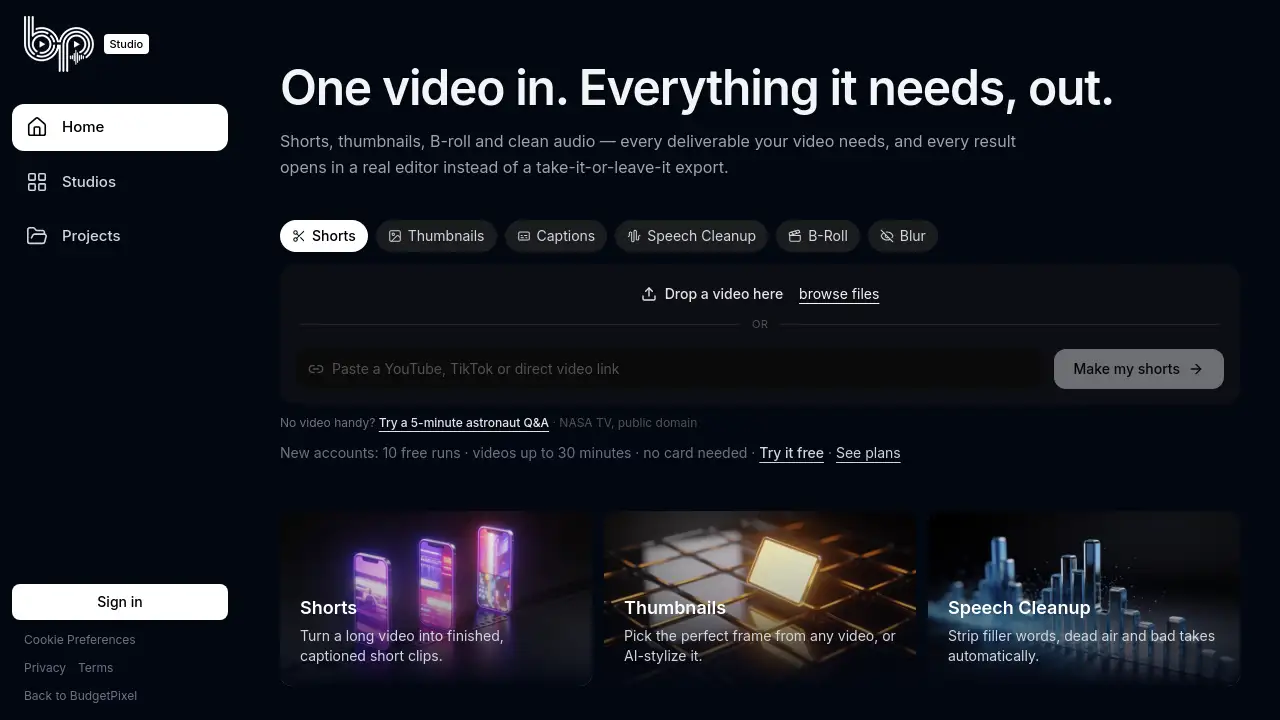
BudgetPixel Studio is a video content platform that takes one video and pulls out everything it needs: AI shorts, thumbnails, B-roll and clean audio. Instead of offering a take-it-or-leave-it export, every result opens in a real editor. This makes BudgetPixel Studio a practical OpusClip alternative for creators who want more control.
The tool is designed for anyone who repurposes long videos into social clips. It also acts as an entry point to the larger BudgetPixel platform, which includes image, video and music tools. For new users, the free tier provides 10 studio runs for videos up to 30 minutes. That makes it easy to test BudgetPixel Studio before buying a subscription.
Key Features of BudgetPixel Studio
AI Shorts Generator
Turn long recordings into ready-to-share clips. The AI shorts output is generated from the same upload, so no extra file prep is needed.
Thumbnail Builder
Create a matching thumbnail from the same source video. This saves time when preparing a YouTube video or a promotional post.
B-roll Extractor
Pull secondary footage directly from the upload. Users can grab cutaways and supporting shots without opening a separate editing app.
Clean Audio Tool
Use the generated clean audio as a clearer soundtrack for shorts, podcasts, or full videos. This keeps the finishing process in one place.
Real Editor Output
Every generated asset opens in a real editor. This is different from services that only hand over a final export, because the user can fine-tune before publishing.
All BudgetPixel Access
One subscription covers the whole BudgetPixel platform. Beyond BudgetPixel Studio, users get image, video and music tools under the same account.
Use Cases for BudgetPixel Studio
Social Media Content Sourcing
When using BudgetPixel Studio, social media managers can upload a webinar or interview and receive AI shorts, thumbnails, B-roll and clean audio in one pass.
YouTube Workflow
Creators can build YouTube videos faster by turning long recordings into clips and designing custom thumbnails from the same footage.
Podcast and Livestream Repurposing
Podcasters and streamers can recycle their content into smaller pieces for different platforms without paying for extra services.
Public Domain Footage Testing
New users can test BudgetPixel Studio with public domain videos such as NASA TV. This is useful for evaluating the platform before uploading private files.
How to Use BudgetPixel Studio
- Visit BudgetPixel Studio and create a new account. New users automatically get 10 free studio runs.
- Upload a video file up to 30 minutes long to BudgetPixel Studio, or choose a public domain video such as NASA TV.
- Select the assets you need, including AI shorts, thumbnails, B-roll and clean audio.
- Let the platform finish processing, then open each result in a real editor.
- Review, adjust, and export the final files. Paid subscriptions add monthly credits for continued use of BudgetPixel Studio and the wider BudgetPixel platform.
Target Audience for BudgetPixel Studio
BudgetPixel Studio is suitable for several groups that need fast video output.
- Social media managers who need fast clip variations
- YouTube creators and video editors who want shortcuts
- Podcast teams producing short-form audio and video content
- Marketing agencies handling multiple client uploads
- Freelancers looking for an OpusClip alternative with more editing control
Is BudgetPixel Studio Free?
BudgetPixel Studio has a free plan for testing. New accounts receive 10 free studio runs, and videos can be up to 30 minutes. No card is required. Paid plans add monthly credits, full access to every studio, and the rest of the BudgetPixel platform.
| Plan | Price | Features |
|---|---|---|
| Free | $0 | 10 free studio runs, videos up to 30 minutes, no card needed |
| Premium | $22/mo or $16.67/mo billed yearly | 25,000 credits a month, every studio, plus all BudgetPixel tools |
| Pro | $55/mo or $41.25/mo billed yearly | 60,000 credits a month, every studio, plus all BudgetPixel tools |
| Ultra | $125/mo or $87.50/mo billed yearly | 130,000 credits a month, every studio, plus all BudgetPixel tools |
BudgetPixel Studio's Pros and Cons
| Aspect | Pros | Cons |
|---|---|---|
| Pricing | Free tier with 10 runs; no card needed for new accounts | Paid plans can feel expensive for very light users |
| Video processing | One upload produces shorts, thumbnails, B-roll and clean audio | Free runs are limited to 30-minute videos |
| Editing workflow | Every output opens in a real editor for further changes | Final manual polish is still necessary |
| Platform coverage | One subscription includes the full BudgetPixel image, video and music platform | Credit-based pricing may be complex for individuals |
Frequently Asked Questions about BudgetPixel Studio
Can I try BudgetPixel Studio without a credit card?
Yes. New accounts get 10 free studio runs for videos up to 30 minutes, and no card is needed.
What does BudgetPixel Studio do with one video?
It generates AI shorts, thumbnails, B-roll and clean audio. Each output opens in a real editor instead of being locked into a single export.
Is BudgetPixel Studio an OpusClip alternative?
Yes. It is an OpusClip alternative for creators who want automated short clips plus more editorial control over thumbnails, B-roll and audio.
How long can uploaded videos be?
BudgetPixel Studio processes videos up to 30 minutes on free accounts. Paid plans add monthly credits for more studio runs and access to the full BudgetPixel platform.
Can users process videos without uploading their own files?
Yes. The homepage includes a public domain option such as NASA TV, so users can test BudgetPixel Studio without having a video file ready.
What does the BudgetPixel platform include besides BudgetPixel Studio?
The larger BudgetPixel platform includes image, video and music tools. BudgetPixel Studio is one part of that platform.
BudgetPixel Studio Tags
BudgetPixel Studio, AI shorts generator, thumbnail builder, B-roll extractor, clean audio tool, OpusClip alternative, video repurposing, real editor, BudgetPixel platform, video subscription, public domain video, AI video tools