Introduction
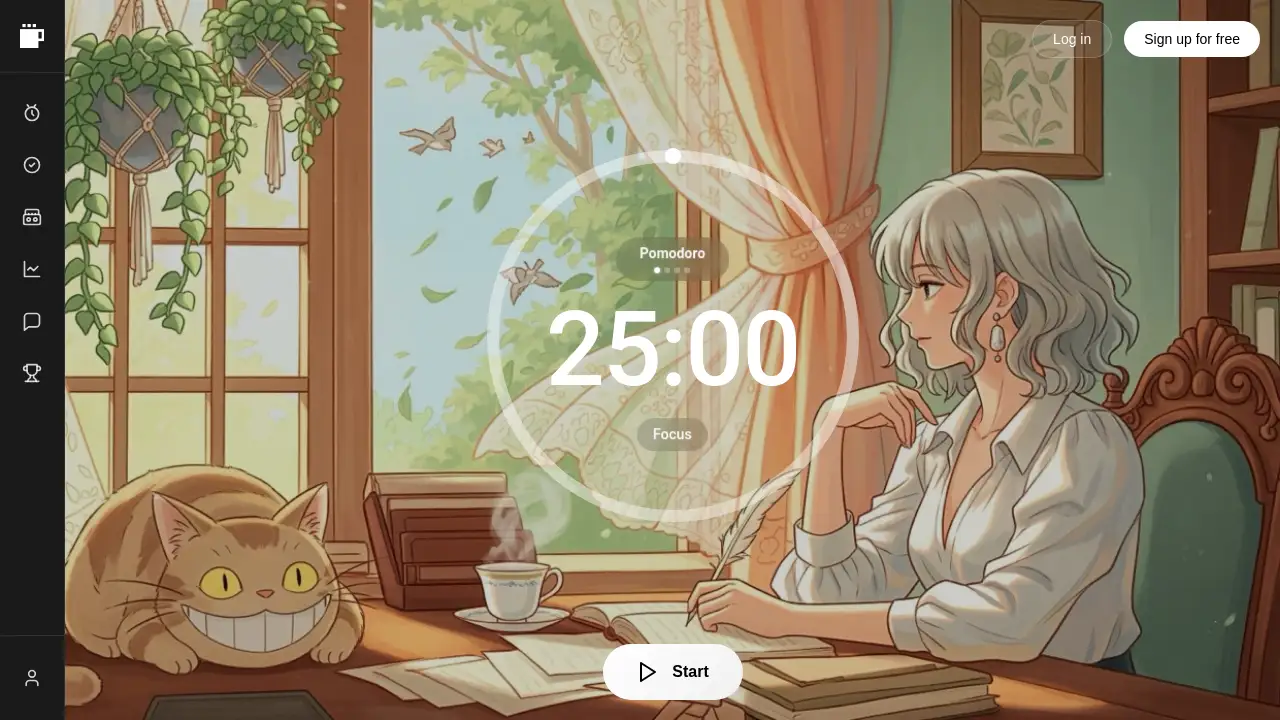
Superfocus is a modern focus timer app that combines the Pomodoro technique with task management and immersive themes.
What is Superfocus?
Superfocus is a web-based productivity tool designed to help individuals manage their time and improve concentration. It addresses the common problem of distraction by integrating a customizable Pomodoro timer with task tracking and ambient sound environments. The platform is particularly suitable for students, remote workers, freelancers, and anyone looking to implement structured time blocking into their day. By providing a visual and interactive way to break work into focused intervals, it aims to build productive momentum and reduce burnout.
Key Features of Superfocus
Customizable Pomodoro Timer
Users can create and save personalized focus timer techniques, setting specific durations for focus sessions, short breaks, and long breaks to match their workflow.
Integrated Task Management
A built-in to-do list allows users to track assignments directly within the app, ensuring work is organized and progress is visible alongside the timer.
Cassettes for Ambient Focus
This feature lets users create or choose "cassettes" that pair background imagery with sound from Spotify, building an immersive environment for better concentration.
Pre-Set Timer Techniques
The app offers several ready-made timer presets like "Pomodoro," "Sprint," and "Deep Work," providing quick access to proven time management structures.
Productivity Resources Hub
Superfocus includes a curated library of external links to videos, articles, podcasts, and books on study techniques, deep work, and motivation.
Visual Themes and Leaderboard
Users can apply visual themes like "Tron" for a customized interface and participate in a leaderboard to see how their focus time compares with others.
Use Cases for Superfocus
Academic Study Sessions
Students can use the Pomodoro timer to structure revision or essay writing, using the task list to manage assignments and cassettes to minimize distractions.
Remote Work and Deep Work Blocks
Professionals working from home can employ time blocking with the app to dedicate uninterrupted periods to complex projects, leveraging the various timer presets.
Creative Project Flow
Writers, designers, and programmers can use the custom timer and ambient cassettes to enter a flow state, maintaining creative momentum over longer sessions.
Habit Building and Consistency
Individuals aiming to build consistent work habits can use the daily report and leaderboard features for motivation and to track their focus over time.
How to Use Superfocus
- Sign Up and Log In: Visit the Superfocus website and create a free account to access all basic features and save your progress.
- Set Up Your Timer: Navigate to the timer section. You can either choose a preset like "Pomodoro" or create a custom technique by defining your focus, short break, and long break durations.
- Add Your Tasks: Go to the "Tasks" panel and list the assignments or items you plan to work on during your focused sessions.
- Select a Cassette (Optional): Browse the "Cassettes" section to pick a background and sound environment that helps you concentrate, or create your own.
- Start Your Session: Begin your timer. Work on a task until the focus period ends, then take the allotted break before starting the next session.
Target Audience for Superfocus
- Students at high school, college, or university levels.
- Remote workers, freelancers, and digital nomads.
- Professionals seeking to implement deep work practices.
- Anyone struggling with procrastination or distraction who wants a structured focus timer app.
Is Superfocus Free?
Superfocus operates on a freemium model. A free plan is available with basic features, but daily limits apply. A Premium plan unlocks unlimited access.
| Plan | Price | Key Features |
|---|---|---|
| Free | $0 | Basic Pomodoro timer, limited tasks, daily focus time limit, access to some presets. |
| Premium (Monthly) | $3.99/month | No daily limits, unlimited tasks and timers, all timer presets (Flow State, Marathon, Deep Work), full report & insights, Study Tutor access, leaderboard. |
| Premium (Lifetime) | $24 one-time | All Premium features with a single payment and no subscription. |
Superfocus's Pros and Cons
| Aspect | Pros | Cons |
|---|---|---|
| Features & Usability | Combines timer, tasks, and ambiance in one clean interface. Excellent pre-set techniques for different work styles. | The free version has significant restrictions (daily limits, locked presets). The AI "Study Tutor" is a Premium-only feature. |
| Pricing & Value | Free tier available to test core functionality. Lifetime Premium option offers good long-term value. | Core productivity tools like custom long breaks and session counts require signing up, even on the free plan. |
| Experience | "Cassettes" offer a unique and customizable way to enhance better concentration. The resource hub provides added educational value. | Designed primarily for desktop/tablet; not optimized as a mobile focus timer app. |
Frequently Asked Questions about Superfocus
Is Superfocus really free to use?
Yes, Superfocus offers a free plan that includes the basic Pomodoro timer, a limited task manager, and access to some cassettes. However, to remove daily limits and access advanced features like unlimited timers and the Study Tutor, a Premium upgrade is required.
What is the difference between the Pomodoro and other timer presets?
The classic Pomodoro technique preset is 25 minutes of focus followed by a 5-minute break. Other presets like "Sprint" (15 min) or "Deep Work" (90 min) are tailored for different types of tasks, allowing for shorter, more intense bursts or longer, uninterrupted deep work sessions.
Can I use my own music with the Cassettes feature?
Yes. When creating a custom cassette, you can paste a URL to a Spotify track, playlist, or album. This will play alongside your chosen background image during focus sessions.
Who is the Superfocus leaderboard for?
The leaderboard is designed for students and users who find motivation in community and gentle competition. It displays the top users based on their total focused time, encouraging consistent use of the focus timer app.
What is the Study Tutor feature?
Study Tutor is a beta AI feature available to Premium users. It acts as a study coach, allowing you to ask questions about how to study for specific subjects, plan your learning, and get productivity tips.
Do I need an account to use Superfocus?
You can access the basic timer interface without an account, but to save your techniques, use cassettes, track tasks, or access most presets, you will need to sign up for a free account.
Superfocus Tags
focus timer app, Pomodoro timer, time management, productivity tools, deep work, study timer, time blocking software, better concentration, focus app, Pomodoro technique, task management, ambient study sounds