Introduction
Synthesia's AI video generator makes studio-quality videos.
What is AI Video Generator by Synthesia?
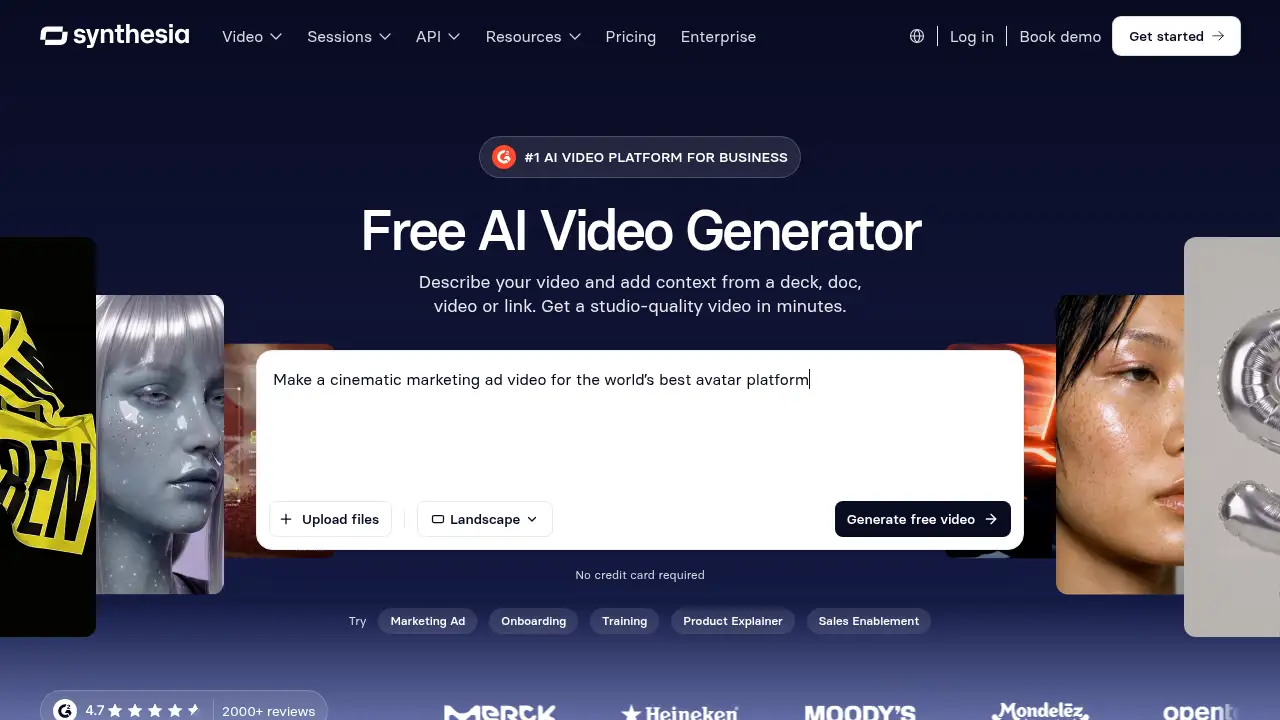
AI Video Generator by Synthesia is a browser-based AI video platform for business users who need finished videos without a camera crew or editing timeline. The tool solves a common production bottleneck: turning an idea, script, document, or URL into a polished video quickly. It is suitable for marketing, training, sales, product, and HR teams that want repeatable AI video creation. The product page describes Syren, an AI video agent that writes the script, designs scenes, and adds voiceover and music. Users can also refine the result through chat. As an AI video generator, it supports text to video workflows, AI avatar presenters, and brand-ready formats, making it a practical option for teams that need speed and consistency. This AI video generator is positioned as a way to create studio-quality videos in minutes.
Key Features of AI Video Generator by Synthesia
Text to Video from Multiple Inputs
Generate video from a prompt, script, PDF, PowerPoint, or URL, and add images, video, or a YouTube link for the AI video generator to work from. This text to video workflow removes the need for a camera, editing timeline, or video skills.
Syren AI Video Agent
Describe the video once and let Syren write the script, design scenes, add voiceover and music, and build the video scene by scene. The AI video agent helps turn a brief into a finished video in one go.
Chat-Based AI Video Editing
Ask for changes as you would brief a designer: rewrite the script, tone, or ending in one message. Add an AI avatar presenter with voiceover in 140+ languages, or restyle any scene without touching a timeline. This makes AI video editing accessible to non-editors.
Brand and Format Controls
Apply brand colors from the first draft and choose landscape for web or portrait for social and mobile. Create quick clips or AI videos up to an hour long with the AI video generator.
Access to Multiple AI Video Models
Use Seedance 2.5, Veo 3.1, Gemini Omni, FLUX 3, and other models inside AI Playground. Turn text or images into cinematic AI video clips alongside the main AI video generator workflow.
Use Cases for AI Video Generator by Synthesia
Marketing Ads
Make cinematic marketing ad videos for web and social channels. The AI video generator can combine brand visuals, AI avatar presenters, and short clips for faster campaign production.
Employee Onboarding
Create a short, friendly onboarding welcome video for a new team member. Use text to video and an AI avatar presenter to deliver consistent messages across locations.
Training Videos
Produce training videos that explain topics such as secure password practices. AI video creation helps teams update lessons quickly and keep visuals consistent.
Product Explainers
Turn a deck, document, or URL into a product explainer video. The text to video workflow is useful when teams need a clear overview without a full production crew.
Sales Enablement
Create a one-minute personalized video that a sales rep can send after a demo. An AI video generator helps sales teams scale outreach without recording every video manually.
How to Use AI Video Generator by Synthesia
- Open AI Video Generator by Synthesia and describe the video. Add context from a deck, doc, video, or link.
- Let Syren, the AI video agent, write the script, design scenes, and add voiceover and music.
- Watch the AI video generator build the video scene by scene. Refine it in chat by rewriting the script, changing the tone, adding an AI avatar, or restyling scenes.
- Apply brand colors and choose landscape or portrait format. Export the finished video for web, slides, or social media.
Target Audience for AI Video Generator by Synthesia
- Marketing teams that need campaign and social videos
- Learning and development teams that create training content
- Sales and enablement teams that send personalized outreach videos
- Product and go-to-market teams that explain products clearly
- HR teams that produce onboarding and internal communication videos
- Small and midsize businesses that want video production without a full studio
Is AI Video Generator by Synthesia Free?
The product page promotes free video creation with no credit card required. The reference information does not list paid plan prices, so users should check the official Synthesia pricing page for current options. A free start makes it possible to test the AI video generator before choosing a paid plan.
AI Video Generator by Synthesia's Pros and Cons
| Aspect | Pros | Cons |
|---|---|---|
| Pricing | Free start with no credit card required | Paid plan costs are not detailed in the reference information |
| Features | Syren AI video agent, AI avatars, 140+ languages, multiple AI video models | Some advanced controls may require time to learn |
| Speed | Studio-quality videos can be created in minutes | An internet connection is required |
| Use cases | Marketing, onboarding, training, product explainers, and sales | Complex custom productions may still need extra review |
| Editing | Chat-based AI video editing avoids a traditional timeline | Users must review generated scripts and scenes for accuracy |
Frequently Asked Questions about AI Video Generator by Synthesia
What makes AI Video Generator by Synthesia different?
It combines text to video, the Syren AI video agent, chat-based AI video editing, AI avatar presenters, and brand controls in one AI video platform. The AI video generator is designed to produce finished videos rather than only short clips.
Does Synthesia's AI video generator support AI avatars?
Yes. Users can add an AI avatar presenter with voiceover in 140+ languages, which is useful for training, onboarding, and marketing videos.
Can I use text to video from a PDF, PowerPoint, or URL?
Yes. The AI video generator accepts prompts, scripts, PDFs, PowerPoint files, URLs, images, video, and YouTube links.
Is AI video editing possible without a timeline?
Yes. Users can edit by chatting, ask for script or tone changes, add avatars, and restyle scenes without touching a timeline.
Is there a free version of AI Video Generator by Synthesia?
The product page promotes free video creation and states that no credit card is required. Paid plan details are not included in the reference information; check the official pricing page for current options.
What formats can I create with the AI video generator?
It supports landscape for web and portrait for social and mobile, with quick clips or videos up to an hour long.
AI Video Generator by Synthesia Tags
AI video generator, Synthesia AI video generator, text to video, AI video creation, AI avatar video, AI video editing, AI video platform, AI video generator for business, marketing video generator, training video maker, AI video agent, Syren AI