Introduction
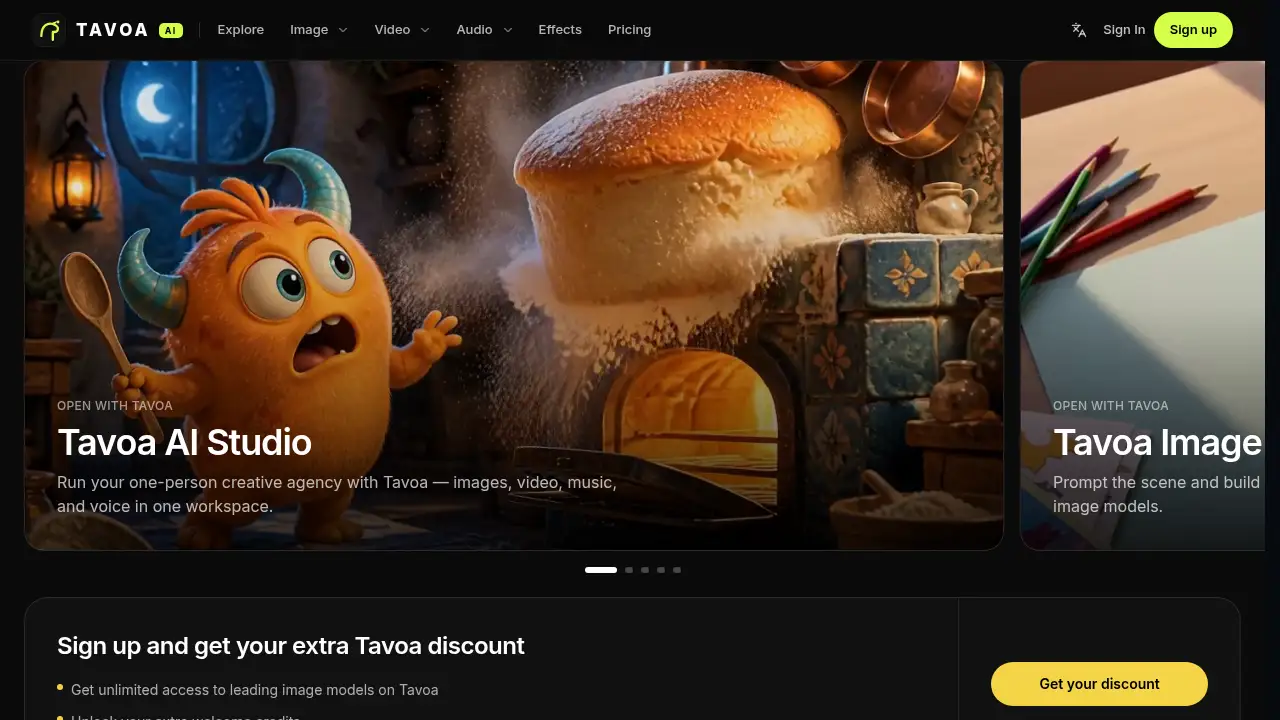
Tavoa AI is an all-in-one AI creation platform.
What is Tavoa AI?
Tavoa AI is a web-based AI creative suite that combines image, video, music, and voice tools in one workspace. Instead of switching between separate AI image generator, AI video generator, and audio tools, users can manage a full project in one place. The platform is designed for people who want production-ready content without building a complex editing stack.
The product is powered by a range of AI models listed on the site, including Seedance 2.5 for video, Kling models, Veo 3.1, Wan models, GPT Image 2, Flux 2, Seedream 5, and other creative options. Tavoa AI also includes presets, studio-style apps, and a Supercomputer feature that is described as one superagent for the creative stack. This matters because model choice and workflow speed often decide how quickly a creator can test ideas and publish content.
Tavoa AI is suitable for solo creators, marketers, filmmakers, and small teams that need an all-in-one AI creation platform. It solves a common problem: creative work is often spread across too many tabs, subscriptions, and file formats. Tavoa AI aims to reduce that friction by keeping image generation, video generation, audio creation, and editing tools close together.
Key Features of Tavoa AI
AI Image Generation
Use text-to-image and image-to-image tools to create characters, product visuals, and concept art. The platform lists models such as GPT Image 2, Flux 2, Seedream 5, and Nano Banana for different image styles.
AI Video Generator
Create short clips and cinematic scenes with text-to-video, image-to-video, and motion-control options. Tavoa AI highlights Seedance 2.5, Kling 3.0, Veo 3.1, Wan 2.7, and other AI video models for different creative needs.
AI Music and Voice Tools
Generate audio elements for videos, social posts, and creative projects. The audio area supports music and voice workflows, which helps creators build a complete AI content creation pipeline in one workspace.
Viral Presets and Effects
Apply ready-made visual effects and popular presets to speed up production. Presets such as Earth Zoom, Bullet Time, Comic, Particles, and Fairytale Castle can help users test trending styles quickly.
Cinema Studio and Creative Apps
Use studio-style apps for cinematic scenes, marketing content, and other structured outputs. These apps are useful for creators who want more guidance than a blank prompt box offers.
Supercomputer and Automation
Tavoa AI describes Supercomputer as one superagent for the creative stack. Automation, skills, apps, and MCP/CLI options are also mentioned, which may appeal to advanced users who want to connect AI creation with existing workflows.
Use Cases for Tavoa AI
Social Media Content
Create scroll-stopping images, short videos, and voiceovers for social campaigns. Tavoa AI can help a small team produce more content variations without opening several separate tools.
Filmmaking and Previsualization
Test scenes, camera moves, and character ideas before production. The AI video generator and Cinema Studio features are relevant for storyboards, concept trailers, and mood pieces.
Marketing and Product Promotions
Generate product visuals, short ads, and promotional clips. An all-in-one AI creation platform can simplify asset handoff between design, video, and audio tasks.
Music and Voice Projects
Produce background music, voice tracks, and audio experiments for creative projects. Tavoa AI supports audio workflows alongside visual tools, so creators can keep related assets together.
Community and Public Projects
Explore public creations from other Tavoa AI users and learn from visible project structures. The site notes that public projects are optional and may offer extra community opportunities.
How to Use Tavoa AI
- Visit the Tavoa AI website and sign up for a free account. The site says no credit card is required to start.
- Choose a workspace area: Image, Video, Audio, Effects, or a studio app.
- Select a model or preset, then write a prompt or upload a reference file.
- Generate the asset with Tavoa AI, review the result, and refine the prompt or settings as needed.
- Download the output or continue building the project with other Tavoa AI tools.
Target Audience for Tavoa AI
- Solo creators who need a free-to-start AI content creation workspace.
- Social media managers producing images, short videos, and audio.
- Filmmakers and video editors exploring AI video generation.
- Marketers and small teams that want one place for visual and audio assets.
- Hobbyists and beginners who prefer presets and guided studio apps.
- Advanced users interested in automation, MCP, CLI, and model variety.
Is Tavoa AI Free?
Tavoa AI is free to start, and the sign-up page states that no credit card is required. New users may receive welcome credits, and the site mentions extra discounts and early access offers for some models. Exact plan limits and paid pricing are not fully listed on the homepage, so users should check the official Tavoa pricing page for current details.
| Plan | Price | Features |
|---|---|---|
| Free to start | $0 entry | No credit card required; welcome credits may apply; limited access depends on current offer |
| Paid plans | See official pricing page | May include more credits, model access, and team or enterprise options |
Tavoa AI's Pros and Cons
| Aspect | Pros | Cons |
|---|---|---|
| Features | Combines image, video, music, voice, effects, and studio apps | The large toolset may feel overwhelming at first |
| Model Access | Lists many well-known AI models in one platform | Model availability and credit costs can change |
| Pricing | Free to start with no credit card required | Exact paid limits are not clear without checking the pricing page |
| Workflow | Supports a one-workspace AI content creation process | Users still need prompt and editing skills for best results |
| Community | Public projects and creator showcases offer inspiration | Public sharing is optional, but privacy settings should be reviewed |
Frequently Asked Questions about Tavoa AI
What is Tavoa AI?
Tavoa AI is an all-in-one AI creation platform for images, videos, music, and voice. It combines multiple AI models and creative apps in a single web workspace.
Which AI models does Tavoa AI support?
The site lists models such as Seedance 2.5, Kling 3.0, Veo 3.1, Wan 2.7, GPT Image 2, Flux 2, Seedream 5, and others. Availability may depend on the current plan and platform updates.
Can I use Tavoa AI outputs commercially?
Commercial use depends on the platform terms and the rules of each underlying model. Users should review Tavoa AI's terms of service and model-specific licensing before publishing paid or client work.
How do credits work on Tavoa AI?
Tavoa AI uses a credit-based system, and new users may receive welcome credits. Credit use can vary by model, preset, or feature, so the official pricing page is the best place to confirm current limits.
Do I need design or video editing experience?
No, beginners can start with presets, templates, and simple prompts. More advanced control is available for users who want to adjust models, camera motion, and studio settings.
Is my content private on Tavoa AI?
The site includes optional public projects and community showcases. Users should check privacy settings and terms before uploading sensitive material or sharing a project publicly.
Tavoa AI Tags
Tavoa AI, all-in-one AI creation platform, AI video generator, AI image generator, AI music generator, AI voice generator, AI content creation, text-to-video, text-to-image, AI creative suite, AI video model, Seedance 2.5