Introduction
Send SMS online with textjuice, no account needed.
What is textjuice?
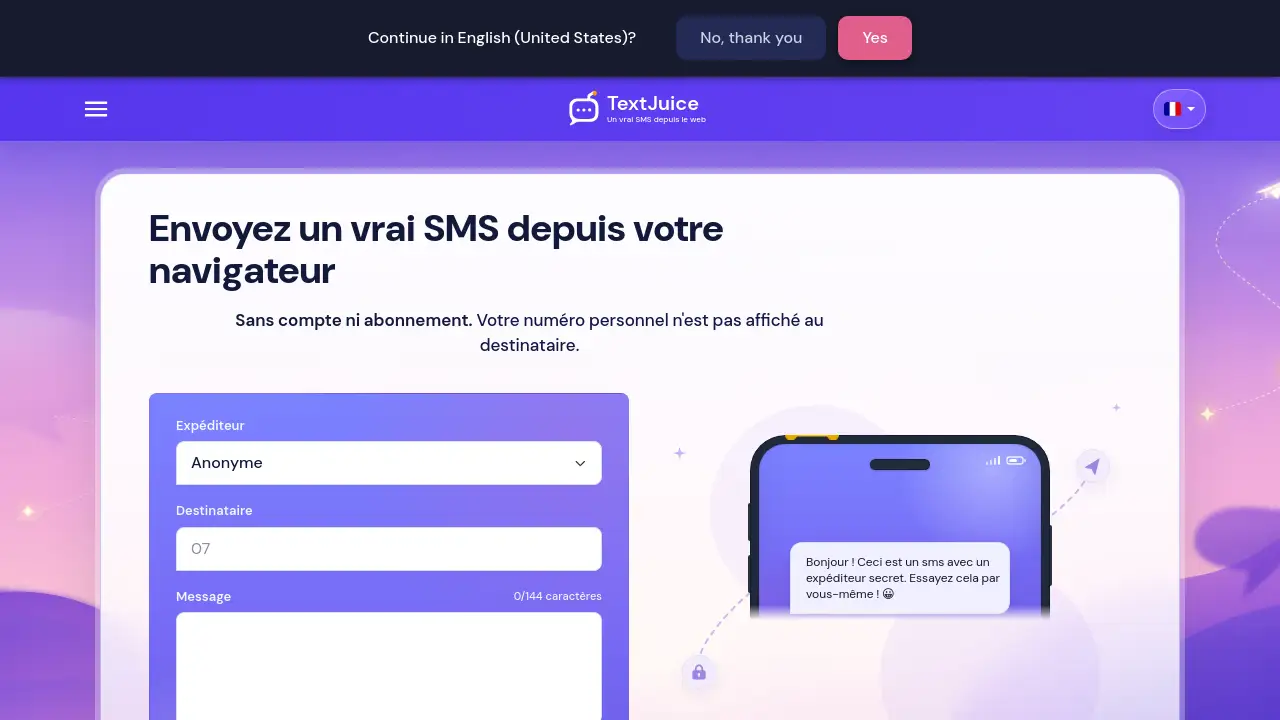
textjuice is a web-based service that lets users send SMS online from a browser. It solves a simple but common problem: sending a real text message without using a personal phone number, installing an app, or creating an account. The service is designed for people who want to send SMS from browser sessions on a PC, Mac, tablet, or phone, and it does not require a connected mobile phone, SIM card, or mobile network on the sender’s side.
The product is especially useful when someone needs to send an anonymous SMS, send SMS from computer without sharing a private line, or reach a recipient in another country through a supported international number. According to the homepage, the recipient receives a real SMS in their normal SMS app. The sender’s personal number is not displayed; instead, the message is sent through a number managed by textjuice. This makes textjuice a practical option for one-way messages where privacy, speed, and simplicity matter.
textjuice also focuses on message writing. It offers character limits, guidance for different situations, and blog resources for relationships, celebrations, condolences, and humor. For users who search for an online SMS service that works without subscriptions and without a mobile relay, textjuice presents a straightforward browser-based option.
Key Features of textjuice
Send SMS Online from a Browser
Users can open textjuice in a browser and send SMS online without installing software or connecting a phone. The process works from a PC, Mac, tablet, or phone as long as there is an Internet connection.
Anonymous SMS with a Private Number
The service allows users to send an anonymous SMS because the sender’s personal number is not shown to the recipient. The message uses a number managed by textjuice, which helps protect the sender’s private line.
No Account or Subscription Required
According to the product homepage, users do not need to create an account or sign up for a subscription to send SMS online. This lowers the barrier for quick, one-time messages.
Real SMS Delivery
Although the message is prepared online, the recipient receives a real SMS in their usual messaging app. textjuice sends the message to the mobile network after the user confirms the number and text.
Works from Computer, Tablet, or Phone
Users can send SMS from browser sessions on many devices, including desktops and laptops. A phone can be used, but it is not required as a relay or hotspot for the SMS to be sent.
International SMS Support
textjuice supports some international numbers when the country and number type are available. To send an international SMS, users begin with + and add the country code before the full number.
Message Review and Character Count
The message box shows a character limit while typing, helping users keep messages concise. Users can review the number and text before sending, which reduces mistakes.
No SIM Card or Mobile Network Needed for Sending
The sender does not need a personal SIM card or mobile network connection to start the process. A Wi-Fi connection and a browser are enough to prepare and launch the online SMS.
Use Cases for textjuice
Sending a Private One-Time Message
Users who want to send an anonymous SMS can contact someone without revealing their personal number. This is useful for short, one-way messages where privacy is important.
Sending SMS from a Computer Without a Phone
People who work on a computer and need to send SMS online can do so without reaching for a mobile phone. This helps when a phone is off, unavailable, or not connected to a mobile network.
Reaching an International Number
When the destination country and number type are supported, users can send an international SMS from the browser. They simply enter +, the country code, and the full recipient number.
Writing Personal Messages for Different Situations
textjuice offers message ideas for relationships, celebrations, condolences, and humor. Users can adapt these templates to send a friendly, respectful, or light-hearted SMS online.
Situations Without a SIM Card
A user without a SIM card can still use the service to send SMS online, provided textjuice supports the destination number. This makes it useful for travel, temporary devices, or shared computers.
Quick Web-Based Messaging Without an App
Users who prefer not to install another messaging app can use a browser to send SMS online. The process is simple and does not require an account or subscription according to the homepage.
How to Use textjuice
- Open textjuice.com in a browser on a PC, Mac, tablet, or phone.
- Enter the recipient’s phone number. For an international SMS, start with + and add the country code.
- Write the message in the text box. Keep an eye on the character counter, which shows the remaining limit.
- Review the number and message carefully before sending.
- Launch the online send. The recipient then receives a real SMS in their normal SMS app, while the sender’s personal number is not displayed.
Target Audience for textjuice
- People who want to send SMS online without sharing their personal number
- Users who need to send SMS from computer, tablet, or phone browser
- Individuals looking for an anonymous SMS service for one-way messages
- Travelers or users who need to reach supported international numbers
- People without a SIM card or active mobile network on the sending device
- Users who prefer no account and no subscription for a quick web-based SMS tool
Is textjuice Free?
The textjuice homepage states that users can send SMS online without an account and without a subscription. However, the provided information does not include a full pricing table, per-message rates, or a list of paid limits. Because pricing details are not clearly published in the reference content, users should check the official textjuice website for current costs, message limits, and country availability before relying on the service for regular use.
| Plan | Price | Features |
|---|---|---|
| Not specified | Not clearly listed | No account or subscription mentioned on the homepage; check the official site for current pricing and limits |
textjuice's Pros and Cons
| Aspect | Pros | Cons |
|---|---|---|
| Ease of Use | Works directly in a browser; no app installation required | Requires an Internet connection |
| Privacy | Personal number is not displayed to the recipient | Recipient cannot reply normally to the sender |
| Access | Works on PC, Mac, tablet, or phone | Some countries or number types may not be supported |
| Delivery | Recipient gets a real SMS in their usual SMS app | Message limit is shown as 144 characters |
| Account | No account or subscription mentioned on the homepage | Full pricing and limits are not clearly listed in the reference content |
| International Use | Supports some international numbers with + and country code | Availability depends on country and number type |
Frequently Asked Questions about textjuice
Can I send SMS online from a browser?
Yes. textjuice lets users send SMS online directly from a browser. No mobile app is required, and the recipient receives the message as a real SMS.
Does textjuice show my personal number?
No. According to the product description, the sender’s personal number is not displayed to the recipient. The SMS uses a number managed by textjuice, which supports anonymous SMS use.
Can I send SMS from a computer without a phone?
Yes. Users can send SMS from a computer without connecting a phone as a relay. An Internet connection and the recipient’s number are enough to start the process.
Can the recipient reply to an anonymous SMS?
No. textjuice does not forward ordinary replies to the sender and does not open a conversation. The recipient may still be able to report the SMS or block future textjuice messages.
Can I send an SMS to an international number?
Yes, if the country and number type are supported. To send an international SMS, begin with +, add the country code, and then enter the full recipient number.
Do I need an account or subscription to use textjuice?
The homepage says no account or subscription is required to send SMS online. Users should check the official website for any current limits, costs, or service conditions.
textjuice Tags
send SMS online, textjuice, anonymous SMS, send SMS from browser, online SMS service, send SMS from computer, no account SMS, no subscription SMS, international SMS, real SMS, SMS without SIM, SMS without mobile network