Introduction
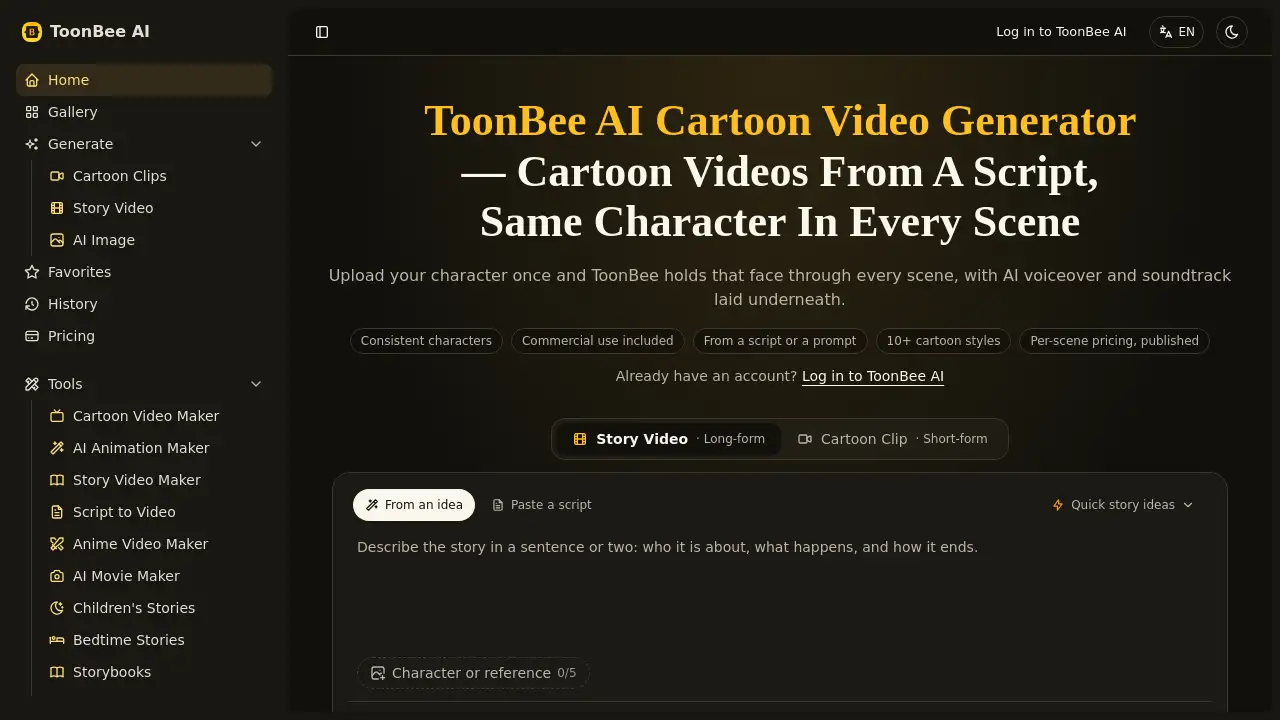
Toonbee AI Cartoon Video Generator is an AI cartoon video generator that turns a script into an animated cartoon video in minutes. It is designed for creators who need consistent characters, AI voiceover, soundtrack, and commercial rights included.
What is Toonbee AI Cartoon Video Generator?
It is a browser-based AI cartoon video generator and AI animation generator. It helps users move from a written script or prompt to a finished animated cartoon video without traditional animation software. The main problem it solves is character consistency: in many AI video tools, a character’s face, clothing, and style can change from scene to scene. This product is designed to hold the same character across scenes, which matters for story videos, explainers, children’s stories, and short-form content. It is suitable for marketers, social media creators, educators, storytellers, and small teams that need animated cartoon videos but do not have a full animation studio. According to the product description, it also includes commercial rights, making it relevant for client work, brand content, and monetized channels.
Key Features of Toonbee AI Cartoon Video Generator
Consistent Characters
Upload or define a character once, then let the AI cartoon video generator carry the same face and look through every scene. This supports story-driven videos where the hero must stay recognizable.
Script-to-Cartoon Workflow
Paste a script or enter a prompt, and the tool converts it into animated cartoon scenes. This script to video AI workflow reduces the need for manual storyboarding, editing, and scene-by-scene animation.
Multiple Cartoon Styles and Models
Choose from 2D cartoon, 3D cartoon, animated, and other styles, with access to models such as ToonBee 1.0, Seedance 2 Mini, Seedance 2.5, H3 Max, H3 Max Turbo, and image models including Nano Banana 2 and GPT Image 2. The platform lists 10+ cartoon styles for different visual directions.
AI Voiceover and Soundtrack
The cartoon video maker can lay AI voiceover and a soundtrack under the visuals, so the output feels like a complete video rather than a silent clip. This is useful for explainers, narrated stories, and social media content.
Vertical and Landscape Formats
Generate native 16:9 landscape videos or 9:16 vertical cartoons for Reels, TikTok, and Shorts. Vertical output is composed for mobile screens rather than cropped down from landscape.
Commercial Use and Credit-Based Pricing
The product description states that commercial rights are included. The homepage also mentions per-scene pricing and 100 free credits after sign-up, giving users a way to test the AI animation generator before paying for larger projects.
Use Cases for Toonbee AI Cartoon Video Generator
Explainer Videos
Create an AI animated cartoon video that explains a product, service, or idea in a simple visual format. A consistent presenter character can guide viewers through the topic.
Children’s Stories and Bedtime Stories
Use the AI story video generator to turn a children’s story or bedtime story into animated scenes. The same character can appear from the first page to the last, which helps young viewers follow the plot.
Social Media Shorts
Make vertical cartoons for TikTok, Instagram Reels, and YouTube Shorts. The 9:16 format is designed for feed-native viewing and quick consumption.
Product Explainers
Build a 60-second animated explainer for a landing page or ad campaign. A cartoon video maker can present an app, service, or offer without filming a live actor.
Bible Videos and Faith Content
The platform includes a Bible video generator category, so creators can produce animated story videos for religious education or community content.
Storybooks and Long-Form Narratives
Use the storybook maker and long-form story video options to build multi-scene narratives. This suits authors, teachers, and creators who want to preview a story in motion.
How to Use Toonbee AI Cartoon Video Generator
- Sign in or create an account. The homepage offers 100 free credits after sign-up.
- Choose a generation mode, such as Story Video, Cartoon Clips, or AI Image.
- Paste a script or write a prompt. Add a character reference or define the main character.
- Select a model, cartoon style, aspect ratio, and duration. Options include 16:9, 9:16, and different animated looks.
- Generate the video, review the scenes, and download the result. Check the pricing page for credit use and commercial rights details.
Target Audience for Toonbee AI Cartoon Video Generator
- Content creators and YouTubers
- Social media managers and short-form video producers
- Marketers and small business owners
- Educators, teachers, and course creators
- Authors, storytellers, and children’s content creators
- Faith-based creators and community organizers
- Agencies that need cartoon video ads or explainers
Is Toonbee AI Cartoon Video Generator Free?
Toonbee AI Cartoon Video Generator can be tried with 100 free credits after sign-up, according to the homepage. The exact paid plan prices are not fully listed in the reference content, but the site mentions per-scene pricing and has a dedicated pricing page. Users should visit the official pricing page for current credit costs and plan details.
| Plan | Price | Features |
|---|---|---|
| Free credits | $0 on sign-up | 100 free credits to test the AI cartoon video generator |
| Paid plans | Varies | Per-scene pricing, access to models and styles, commercial rights included according to product description |
Toonbee AI Cartoon Video Generator’s Pros and Cons
| Aspect | Pros | Cons |
|---|---|---|
| Character consistency | Designed to keep the same character across scenes | Results may still need review for complex stories |
| Workflow | Script-to-video and prompt-to-video options | Users need a clear script or prompt for best results |
| Formats | Native 16:9 and 9:16 output | Advanced editing is limited compared with full animation software |
| Pricing | 100 free credits and published per-scene pricing | Exact paid plan costs require checking the official pricing page |
| Rights | Commercial rights included according to product description | Users should confirm current terms before client or monetized use |
Frequently Asked Questions about Toonbee AI Cartoon Video Generator
What is Toonbee AI Cartoon Video Generator?
It is an AI cartoon video generator that turns scripts or prompts into animated cartoon videos. It is designed for story videos, explainers, social clips, and other cartoon content.
Can it keep the same character in every scene?
Yes, consistent characters are a core feature. The tool is built to hold the same face and look across scenes, which is important for story-driven videos.
Can I use the videos commercially?
The product description says commercial rights are included. Users should review the official terms on the pricing or legal page before using videos for client work, ads, or monetized channels.
Does it support vertical videos for TikTok and Reels?
Yes. The platform supports native 9:16 vertical cartoons for TikTok, Instagram Reels, and YouTube Shorts, as well as 16:9 landscape videos.
Do I need animation or editing skills?
No advanced animation skills are required for the basic workflow. Users paste a script or prompt, choose a style and model, then generate the cartoon video.
Is there a free trial?
The homepage states that new users can sign up and get 100 free credits. After those credits are used, paid plans and per-scene pricing apply.
Toonbee AI Cartoon Video Generator Tags
Toonbee AI Cartoon Video Generator, AI cartoon video generator, cartoon video maker, AI animation generator, script to video AI, consistent characters, commercial rights, AI story video generator, anime video maker, vertical cartoons, 2D cartoon, 3D cartoon, AI voiceover, children's story generator