Introduction
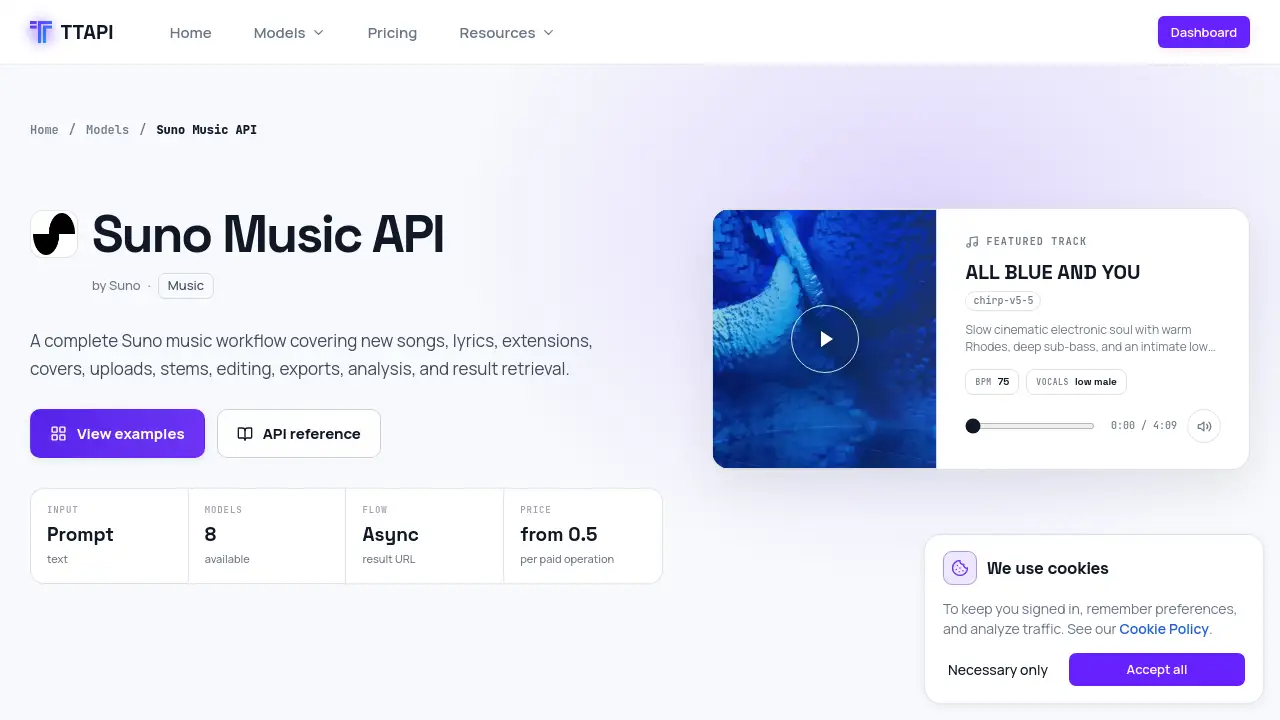
Suno API TTAPI is a developer-focused gateway for AI-powered music creation. It wraps Suno’s generation tools into a clean, callable workflow. With this API, users can create songs, generate lyrics, extend tracks, build covers, upload audio, separate stems, edit audio, export files, and retrieve results. This article explains the Suno API TTAPI features, pricing, and realistic use cases.
What is Suno API TTAPI?
Suno API TTAPI is an AI music API available inside the TTAPI model catalog. It is designed for developers who need a complete Suno music workflow without manually moving prompts and audio between websites. The API supports many music operations and exposes them through request endpoints such as /suno/v1/music, /suno/v1/lyrics, /suno/v1/cover, and /suno/v1/stems.
The main value of this API is that it turns a complex music production process into a simple set of HTTP requests. A developer can send a prompt, choose a Suno model, wait for the async result, and download the final audio. It also helps businesses embed music creation into larger products, such as content tools, video editors, or music automation systems.
This product matters because it solves three common problems: generating original songs at scale, editing tracks programmatically, and moving files from Suno-created tasks into production pipelines. The API gives access to popular Suno models, with eight models listed on the page at the time of this review.
Key Features of Suno API TTAPI
Generate New Songs
Send an inspiration prompt or custom lyrics to create complete songs. The request body supports fields like custom mode, instrumental output, title, tags, duration, and vocal gender.
Create Lyrics Automatically
Suno API TTAPI includes a separate lyrics endpoint. Users can send a text brief and get lyrics back before generating music, which helps streamline the songwriting workflow.
Extend Existing Music
Use the Extend operation to continue a track from a selected point. The Upload Extend variant lets users provide a public audio URL and extend that file in one request.
Build Covers from Audio
The Cover endpoint creates a cover version of an existing audio asset. Upload Cover combines a public audio URL and cover generation into a single step. This is useful for remix-style applications.
Separate Stems
Stem separation splits a track into vocal and instrumental parts. The All Stems operation creates a full multi-track stem separation, which is useful for remixing and mixing tasks.
Edit and Repair Audio
The API includes crop, remove section, fade in, fade out, replace section, remaster, mashup, and adjust speed operations. These features allow developers to build editing tools beyond simple playback.
Export and Analyze Results
Users can export completed songs as WAV or MIDI files. The BPM analysis operation detects tempo and beat speed, making it easier to sort and tag generated music.
Fetch and Store Results
Suno API TTAPI uses an asynchronous result URL flow. The Fetch V2 endpoint retrieves task status and results, while the optional isStorage setting stores output on the TTAPI CDN.
Use Cases for Suno API TTAPI
Build an AI Music App
Developers can quickly build a text-to-music app with Suno API TTAPI. The API handles song generation, lyrics generation, and result retrieval, so the app only needs a simple interface.
Automate Audio Production
A production company can create batch workflows that generate multiple cover versions, extended songs, or stem files. Because each operation is async, tasks can run in parallel through a queue system.
Create a Music Editing Tool
Independent tools for cropping, removing sections, or changing speed can use Suno API TTAPI instead of managing audio libraries directly. The API supports common editing actions and returns the updated result.
Process Uploaded Tracks
Users who upload their own audio can work with supported continuation and editing flows. They can extend an uploaded song, create a cover from it, or isolate vocals and instruments.
Export Music for Professional Use
The WAV and MIDI export options make this API useful for music production platforms. Teams can generate music, analyze its BPM, and send final files into a mixer, editor, or distribution system.
How to Use Suno API TTAPI
Using this API is straightforward for developers who are familiar with REST APIs. The basic flow looks like this:
- Sign up for TTAPI and get a personal API key.
- Choose the operation you need, such as generating music or separating stems.
- Send a POST request with the required headers, including
TT-API-KEYandContent-Type: application/json. - Add request fields like
prompt,custom,mv, oraudio_url, depending on the operation. - Use the async result URL or the
hookUrlcallback to retrieve the finished audio.
For example, a simple music request can go to https://api.ttapi.io/suno/v1/music. In the body, developers can set custom to false, select chirp-v5-5 as the model, and include a gpt_description_prompt. The API then returns a task ID and progress information.
Target Audience for Suno API TTAPI
- Developers building AI music tools
- SaaS platforms that need music generation features
- Content creators automating audio production
- Product teams that want custom cover or remix functionality
- Startups adding stem separation or WAV export to their tool
- Music librarians who need BPM analysis and metadata collection
Is Suno API TTAPI Free?
Suno API TTAPI is not described as a fully free service. It uses a per-action quota system, and pricing starts from 0.5 per paid operation. Several lower-effort operations, such as BPM analysis, WAV export, VOX, and video tasks, are listed as free per request. Official pricing may change, so developers should check the TTAPI docs for the latest costs.
| Plan | Price | Features |
|---|---|---|
| Pay as you go | From 0.5 quota per operation | Song generation, lyrics, extensions, covers, stems, editing, exports |
| Sample operations | 6 quota per task | Music, Extend, Cover, Upload Cover, Upload Extend, Add Vocals, Add Instrumental |
| Heavy processing | 12 to 30 quota per task | Stem separation and all stems |
| Free requests | No quota listed | BPM, Concat, Persona, Video, WAV, Vox, Upsample tags |
Suno API TTAPI's Pros and Cons
| Aspect | Pros | Cons |
|---|---|---|
| Workflow coverage | Covers generation, editing, separation, and export | Many endpoints require time to learn |
| Pricing | Low entry cost from 0.5 per paid operation | Quota logic can be confusing for new users |
| Integration | Clean REST endpoints and async result URLs | Requires an API key and backend setup |
| Output control | Supports WAV, MIDI, stems, and CDN storage | Some features may depend on the chosen Suno model |
| Model options | Eight Suno models are listed | Model availability can change as new versions appear |
Frequently Asked Questions about Suno API TTAPI
What is Suno API TTAPI used for?
Suno API TTAPI is used to add Suno-powered music generation and processing features to a website or application. It supports song creation, lyrics, covers, extensions, stem separation, and music analysis.
How much does Suno API TTAPI cost?
Pricing is based on quota per task. Some operations start at 0.5 quota, while more complex actions like stem separation cost more. A small number of requests are listed as free, but developers should confirm exact rates on the official TTAPI pricing page.
Does Suno API TTAPI support custom lyrics?
Yes. The music request body includes a custom boolean and a prompt field. When custom mode is enabled, the user can provide original lyrics instead of using an inspiration prompt.
Can I create cover songs with Suno API TTAPI?
Yes. The API includes a dedicated Cover operation and an Upload Cover operation. These allow users to create covers from existing audio assets, including tracks uploaded from a public URL.
What are stems in Suno API TTAPI?
Stems are separated audio parts. The API can extract vocals, instrumental sections, or a complete set of stems from a generated track. This is useful for remixes, karaoke versions, and professional audio editing.
Does Suno API TTAPI store generated audio?
The API includes an isStorage field that defaults to true. When enabled, the result is stored on the TTAPI CDN so developers can access and distribute the final audio later.
Suno API TTAPI Tags
Suno API TTAPI, Suno Music API, AI music API, music generation API, text to music API, Suno cover API, Suno stems API, music workflow API, TTAPI pricing, upload audio API, music API for developers, Suno API workflow