Introduction
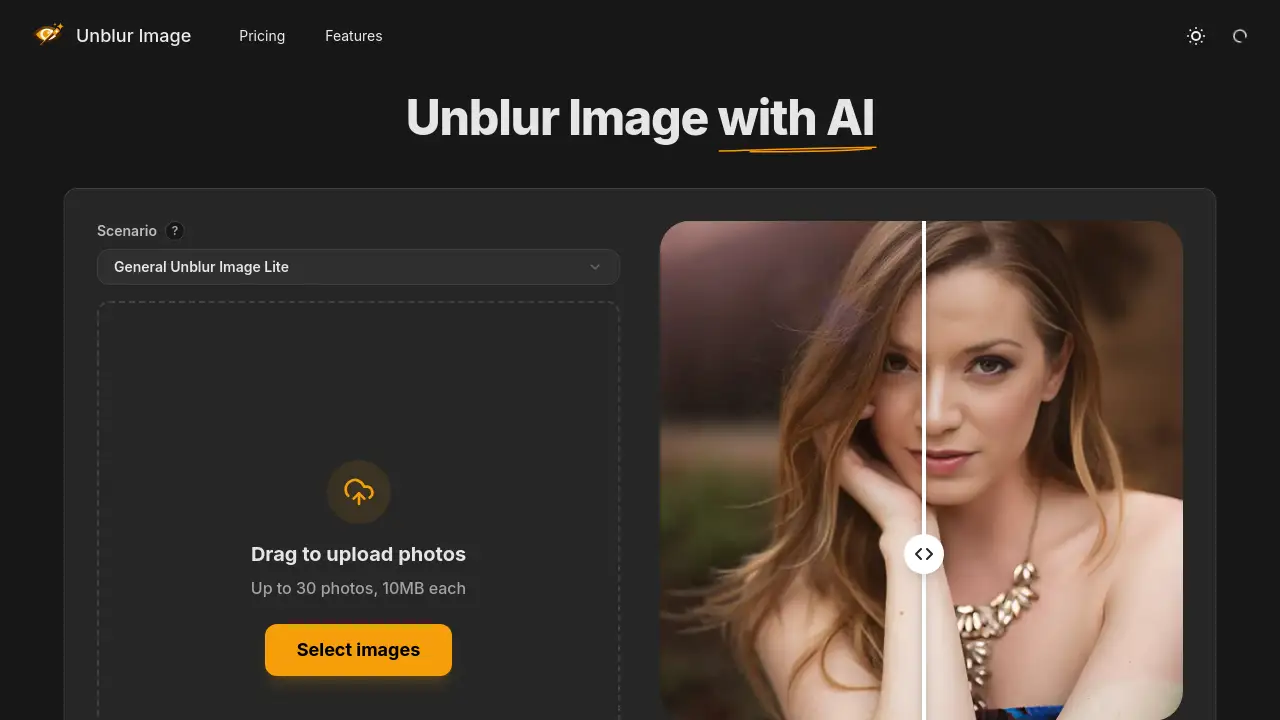
Unblur Image is a powerful online AI tool that sharpens blurry photos in seconds.
What is Unblur Image?
Unblur Image is an online AI-powered platform designed to enhance blurry pictures. It addresses common photography issues like motion blur, missed focus, and low resolution. The tool is suitable for a wide range of users, from professionals needing crisp product photos to individuals looking to restore cherished old family pictures. By offering specialized scenarios for different needs, it simplifies the process of AI image restoration and blurry photo fix, making photo enhancement accessible to everyone without requiring technical expertise or expensive software.
Key Features of Unblur Image
AI Blur Removal
The tool automatically detects and reduces various types of blur, including motion blur and focus blur, to deliver a clearer image.
Multiple Processing Scenarios
Users can select from dedicated modes like General Unblur, Portrait Enhancer, and Restore Old Photo for optimized results tailored to specific image types.
Batch Processing
Efficiently handle multiple photos at once by uploading up to 30 images in parallel, saving significant time for bulk editing tasks.
Image Sharpening and Upscaling
Beyond simple deblurring, the AI sharpens fine details and can upscale image resolution while preserving quality, ideal for printing or large displays.
Web-Based Workflow
The entire online photo enhancer process happens in a browser on any device, requiring no software downloads or installations.
Noise Reduction
The tool cleans up unwanted grain and compression artifacts in photos, resulting in a smoother and cleaner final image.
Use Cases for Unblur Image
Enhancing Product Photography
E-commerce sellers and marketers can unblur product photos to sharpen textures, labels, and edges, making items more appealing in online listings.
Restoring Old and Damaged Photos
Digitize and preserve family history by using the old photo restoration feature to repair scratches, restore contrast, and recover faded details in vintage pictures.
Improving Portrait Quality
The Portrait Enhancer mode is perfect for portrait enhancement, recovering sharpness in selfies, headshots, and group photos by refining facial features and skin texture.
Sharpening Logos and Documents
Professionals can use the tool to sharpen logos & text in blurry signage, presentations, or scanned documents, ensuring clarity and readability.
Fixing Everyday Blurry Photos
Salvage photos affected by camera shake or poor lighting from events, vacations, or everyday moments with the general deblur function.
How to Use Unblur Image
Using Unblur Image is a straightforward, four-step process that can be completed in minutes.
- Select a Scenario: Choose the processing mode that best fits your image, such as "General Unblur," "Portrait Enhancer," or "Restore Old Photo."
- Upload Your Image: Drag and drop your blurry photo(s) into the browser. The platform supports batch uploads of up to 30 images in formats like JPG and PNG.
- AI Processing: The AI automatically analyzes and processes your image, applying sharpening, deblurring, and enhancement algorithms based on your selected scenario.
- Download the Result: Preview the before-and-after comparison. Once satisfied, download the enhanced, high-quality image to your device.
Target Audience for Unblur Image
- E-commerce Sellers and Marketers: Individuals who need to present products in the best light for online marketplaces.
- Photographers and Content Creators: Hobbyists and professionals looking for a quick tool to salvage slightly out-of-focus shots.
- Genealogists and Families: Anyone wishing to digitize, restore, and preserve old, damaged family photographs.
- Social Media Users: People who want to improve the quality of their profile pictures, selfies, and shared moments.
- Professionals and Students: Those who need to sharpen text in scanned documents, presentation graphics, or logos for work or academic projects.
Is Unblur Image Free?
Unblur Image offers a free trial, allowing users to test its core functionality. For access to advanced features like batch processing and higher-quality enhancements, paid plans are available. The official website lists several credit-based plans tailored to different usage levels and scenarios. For detailed and up-to-date pricing, users should visit the Unblur Image pricing page.
| Plan Type | Key Feature | Best For |
|---|---|---|
| Free Trial | Basic image processing | Testing the tool's core capabilities |
| Paid Credits | Advanced scenarios & batch processing | Regular users needing higher volume or specialized enhancements like portrait enhancement or old photo restoration |
Unblur Image's Pros and Cons
| Aspect | Pros | Cons |
|---|---|---|
| Ease of Use | Extremely simple, web-based interface with one-click processing. No learning curve. | Limited manual control over the enhancement process for advanced users. |
| Specialization | Offers dedicated, optimized modes for portraits, products, and old photos. | Requires selecting the correct scenario for optimal results, which may confuse first-time users. |
| Accessibility | Completely online; works on any device with a browser. No software installation needed. | Requires a stable internet connection to upload and process images. |
| Efficiency | Features batch processing for up to 30 images, saving considerable time. | Paid credits are required for batch processing and access to the most advanced enhancement modes. |
Frequently Asked Questions about Unblur Image
What types of blur can Unblur Image fix?
The AI is designed to address common issues like motion blur from shaky hands, focus blur from missed autofocus, and softness from low-resolution images. It works well for general blurry photo fix tasks.
Is there a free version of Unblur Image?
Yes, Unblur Image offers a free trial that allows users to process images and experience the basic AI image restoration capabilities before committing to a paid plan.
How does the batch processing feature work?
Batch processing lets users upload up to 30 photos at once. The AI will process them all in parallel, which is efficient for large jobs. This feature typically requires the use of paid credits.
What file formats does Unblur Image support?
The tool supports common image formats for upload, including JPG, PNG, and WebP. Processed images can be downloaded in high-quality formats suitable for further use.
Can it restore extremely blurry or damaged photos?
While powerful, the tool has limits. It can significantly improve moderately blurry or damaged photos, especially with the Restore Old Photo scenario, but results may vary with extremely low-quality or heavily degraded originals.
Do I need to install any software to use it?
No. Unblur Image is a 100% web-based online photo enhancer. You only need a modern web browser and an internet connection to access and use all its features.
Unblur Image Tags
unblur image, AI image restoration, blurry photo fix, online photo enhancer, sharpen blurry photos, unblur product photos, portrait enhancement, old photo restoration, sharpen logos & text, AI photo editor, batch image processing, web-based photo tool