Introduction
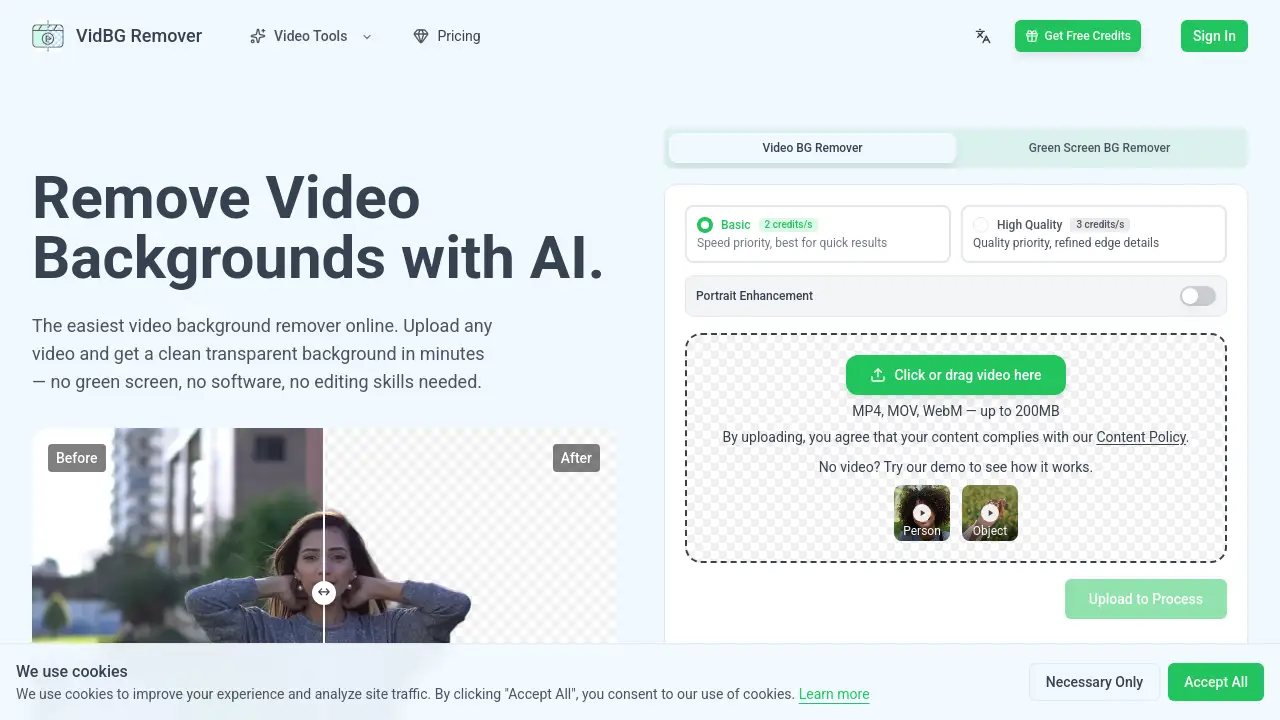
VidBG Remover is an online video background remover that uses AI to remove backgrounds from videos without a green screen. Users simply upload a video file and download a clean transparent result in minutes — no software installation or editing skills required.
What is VidBG Remover?
VidBG Remover is a web‑based tool designed to automatically remove the background from any video clip. It eliminates the need for physical green screens, complex masking, or frame‑by‑frame editing. The AI processes the video and delivers a transparent output with stable edges — making it suitable for content creators, marketers, educators, and anyone who needs clean cutouts for compositing. By handling MP4, MOV, and WebM files up to 200MB, the video background remover works directly in a browser and stores uploads securely in the cloud. This approach saves time and avoids the learning curve of professional video editing software.
Key Features of VidBG Remover
AI‑Powered Automatic Background Removal
The tool uses advanced AI to detect and separate the foreground subject from the background in every frame. No manual selection or training is required — just upload and let the video background remover do the work.
Stable Edges Without Flickering
Unlike many other tools, VidBG Remover produces edges that remain stable from start to finish. Hair, fingers, and moving body parts stay natural and clean, even during fast motion or when people walk in front of the subject.
True Transparent Export
VidBG Remover exports video with a real alpha channel. Users can download WebM (VP9) or MOV (ProRes 4444) files that contain genuine transparency, not a placeholder color. These files can be dropped directly into editing software like Premiere, DaVinci Resolve, After Effects, or CapCut.
No Green Screen Needed
Because the AI removes video background intelligently, users can shoot in any environment — a cluttered home office, a plain wall, or outdoors — and still get a clean cutout. This makes the tool especially useful for creators who lack studio space.
Fast Processing for Most Clips
Most videos are processed within minutes. The exact time depends on the video length. The tool handles shaky footage and complex movements that trip up other background removers.
Pay‑As‑You‑Go Credits
Instead of a monthly subscription, VidBG Remover uses a credit system. Credits never expire, so users buy once and use them whenever needed. This model works well for infrequent or project‑based work.
Use Cases for VidBG Remover
Talking Head Videos
Content creators, reviewers, and real estate agents can record in any setting and then remove video background to place themselves against a professional backdrop. Clean hair edges and stable finger movements keep the result looking natural.
E‑commerce Ad Creatives
Shoot a model once against a simple wall, then remove the background and composite them into different scenes — London streets, New York apartments, or holiday settings — for A/B testing across multiple markets.
Online Courses and Educational Content
Lecturers can record from home and layer themselves over slides or courseware without a green screen. The AI background removal keeps hair and hand movements smooth, avoiding the jittery edges that distract students.
Action and Meme Videos
Extract characters from fast‑moving clips or popular film scenes to create memes. The tool maintains clean edges even with dramatic camera motion and multiple people in the frame.
Automotive and Product Showcases
Isolate vehicles or products for stunning visuals. The video background remover works with full‑body motion and complex shapes, making it easier to composite objects into custom environments.
How to Use VidBG Remover
Using the video background remover is straightforward and requires only three steps:
- Upload Your Video – Select an MP4, MOV, or WebM file (up to 200MB). The file is sent to secure cloud storage — no local processing is used.
- AI Processes the Background Removal – The tool automatically analyzes every frame, removes the background, and keeps edges stable. Most clips are ready within minutes.
- Download the Transparent Video – Export the result as WebM (VP9) or MOV (ProRes 4444) with a true alpha channel. The file is ready to use online or import into video editing software.
A demo video is available for users who want to see the quality before uploading their own content.
Target Audience for VidBG Remover
- Content creators and YouTubers who need quick, professional‑looking cutouts without a green screen.
- E‑commerce marketers and advertising agencies creating localized ads or product demos.
- Online educators and course creators who want to layer themselves over slides cleanly.
- Social media managers producing memes or short‑form videos with isolated subjects.
- Video editors looking for a fast solution to remove backgrounds without manual masking.
- Small business owners who need to create promotional videos but lack video editing expertise.
Is VidBG Remover Free?
VidBG Remover offers a free trial — users can upload a video and see the result without entering credit card information. After the trial, the service operates on a pay‑as‑you‑go credit system. Credits never expire. The available packs are:
| Plan | Credits | Approximate Video Time | Pricing |
|---|---|---|---|
| Starter | 240 credits | ~120 seconds (basic) | Visit website for pricing |
| Popular | 960 credits | ~480 seconds (basic) | Visit website for pricing |
| Pro | 3,000 credits | ~1,500 seconds (basic) | Visit website for pricing |
| Best Value | 12,000 credits | ~6,000 seconds (basic) | Visit website for pricing |
Pricing details are available on the official product page.
VidBG Remover's Pros and Cons
| Aspect | Pros | Cons |
|---|---|---|
| Ease of Use | No software installation; works in browser; simple three‑step process | Requires internet connection; file size limited to 200MB |
| Quality | Stable edges with no flickering; handles fast motion and complex subjects | Maximum video duration approximately 60 seconds per upload |
| Export Options | True alpha channel export (WebM with VP9 or MOV with ProRes 4444) | Limited to two formats; no direct upload to social media platforms |
| Pricing | Credits never expire; no monthly subscription required | No free tier beyond the demo; pricing per credit may be high for heavy users |
| Privacy | History kept for 7 days (5 items); secure cloud storage | Users must remember to download files before they expire |
Frequently Asked Questions about VidBG Remover
What video formats does VidBG Remover support?
VidBG Remover accepts MP4, MOV, and WebM files. Each file must be under 200MB. The tool processes these formats and outputs transparent WebM (VP9) or MOV (ProRes 4444) files.
Do I need a green screen to remove the background?
No. The video background remover uses AI to detect the subject in any environment — indoors, outdoors, or against a wall. No physical green screen is required.
How long does it take to process a video?
Most videos are ready within minutes. The exact time depends on the video length and complexity. Longer clips or those with fast motion may take slightly longer.
Can I download a video with a transparent background?
Yes. You can download the result as WebM (VP9) or MOV (ProRes 4444). Both formats include a true alpha channel, allowing you to overlay the clip seamlessly in any editing software.
Is there a free trial?
Yes. You can upload a video and see the result for free. After the trial, you will need to purchase credits to continue removing backgrounds from videos.
What happens if my video exceeds 200MB?
The tool currently limits uploads to 200MB. If your file is larger, you may need to trim the clip or compress it before uploading. For longer videos, consider splitting them into shorter segments.
VidBG Remover Tags
video background remover, AI background removal, remove video background, transparent video, no green screen background removal, online video editor, background remover for video, video cutout tool, alpha channel export, WebM transparent, MOV ProRes 4444, pay as you go video tool