Introduction
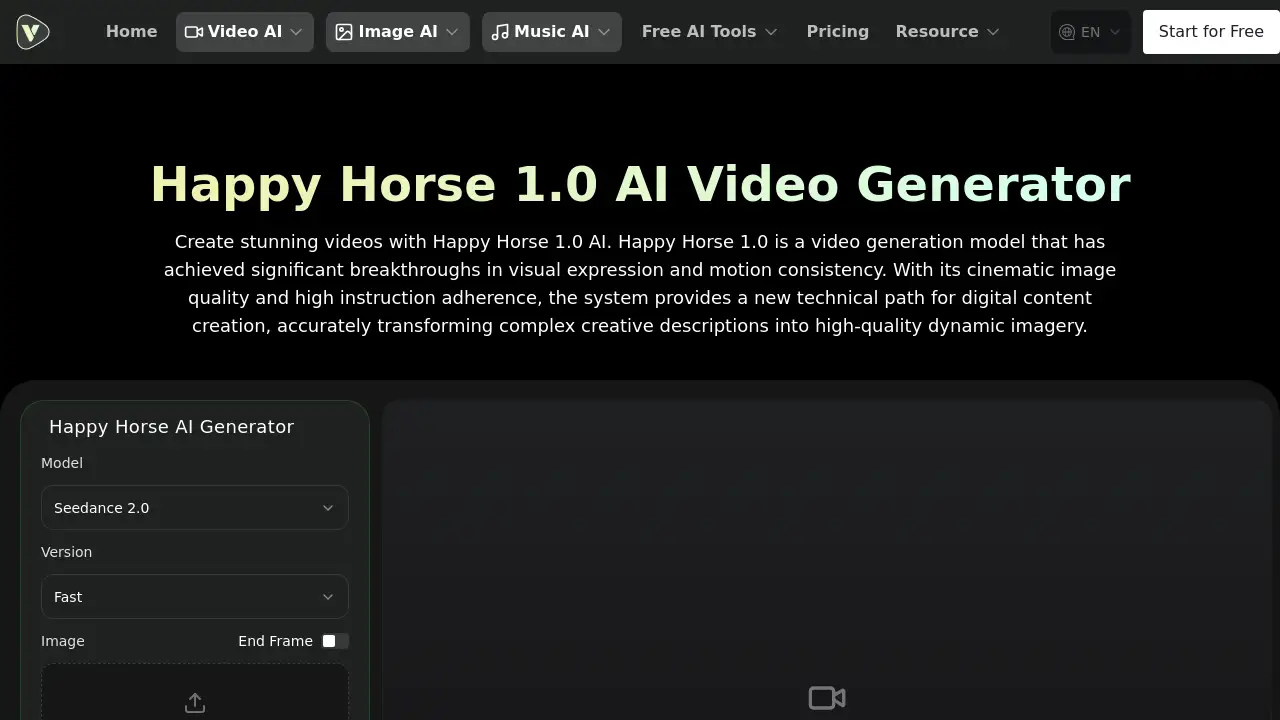
Happy Horse 1.0 AI Video Generator is a free tool for creating stunning videos from text or images with cinematic quality.
What is Happy Horse 1.0 AI Video Generator?
The Happy Horse 1.0 AI Video Generator is a state-of-the-art artificial intelligence model designed to transform creative ideas into high-quality video content. It solves the problem of time-consuming and technically complex video production by offering a streamlined, AI-powered platform. Users can input a detailed text description or upload a static image, and the model generates a dynamic, short video clip. It is suitable for a wide range of users, from independent filmmakers and marketing professionals to educators and game developers, who need to quickly visualize concepts or create engaging content without extensive video editing skills. The model's significance lies in its dual focus on exceptional visual expression and motion consistency, providing a new technical path for digital content creation.
Key Features of Happy Horse 1.0 AI Video Generator
Synchronized Video and Audio Generation
This core feature allows the model to generate high-quality video frames while simultaneously producing perfectly matched sound effects, ambient noise, and speech rhythms, creating a natural and cohesive audiovisual experience.
Cinematic Text-to-Video
The model excels at constructing imagery directly from detailed text prompts, accurately rendering high-tension action scenes or atmospheric emotional moments with stable frame rates and smooth motion paths.
High-Precision Image-to-Video Animation
By analyzing the geometric structure and lighting of a static image, this function can animate old photographs, portraits, or original designs, generating natural dynamic effects while maintaining the original visual style.
Superior Motion Quality
Happy Horse 1.0 solves common AI video issues like stiff movement and physical distortion through advanced motion modeling, ensuring character consistency and realistic limb coordination that simulates real-world physics.
Exceptional Prompt Adherence
The model faithfully restores creative intent, precisely capturing specific elements, color tones, and compositional requirements from user descriptions, which reduces the need for repeated debugging.
Multi-language Instruction Understanding
It possesses extensive linguistic adaptability, accurately parsing text prompts in various languages, including English and Chinese, allowing users to create content seamlessly in their native language.
Use Cases for Happy Horse 1.0 AI Video Generator
Pre-Visualization and Visual Proposals
Directors and filmmakers can use this tool to quickly generate concept sequences or storyboard animations, helping to confirm visual styles and shorten communication cycles during early project stages.
Marketing Advertising and Creative Display
Marketing teams can transform creative copy into cinematic advertising clips in a short time, ideal for social media promotions or visualizing brand stories with competitive image quality.
Game Development and Virtual Assets
Game developers can generate high-quality cutscenes, character motion references, and environmental sequences without complex rendering pipelines, providing rich asset support for virtual worlds.
Digital Training and Knowledge Dissemination
Educators and trainers can transform educational content into engaging video courses, with synchronized audio lowering the barrier for producing high-quality, attractive instructional materials.
How to Use Happy Horse 1.0 AI Video Generator
Using the Happy Horse 1.0 AI Video Generator involves a simple three-step process.
- Input Your Idea: Start by entering a detailed text description into the prompt box or uploading a static image that you want to animate. You can use the built-in prompt optimizer for better results.
- Configure Parameters: Set your preferences for the output, such as resolution (e.g., 480p), duration (e.g., 5 seconds), aspect ratio (e.g., 16:9), and confirm whether to enable the synchronized audio generation option.
- Generate and Review: Click the generate button. The system will process your request, creating the synchronized video and audio. You can then view and download your creation from the video history section.
Target Audience for Happy Horse 1.0 AI Video Generator
- Independent Filmmakers and Content Creators
- Marketing and Advertising Professionals
- Game Developers and Animators
- Educators and Corporate Trainers
- Social Media Influencers and Bloggers
Is Happy Horse 1.0 AI Video Generator Free?
Based on the available reference information, the Happy Horse 1.0 AI Video Generator is promoted as a free tool to create videos. The platform it resides on, VideoWeb AI, also offers a "Start for Free" option. For detailed information on any usage limits, premium features, or subscription plans, users should consult the official VideoWeb AI pricing page.
| Plan | Price | Key Features |
|---|---|---|
| Free Tier | $0 | Access to the Happy Horse 1.0 model for basic video generation. |
| Pro/Paid Plans | See Official Page | Likely includes higher resolution exports, longer video durations, priority generation, and access to more AI models. |
Happy Horse 1.0 AI Video Generator's Pros and Cons
| Aspect | Pros | Cons |
|---|---|---|
| Technology & Output | Achieves high motion consistency and cinematic quality; synchronized audio generation is a standout feature. | Maximum video duration may be limited compared to some professional tools. |
| Usability | Streamlines the creative workflow by combining video and audio production; intuitive text and image-to-video functions. | Advanced parameter configuration might have a learning curve for absolute beginners. |
| Accessibility | Offers a free-to-use tier, making advanced AI video generation accessible to a broad audience. | Specific limitations of the free tier (like watermarking or credit systems) are not explicitly detailed on the product page. |
| Performance | Demonstrates leading benchmark scores in image-to-video tasks, indicating high reliability. | Performance is dependent on the clarity and detail of the user's input prompt or image. |
Frequently Asked Questions about Happy Horse 1.0 AI Video Generator
What is the maximum duration of the videos generated by Happy Horse 1.0?
While the exact maximum duration isn't specified on the product page, the interface example shows a default setting of 5 seconds. For the most current information on video length limits, users should check the tool's settings or the official VideoWeb AI documentation.
How does the image-to-video function perform?
The image-to-video function performs exceptionally well. It deeply analyzes the geometric structure and lighting of static images to generate natural and logical animations while preserving the original style, making it ideal for animating portraits, artwork, or old photographs.
Is a separate audio processing module required?
No, a separate audio module is not required. One of Happy Horse 1.0's key advantages is its synchronized video and audio generation, which produces matching sound effects and ambient noise alongside the video frames in a single, integrated process.
How can the motion smoothness of generated images be improved?
To improve motion smoothness, provide clear, detailed prompts that describe the desired action sequence. Using a high-quality, well-lit reference image for the image-to-video function also helps the model understand and replicate natural movement more accurately.
What languages does Happy Horse 1.0 support for text prompts?
Happy Horse 1.0 features multi-language instruction understanding, accurately parsing prompts in various languages, including English and Chinese. This allows users to create content using their native language for more precise creative control.
Who is the Happy Horse 1.0 AI Video Generator best suited for?
This AI video generator is best suited for filmmakers, marketers, game developers, educators, and social media creators who need to quickly produce high-quality, short-form video content with synchronized audio for visualization, promotion, or storytelling purposes.
Happy Horse 1.0 AI Video Generator Tags
Happy Horse 1.0 AI Video Generator, free AI video generator, text to video AI, image to video AI, synchronized audio video AI, cinematic AI video, AI video creation tool, AI animation generator, AI for filmmakers, video marketing AI, digital content creation AI, AI video model