Introduction
Video Compressor is a free, browser-based tool that helps users reduce video file sizes by up to 90% without uploading files to a server.
What is Video Compressor?
Video Compressor is a web application that allows users to shrink the size of their video files directly within their browser. It solves the common problem of oversized videos that are difficult to share via email, messaging apps like WhatsApp, or social platforms with strict size limits like Discord. This tool is suitable for anyone from casual smartphone users to professional content creators who need to send or upload videos quickly. Its significance lies in its unique 100% private processing model, where all compression happens locally on the user’s device, ensuring data never leaves their computer or phone.
Key Features of Video Compressor
100% Free with No Limits
The video compressor is completely free to use, with no hidden fees, watermarks, or restrictions on file size, allowing users to compress large videos of any length.
No Upload, 100% Private
All compression processing is performed locally using the device's GPU and CPU; videos are never uploaded to any server, guaranteeing complete privacy and security for sensitive content.
GPU-Accelerated Speed
Leveraging hardware acceleration, this tool compresses videos rapidly, turning what could be a lengthy wait into a process that takes just seconds for typical files.
Precise Output Size Control
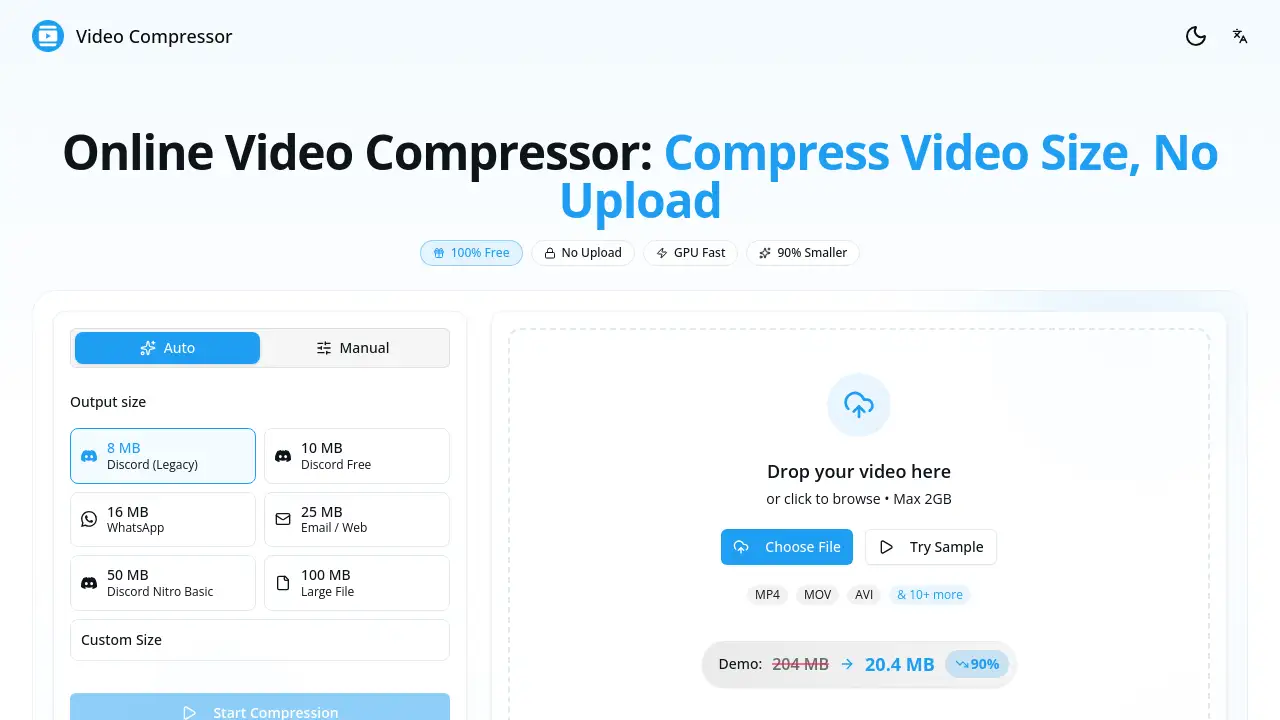
Users can choose from popular preset sizes for platforms like Discord (8MB, 10MB, 25MB) and WhatsApp (16MB), or set a custom file size to meet exact requirements.
Broad Format Support
It supports a wide range of input formats including MP4, MOV, AVI, and more than 10 others, always outputting an optimized, widely compatible MP4 file.
Simple Drag-and-Drop Interface
The process is incredibly user-friendly: users simply drag their video file into the browser window or click to browse, making online video compression accessible to everyone.
Use Cases for Video Compressor
Sharing on Discord and Social Media
Compress video files to specific size limits (e.g., 8MB for Discord Legacy or 25MB for Twitter) to share gameplay clips, tutorials, or content without compression errors.
Sending Videos via Messaging Apps
Reduce iPhone or camera video sizes to under 16MB for WhatsApp or optimize for Telegram to ensure fast sending and high playback quality for friends and family.
Emailing Video Attachments
Shrink large video files to under 25MB to bypass common email attachment limits, making it easy to send work presentations or personal videos.
Saving Device Storage Space
Compress videos on your phone or computer to free up significant storage by reducing file sizes by an average of 90%, without deleting precious memories.
How to Use Video Compressor
Using this free video compressor is a straightforward, three-step process that happens entirely in your web browser.
- Add Your Video: Visit the website and either drag and drop your video file into the designated area or click to browse and select it from your device. Files up to 2GB are supported.
- Choose Your Settings: Select a target output size from the convenient presets (like 16MB for WhatsApp or 25MB for Email) or use the custom slider to set a specific size.
- Compress and Download: Click the "Start Compression" button. The tool will process the video locally using your device's hardware. Once complete, download the newly compressed video file to your device.
Target Audience for Video Compressor
- Social Media Users and Content Creators
- Gamers and Streamers sharing clips on Discord
- Professionals needing to email video presentations
- Smartphone users wanting to save storage space
- Anyone who values privacy when handling video files
Is Video Compressor Free?
Yes, Video Compressor is completely free. There is no paid tier, subscription, or premium plan. The service offers all its features—including no file size limits, no watermarks, and private local processing—at no cost, with no account registration required.
| Plan | Price | Key Features |
|---|---|---|
| Free | $0 | Unlimited compression, no uploads (100% private), GPU acceleration, all output presets, no watermarks. |
Video Compressor's Pros and Cons
| Aspect | Pros | Cons |
|---|---|---|
| Cost & Accessibility | Completely free with no sign-up required; works on any modern browser. | Requires a stable internet connection to load the web app. |
| Privacy & Security | Unmatched privacy as videos are processed locally and never uploaded. | None identified from available information. |
| Performance & Ease of Use | Very fast due to GPU acceleration; extremely simple drag-and-drop interface. | Compression speed depends on the user's own device hardware capabilities. |
| Functionality | Offers precise size presets for major platforms and supports many video formats. | Advanced editing features (like trimming or codec selection) are not the primary focus. |
Frequently Asked Questions about Video Compressor
How does the video compressor work without uploading?
The tool is a web application that runs entirely in your browser. It uses JavaScript and WebAssembly to process the video file directly on your computer or phone using your device's own GPU and CPU. The file data never transmits over the internet to an external server.
Can I compress video without losing quality?
Yes. The compressor uses intelligent encoding to maximize quality for a given file size. For the best results, using the platform-specific presets (like "16MB WhatsApp") is recommended, as they are optimized to maintain good visual quality within those constraints.
Is there a file size limit for the video compressor?
No. Since the processing happens locally on your device, the tool can handle videos of any size, from a few megabytes to multiple gigabytes. The only practical limit is the available memory and processing power of your own device.
What video formats are supported?
The compressor supports all major formats including MP4, MOV, AVI, MKV, WMV, FLV, and WebM. The output file is always delivered in the highly compatible MP4 format with H.264 encoding.
How long does it take to compress a video?
Compression time varies based on video length, resolution, and your device's power. With GPU acceleration, a 5-minute 1080p video typically compresses in under a minute. Longer, higher-resolution videos will take more time.
Does it work on mobile phones?
Yes. The video compressor website is fully functional on mobile browsers like Safari (iPhone) and Chrome (Android). You can compress videos directly from your phone's gallery and save the output back to your device.
Video Compressor Tags
video compressor, compress video, free video compressor, compress video online, reduce video size, video size reducer, compress video for WhatsApp, compress video for Discord, online video compressor, no upload video compressor, private video compression, GPU video compression, shrink video file, MP4 compressor, compress MOV file