Introduction
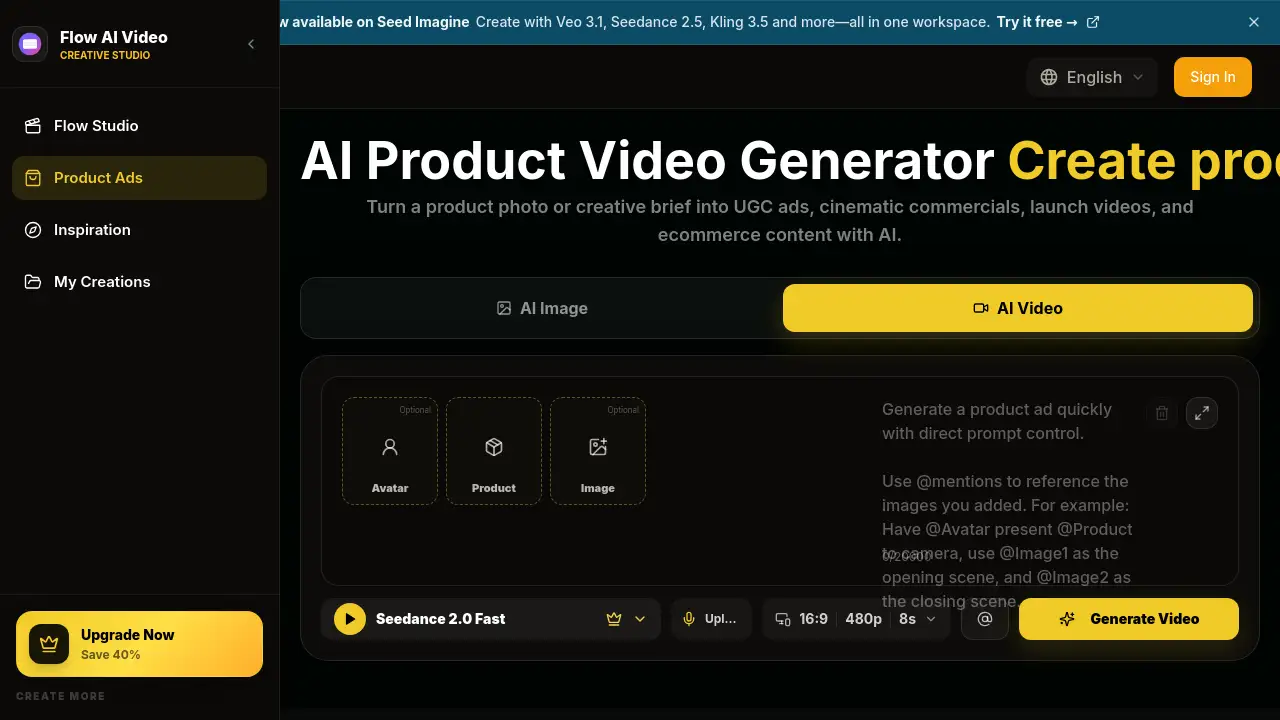
The AI Product Video Generator is an online tool that turns product images or text prompts into product videos for ads. It serves ecommerce stores, social media teams, and independent creators who need fast video content. This review explains how the AI product video generator works, what features it includes, and who may benefit from using it.
What is AI Product Video Generator?
The AI Product Video Generator is a product video generator developed by Flow AI Video. It converts a product photo or a written prompt into AI product videos for UGC ads, commercials, product launches, unboxing clips, ecommerce listings, and social campaigns. Instead of scheduling a shoot or hiring actors, users can upload one image or write a short brief and receive a video concept in minutes.
As a product video generator, it solves a common production problem. Many teams have product images but not enough time or budget to turn them into video. The AI product video generator helps teams explore different creative directions. The same product can become a creator-style UGC review, a polished commercial, or a simple product demo. It is suitable for individual sellers, ecommerce managers, and brand marketers who need quick creative options.
Key Features of AI Product Video Generator
Product Image to Video AI
Users can upload a product photo and describe motion, setting, camera angle, lighting, and product details. The AI product video generator uses the image as the starting point for a short product video.
Text to Product Video
When no image exists, users can start with a written product brief. The AI product video generator can turn that brief into a product video concept with a reveal, lifestyle scene, or promotional angle.
AI Product Ad Templates
The tool includes a library of product video examples and prompt structures. These templates cover UGC ads, product demos, launches, tutorials, unboxing videos, try-ons, and commercials. This product video generator gives users a proven structure to follow.
Multiple AI Video Models
Users can compare supported video models and choose the option that fits motion, duration, quality, audio, and credit cost. The AI product video generator also supports models such as Veo 3, Sora 2, Seedance, Wan 2.5, Nano Banana, and Seedream.
Vertical and Landscape Video Formats
The tool supports 9:16 video for short-form social placements and 16:9 video for wider ads and presentations. Users can direct the AI product video generator to match the placement they need.
AI Image and Video Workflow
Users can create a supporting product visual, switch to image-to-video, add a reference, and continue the campaign workflow in one studio. This product video generator is useful for teams that want one workspace for image and video tasks.
Use Cases for AI Product Video Generator
UGC Video Ads
Create creator-style product reviews, testimonials, routines, and product-in-hand videos for TikTok, Instagram Reels, and other vertical placements. The AI product video generator makes it easy to test UGC ad variations quickly.
Ecommerce Product Video
Turn a product image into a short listing or storefront video. This product video generator can highlight packaging, features, texture, and real-world use.
Product Launch Video
Generate teaser, reveal, and new-product announcement videos with detail shots and campaign pacing. A product video generator like this one helps teams prepare launch content without a video crew.
Unboxing Video
Create an unboxing or first-impression sequence that moves from package arrival to the product reveal and key selling point. The AI product video generator can build the story in a vertical or landscape format.
Product Demo Video
Show how a product works with a problem-solution structure, feature close-ups, use steps, and a benefit-focused ending. This AI product video format is useful for shopping ads and conversion-focused campaigns.
Video Commercial
Create a polished product commercial from an image or brief. The AI product video generator can add directed lighting, camera movement, atmosphere, and a hero shot.
How to Use AI Product Video Generator
To use the AI product video generator, follow these steps:
- Add your product – Upload a product image as a visual reference, or begin with a text brief.
- Choose a model and format – Select a video model, then set aspect ratio, duration, quality, and audio options.
- Direct the ad – Describe the audience, product benefit, hook, action, camera movement, lighting, pacing, and final shot in plain English.
- Generate, review, and download – Create the video, review how the product and message appear, refine the prompt if needed, and download the result.
The AI product video generator keeps the user in control. Review product identity, on-screen text, demonstrations, and advertising claims before using any generated video in a live campaign.
Target Audience for AI Product Video Generator
- Ecommerce sellers who need AI product video generator output for listings
- Social media managers running UGC ad campaigns on TikTok and Instagram
- DTC brand marketers creating launch videos and commercials
- Content creators producing product reviews and try-on videos
- Agencies exploring ad concepts before a traditional shoot
- Small business owners who want a product video generator without hiring a production team
Is AI Product Video Generator Free?
The AI product video generator offers free credits for testing. Paid plans start at $19.90 per month. The Basic plan includes 800 credits and up to 40 videos per month. The Enterprise plan costs $99.90 per month and includes 6,000 credits and up to 600 videos per month. The product page also lists an annual option that can save 50%.
| Plan | Price | Features |
|---|---|---|
| Basic | $19.90/month | 800 credits, up to 40 videos, unlimited downloads, no watermark, multiple models |
| Enterprise | $99.90/month | 6,000 credits, up to 600 videos, priority queue, no watermark, priority support |
AI Product Video Generator's Pros and Cons
| Aspect | Pros | Cons |
|---|---|---|
| Pricing | Free credits and affordable monthly plan | High-volume use requires the Enterprise plan |
| Features | Image-to-video, text-to-video, templates, multiple AI models | AI output can vary, so generated videos need review |
| Ease of Use | Clear four-step workflow with plain English prompts | Prompt writing may take practice |
| Formats | Supports vertical 9:16 and landscape 16:9 | Format options depend on the selected model |
Frequently Asked Questions about AI Product Video Generator
Can I create an AI product video from a single product image?
Yes. The AI product video generator lets users upload a product photo and describe motion, setting, lighting, and camera angle. The product remains recognizable in the generated video.
What types of product videos can I make?
Users can create UGC ads, ecommerce videos, launch videos, unboxing clips, product demos, tutorials, try-ons, and commercials. The tool provides AI product video templates for each format.
Which AI video models are supported?
Flow AI Video supports multiple models, including Veo 3, Sora 2, Seedance, Wan 2.5, Nano Banana, and Seedream. Users can compare these models by motion, duration, quality, audio, and credit cost.
Are there free options for the AI product video generator?
Flow AI Video offers free credits for new users. Paid plans start at $19.90 per month, and annual billing is available at a discounted rate.
Do generated videos include a watermark?
According to the product details, paid plans include no watermark. Users should check the current plan before downloading.
AI Product Video Generator Tags
AI product video generator, product video generator, AI product video, product image to video, text to product video, UGC ad generator, ecommerce product video, AI video ads, product launch video maker, AI unboxing video generator, AI commercial generator, product demo video