Introduction
Dola AI Video Generator is a versatile AI video creation tool available on the Seed Imagine platform. It lets users turn simple text prompts into short video clips and animate existing images into moving scenes. Designed for creators who want quick results, this tool supports many popular styles like romance, beauty, couple moments, anime, and portrait motion. With an easy workflow that combines text-to-video and image-to-video options, the AI video generator helps beginners and professionals produce original short videos without advanced editing skills. It is part of a larger ecosystem of AI creation tools, making it simple to switch between video and image projects.
What is Dola AI Video Generator?
Dola AI Video Generator is an online AI-powered tool found in the Seed Imagine tool library. Its main purpose is to create short videos automatically from either text descriptions or reference images. The platform offers several video workflows, and this tool focuses on giving users an accessible way to generate motion content for social media, marketing, or personal projects. Instead of dealing with complicated editing software, users simply type a prompt or upload a photo, choose a style, and let the AI handle the animation. It solves a common content creation problem by removing the barriers of time, cost, and technical skill. The tool matters because it makes AI video creation available to a wider audience while still offering enough creative control for professional-looking output. Since it lives inside the Seed Imagine platform, users can also pair video generation with image tools such as text-to-image, image upscaling, and background removal. Popular prompt examples on the platform include cinematic kisses, couple reunions, soft glam reveals, outfit changes, beauty transformations, portrait motion, anime couple scenes, and glow-up transitions. These ready-made ideas give new users a head start and show the range of creative possibilities.
Key Features of Dola AI Video Generator
Text-to-Video Creation
Type a written scene description and watch it become a video clip. The tool accepts prompts up to 900 characters, giving users enough room to describe actions, settings, and moods in detail.
Image-to-Video Animation
Upload a reference image to bring it to life with motion. This image-to-video workflow is useful for turning still photos into short animated scenes for various creative projects.
Photo Animation and Portrait Motion
Animate portraits and personal photos with natural movement. This feature works well for creating living memories, animating character art, or adding subtle motion to headshots.
Couple and Romance Scene Templates
The tool includes ready-made prompt ideas for romantic moments like cinematic kisses and couple reunions. These templates help users generate emotionally engaging clips quickly without starting from scratch.
Beauty and Makeover Edits
Create beauty transformations, soft glam reveals, hair makeovers, and skincare vlogs. These templates are designed for content creators in the beauty and fashion space.
Audio Upload Support
Users can upload audio to accompany the generated video. This allows for better storytelling by pairing visuals with music, voiceovers, or ambient sound.
Adjustable Output Settings
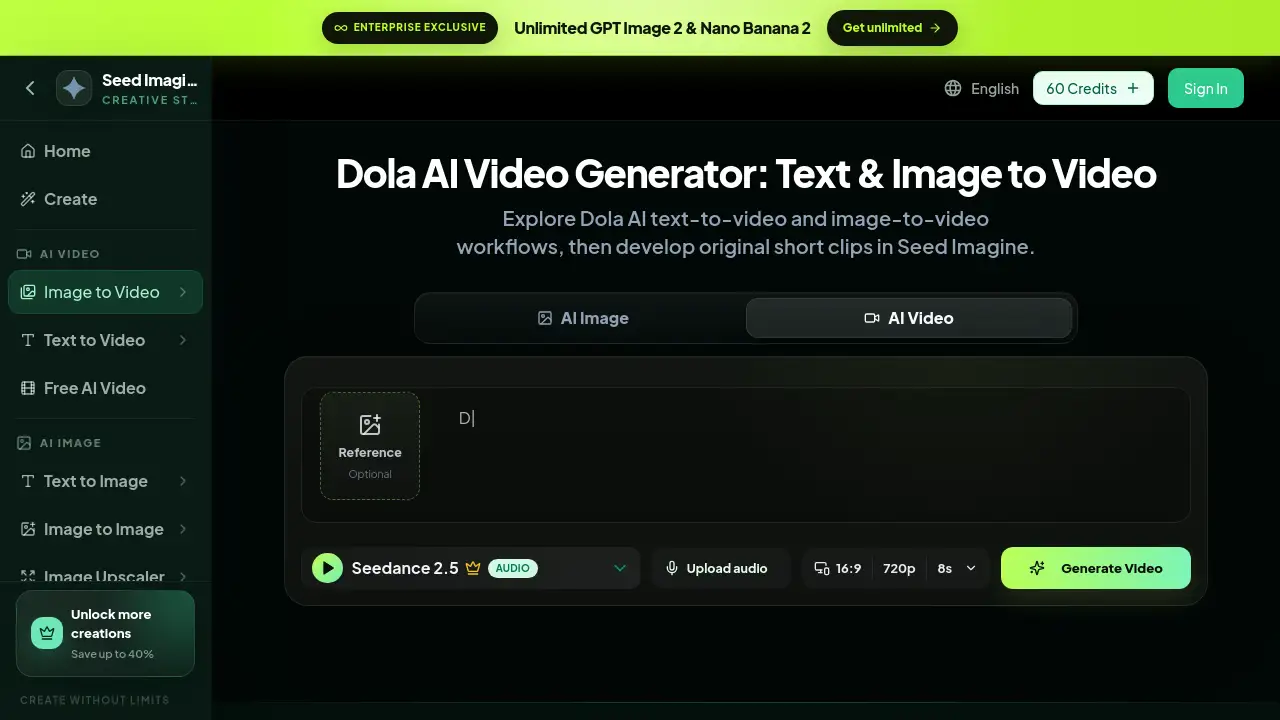
Choose from different aspect ratios, resolutions, and durations, including 16:9, 720p, and 8-second clips. This flexibility supports various output formats for different social media platforms.
Use Cases for Dola AI Video Generator
Social Media Content Creation
Creators can use the tool to produce short clips for TikTok, Instagram Reels, and YouTube Shorts. The quick workflow makes it easy to test multiple prompts and styles in a single session.
Marketing and Advertising
Brands can generate product-focused videos, outfit changes, and lifestyle scenes using text-to-video prompts. This reduces the cost and time needed for traditional video production.
Personal Photo Projects
Users can transform personal photos into animated videos using the image-to-video feature. This is great for birthdays, travel memories, or family keepsakes.
Anime and Fantasy Storytelling
The tool supports anime couple scenes and cinematic fantasy clips, making it useful for hobbyists who enjoy creating short fictional stories.
How to Use Dola AI Video Generator
Getting started with this AI video generator on Seed Imagine is straightforward:
- Go to the tool page on the Seed Imagine website.
- Choose either text-to-video or image-to-video mode.
- Write a detailed prompt in the prompt box, or upload a reference image.
- Select optional settings like aspect ratio, resolution, and duration. You can also upload audio.
- Click the generate button and wait for the AI to create the video.
Each generation uses a set number of credits, and the video appears in the preview area once the process is complete.
Target Audience for Dola AI Video Generator
This tool suits a wide range of users:
- Social media influencers and content creators
- Small business owners and marketing teams
- Video editors looking for quick AI-assisted clips
- Educators and trainers creating visual materials
- Hobbyists interested in AI art and animation
- Anyone who wants to make short videos without learning complex software
Is Dola AI Video Generator Free?
This tool is part of the Seed Imagine platform, which uses a credit-based system. New users can start with a free credit option, but generating videos consumes credits—each video generation costs around 280 credits based on the selected settings.
| Plan | Price | Features |
|---|---|---|
| Free | $0 | Limited credits for testing basic video generation |
| Paid Plans | Varies | More credits, access to all AI models, unlimited image tools |
For full details on current pricing and credit packages, it is best to check the official Seed Imagine pricing page.
Dola AI Video Generator's Pros and Cons
| Aspect | Pros | Cons |
|---|---|---|
| Ease of Use | Simple prompt-based workflow | No dedicated desktop app |
| Speed | Generates short clips quickly | Output length is limited to short durations |
| Creative Options | Supports text-to-video, image-to-video, and many scene styles | Credit costs can add up for heavy usage |
| Audio | Allows audio uploads | No advanced editing tools after generation |
| Pricing | Free credits available | Full features require a paid plan |
Frequently Asked Questions about Dola AI Video Generator
What is Dola AI Video Generator?
It is an online AI tool on Seed Imagine that creates short videos from text prompts or reference images. It supports many styles, including romance, beauty, anime, and portrait motion. The tool is designed to be simple enough for beginners while still offering creative flexibility.
How much does Dola AI Video Generator cost?
The tool runs on credits. Generating a video costs about 280 credits, and users can purchase credit packs through the Seed Imagine pricing page. A free plan is available for testing, and paid plans offer more credits and access to additional AI models.
Can I use Dola AI Video Generator for free?
Yes, Seed Imagine offers a free credit option that lets new users try the tool. However, free credits are limited, and continued use will require a paid plan. Check the pricing page for current credit amounts and plan details.
What is the difference between text-to-video and image-to-video?
Text-to-video starts with a written prompt and generates an entirely new scene. Image-to-video uses an uploaded photo as a reference and animates it with motion. Both modes are available in the same workflow, so users can pick the starting point that fits their project.
What video settings can I adjust?
The tool allows users to choose aspect ratio, resolution, and duration. Common settings include 16:9, 720p, and 8-second clips. Users can also upload audio to go with the visual output for more polished results.
Is Dola AI Video Generator good for beginners?
Yes, the interface is simple and the workflow is guided. Users only need to write a prompt or upload an image, so no previous video editing experience is required. The example prompts also help beginners understand what to type.
Dola AI Video Generator Tags
Dola AI Video Generator, text-to-video AI, image-to-video AI, AI video creator, video generator online, Seed Imagine video tool, AI portrait animation, anime scene generator, beauty video AI, AI video from photo, romance video maker, AI video generator free