Introduction
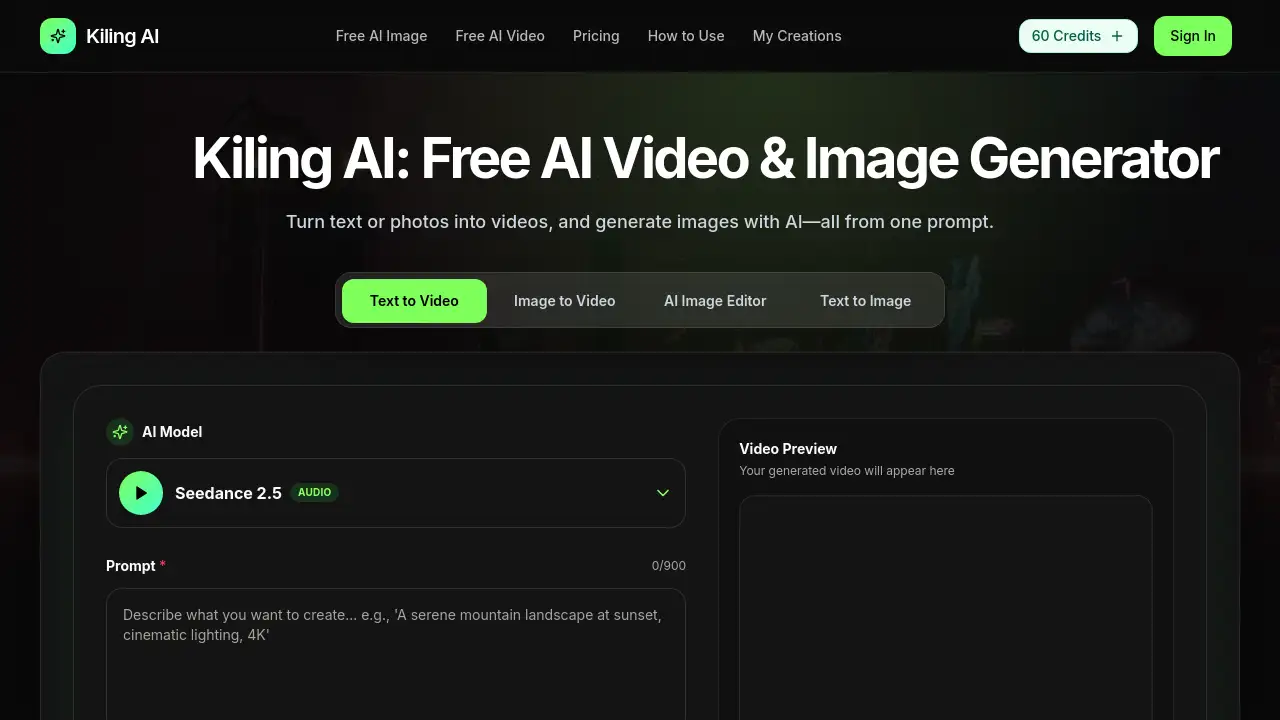
Image TO video ai is a browser-based AI video generator from Kiling AI that turns text prompts and photos into video clips. This AI video generator also creates original images and supports multiple visual styles. With free daily credits, it gives creators a fast way to test text-to-video and image-to-video tools before choosing a paid plan.
What is Image TO video ai?
Image TO video ai is an AI video generator designed for people who want to create videos without learning complex editing software. Instead of using traditional video editors, users can type a scene description or upload a reference photo, and the tool generates a video automatically. The product is made by Kiling AI and works entirely in the browser.
This tool solves common creative problems such as lack of time, high production costs, and the need for technical skills. It is suitable for content creators, marketers, game developers, and small business owners. By offering both text-to-video and image-to-video features, Kiling AI covers two important workflows in one workspace.
The product matters because video content is now essential for social media, advertising, and client work. Image TO video ai makes video creation more accessible to non-editors while still offering useful options for experienced designers.
Key Features of Image TO video ai
Text-to-Video Generation
Type a prompt that describes your scene, action, and camera movement. The AI video generator then creates a short video that matches your description. This is useful for brainstorming, pitching ideas, and making quick drafts.
Image-to-Video Animation
Upload a portrait, product photo, or scene, and Kiling AI turns it into a moving video. Natural subject motion and camera motion are added automatically. This is a practical way to turn still images into content for social feeds or ads.
AI Image Generation
The tool can also generate detailed images from text prompts. Users can choose cinematic, realistic, anime, or other visual styles. This makes Image TO video ai useful for projects that need both stills and video.
Multiple AI Models & Styles
Kiling AI lets users switch between AI models and visual styles. This provides more control over the final look without changing tools. It is especially helpful for creators who work across different brand aesthetics.
Up to 4K Export
The platform supports high-resolution export for images and supported video outputs. Depending on the model and plan, users can download videos in up to 4K. This is useful for client delivery and publishing on video platforms.
Browser-Based Creative Workflow
Everything can be done in the browser, so there is no need to install software or use a local GPU. Users can generate, preview, and refine work in one place. This keeps the AI video generator easy to access from different devices.
Use Cases for Image TO video ai
Social Media Content
Creators can use Image TO video ai to make short clips for TikTok, Instagram Reels, and YouTube Shorts. The fast generation process helps maintain a consistent posting schedule.
Marketing and Ads
Marketers can generate video concepts for campaigns without hiring a production team. The image-to-video feature is useful for turning product renders into moving ad assets.
Client Projects
Freelancers and agencies can draft video concepts quickly. This AI video generator helps teams show clients a rough cut before committing to expensive production.
Game Development Previews
Game developers can use Kiling AI to preview characters and environments in motion. This helps teams test ideas before building the final assets.
Content Repurposing
Photographers and brand teams can turn photo shoots into video content. Uploading a still and getting natural camera motion makes it easier to reuse existing images.
How to Use Image TO video ai
-
Describe the scene or upload a reference.
Type the scene or action you want, or upload a photo as the starting frame. For text-to-video prompts, add details about movement and camera moves. -
Choose a model, style, and length.
Select an AI model and a visual style such as cinematic, realistic, or anime. Set the duration and aspect ratio for your target platform. -
Generate, download, and share.
Run the generation, preview the result, and export the video. Depending on your plan, downloads are available without a watermark.
This simple workflow makes Image TO video ai a practical AI video generator for fast content creation.
Target Audience for Image TO video ai
- Social media creators and influencers
- Digital marketers and ad managers
- Freelance video editors and designers
- Small business owners
- Game developers and animators
- Content teams at agencies
Is Image TO video ai Free?
Yes, Image TO video ai offers free daily credits. Users can explore the tool without entering a credit card. Paid plans start at $19.9 per month, and annual billing can save up to 40%.
| Plan | Price | Features |
|---|---|---|
| Free trial | $0 | Free daily credits, no credit card required |
| Basic | $19.9/month | Up to 40 videos/month, 800 credits, unlimited downloads, permanent history |
| Pro | $39.9/month | Up to 100 videos/month, 2,000 credits, priority queue, unlimited downloads |
| Enterprise | $99.9/month | Up to 300 videos/month, 6,000 credits, priority queue, Commercial Use License |
Subscription cancellation is available by contacting support.
Image TO video ai's Pros and Cons
| Aspect | Pros | Cons |
|---|---|---|
| Pricing | Free trial available; lower-cost entry plan | Paid plans may be expensive for casual users |
| Features | Combines text-to-video, image-to-video, and image generation | Some advanced features depend on plan level |
| Ease of use | Browser-based and made for non-editors | Requires internet connection |
| Output quality | Up to 4K export and watermark-free downloads | Resolution depends on selected model and plan |
Frequently Asked Questions about Image TO video ai
Can I use Image TO video ai for free?
Yes. Kiling AI offers free daily credits, and no credit card is required to start. Users can try the AI video generator before choosing a paid plan.
What is the difference between text-to-video and image-to-video?
Text-to-video creates a video from a written prompt. Image-to-video uses a photo or reference image as the starting frame and animates it with natural motion.
What styles can I choose in Image TO video ai?
The platform includes cinematic, realistic, anime, and other visual styles. Users can also switch between AI models to find the best result.
Can I download videos without a watermark?
Yes. Kiling AI offers watermark-free downloads, making it suitable for social media and client delivery.
Do I need editing software to use Kiling AI?
No. Image TO video ai works directly in the browser. Users can generate, preview, and refine videos without installing editing tools.
Can I use the videos for commercial projects?
The Enterprise plan includes a Commercial Use License. For other plans, users should check the license terms on the official Kiling AI pricing page.
Image TO video ai Tags
AI video generator, image to video AI, text-to-video, image-to-video, Kiling AI, AI video creation, text to video AI, generate video from photo, AI content creation, browser video generator, 4K AI video, AI canvas editing