Introduction
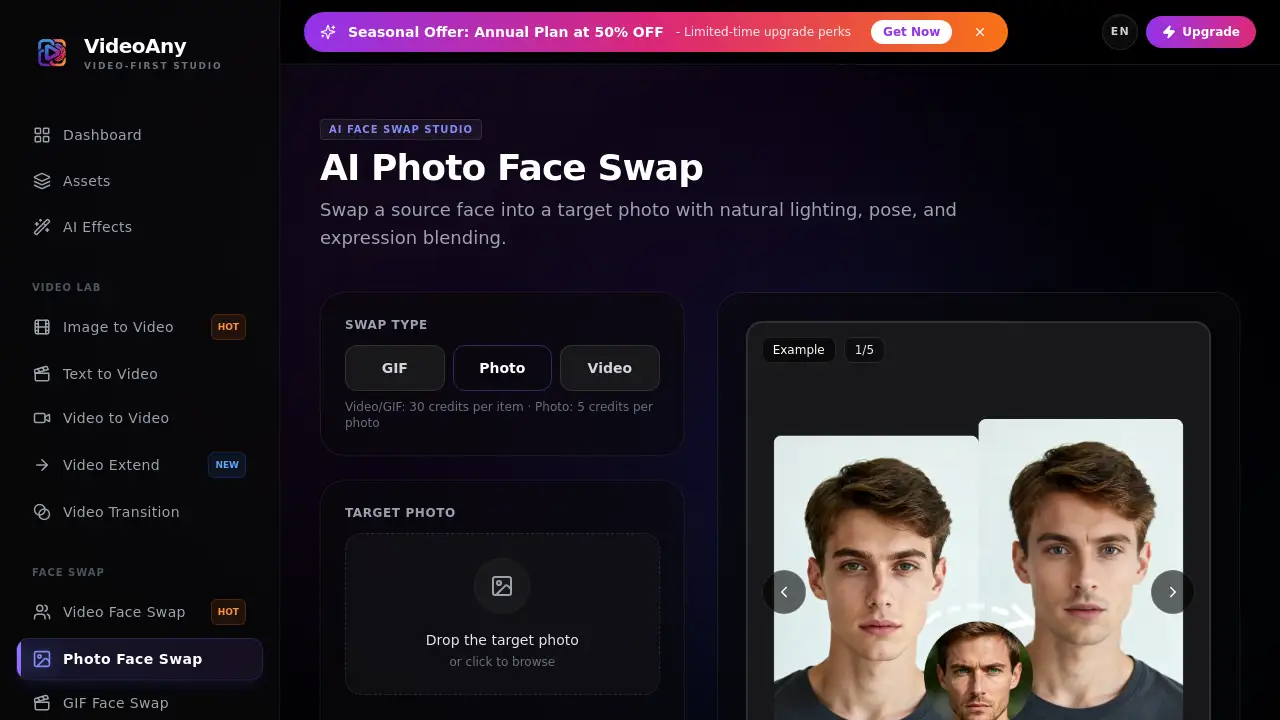
Photo Face Swap by VideoAny is a practical AI tool for anyone who wants a realistic photo face swap online. Users upload two images, and the tool blends the source face into the target photo. This makes an online face swap fast and simple, without advanced editing skills.
What is Photo Face Swap?
Photo Face Swap is a browser-based face swap tool on VideoAny. It solves the problem of complex image editing by allowing users to upload a target photo and a source face. The tool keeps the original scene, pose, and expression from the target photo. The source image supplies the new identity for the face.
The photo face swap process begins with two photos: one target and one source. The AI face swap engine blends facial features together to produce a natural looking image. This matters because it gives creators a fast face swap online without needing manual retouching. The tool is suitable for social media users, designers, and marketers who want an AI face swap in a few simple steps.
Key Features of Photo Face Swap
Simple Three-Step Workflow
The tool uses a clear flow: upload a target, add a face, and generate. This makes the face swap experience easy for beginners.
Realistic AI Face Swap
The AI face swap engine focuses on natural blending. Matching angle, sharpness, and lighting between the two images helps the final result look more believable.
Preserves Scene and Pose
During every face swap, the target photo defines the composition. The source portrait only provides the identity, so the original background, lighting, and expression remain intact.
Flexible Upload Options
Users can upload JPG, PNG, and WebP images up to 10MB each. This gives enough flexibility for standard phone photos and portrait shots.
Responsible Use Rules
The platform requires users to have rights to the video and face they upload. Illegal content, non-consensual deepfakes, and impersonation are prohibited.
Use Cases for Photo Face Swap
Social Media Posts
A quick photo face swap can create entertaining images for challenges, profile pictures, or group photos. It offers a simple way to experiment with fun edits.
Marketing Visuals
Marketers can use an AI face swap to test a person’s face on different product images or campaign concepts. This saves time and avoids reshoots in early creative stages.
Creative Portraits
Designers can swap faces in concept art or sample portraits to show new ideas. A realistic face swap online helps visual storytellers explore different identities quickly.
Personalized Edits
With permission, users can create custom photo gifts or themed images. The photo face swap process makes these edits easier and faster than manual cloning tools.
How to Use Photo Face Swap
Using the photo face swap feature is straightforward:
- Open the Photo Face Swap page on VideoAny.
- Upload a target photo with the face you want to replace.
- Upload a clear source portrait.
- Generate the face swap and save the result.
For better output, choose sharp photos with similar angles and steady lighting. Avoid heavy filters, masks, or anything that hides the face.
Target Audience for Photo Face Swap
- Casual users who want a quick face swap online
- Social media managers creating engaging posts
- Digital marketers testing ad visuals
- Graphic designers and content creators
- Hobbyists interested in AI photo editing tools
- Anyone who needs a simple image face swap solution
Is Photo Face Swap Free?
The official source does not clearly state whether the Photo Face Swap tool has a permanent free plan. It mentions that users can upgrade for faster queues, higher resolutions, and expanded usage options. This suggests that a free or basic tier exists, but the exact limits are not listed in the reference materials.
| Plan | Price | Features |
|---|---|---|
| Free | Not specified | Basic photo face swap usage may be available |
| Upgraded | Not specified | Faster queues, higher resolutions, expanded usage options |
For the latest pricing details, users should check the official VideoAny website.
Photo Face Swap's Pros and Cons
| Aspect | Pros | Cons |
|---|---|---|
| Ease of use | Simple three-step process; no editing skills needed | Limited advanced controls mentioned |
| Output quality | Realistic AI face swap with natural blending | Quality depends on source photo angle and lighting |
| File support | Accepts JPG, PNG, and WebP up to 10MB | Not suitable for video files on this page |
| Privacy rules | Clear consent requirements are stated | Users must handle rights themselves |
| Pricing | Upgrade options available | Exact pricing is not listed |
Frequently Asked Questions about Photo Face Swap
What is the difference between a target photo and a source face?
The target photo keeps its scene, pose, and expression. The source image provides the replacement identity. Both images must be uploaded correctly for the swap to work.
What image formats are supported?
The uploader accepts JPG, PNG, and WebP images up to 10MB each. Users should use sharp portraits and clear target photos for better results.
How does the AI face swap work?
The AI face swap engine analyzes both images and blends the source face into the target photo. It tries to keep the natural look of the original image while changing the identity.
Can I use any photo for a face swap?
No. Users must have the rights and permission to use the video and face they upload. Non-consensual deepfakes, illegal content, and impersonation are prohibited.
What makes a photo face swap look natural?
Sharp portraits with similar face angles and compatible lighting create more natural results. Avoid heavy blur, extreme filters, masks, or obstructions. The tool also keeps the target photo’s scene, pose, and expression.
Is Photo Face Swap free?
Exact pricing is not confirmed in the official source. The platform offers upgrade options for faster queues, higher resolutions, and expanded usage. Users should visit the official site for current pricing.
Photo Face Swap Tags
photo face swap, AI face swap, face swap online, face swap tool, swap faces in photos, image face swap, realistic face swap, online face swap, face swap generator, VideoAny photo face swap