Introduction
A free online tool that analyzes videos into structured AI prompts and scripts.
What is Video to Prompt Generator?
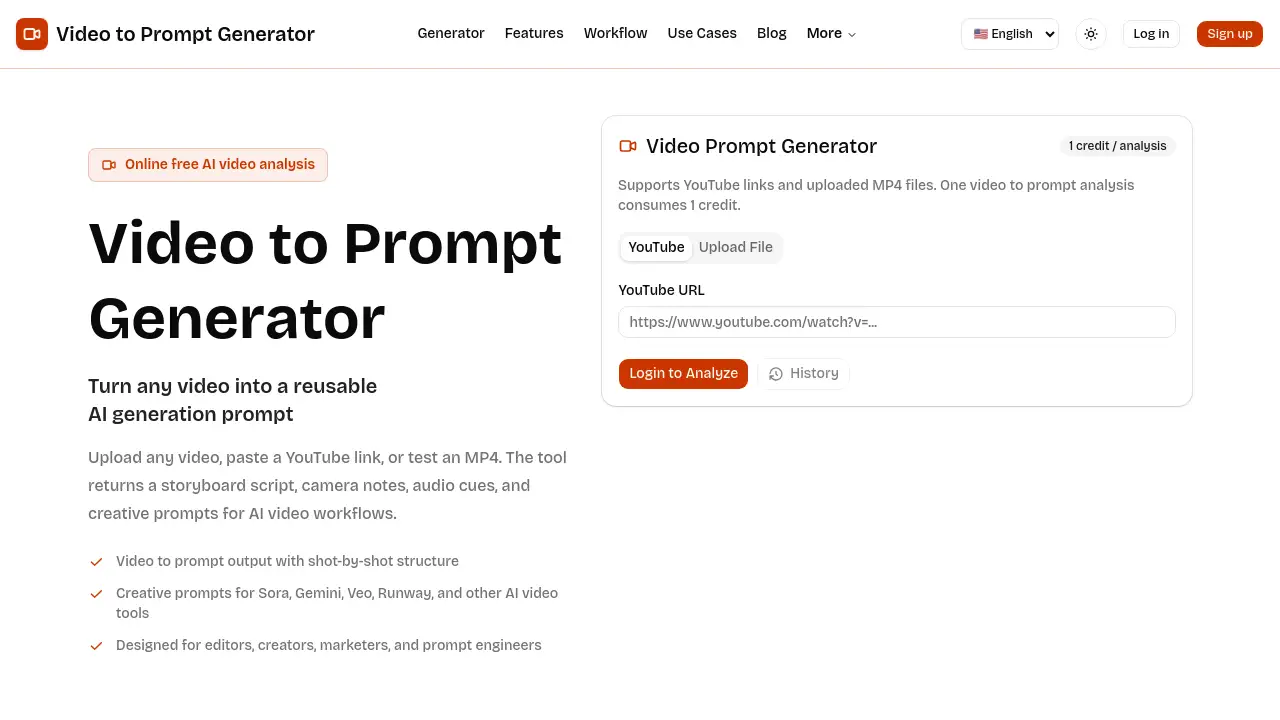
The Video to Prompt Generator is an online AI tool designed to deconstruct video content into a detailed, text-based format. It addresses a common challenge for creators, marketers, and video editors: how to effectively translate visual ideas into a structured language that AI video models can understand. By uploading a YouTube link or an MP4 file, users can receive a shot-by-shot script complete with camera notes, audio cues, and creative prompts. This video to prompt analysis is particularly valuable for those working with AI video generation tools like Sora, Runway, or Veo, as it helps reverse-engineer existing footage into reusable, clear instructions, saving significant time in creative workflows.
Key Features of Video to Prompt Generator
YouTube to Prompt Analysis
Users can simply paste a YouTube URL to have the tool analyze the video's scene flow, camera language, and direction, turning a public video into a private creative asset.
MP4 Upload for Private Analysis
The tool allows for the upload of personal MP4 files (up to 50MB) for a private video analysis, enabling teams to work with proprietary or draft footage without sharing it publicly.
Detailed Shot-Level Script
It generates a comprehensive, storyboard-style table that breaks down each shot with details on framing, camera movement, subject action, lighting, and audio notes, providing a clear shot-by-shot structure.
Reusable AI Prompt Output
The final output consolidates the analysis into a creative prompt formatted for use in AI video workflows, which can be copied directly into tools like Sora, Gemini, or Runway for generation.
Supports Multiple AI Video Tools
The generated prompts are designed to be compatible with a wide range of popular AI video tools, including Sora, Gemini, Veo, and Runway, offering flexibility for different production pipelines.
Use Cases for Video to Prompt Generator
For AI Video Creators
Creators use the video prompt generator to deconstruct reference clips, understanding specific camera moves and atmosphere before instructing an AI model to create a new, similar scene.
For Marketing and Campaign Teams
Marketing teams can analyze successful product videos or social clips to create prompt-ready briefs, ensuring brand consistency and enabling the rapid creation of campaign variants.
For Video Editors and Storyboard Artists
Editors and artists use the shot-by-shot script to document reference material, compare pacing between projects, and communicate precise visual intent without lengthy manual descriptions.
For Prompt Engineers
Prompt engineers can build reliable, repeatable templates based on real-world footage analysis, moving beyond vague stylistic terms to precise, actionable language.
How to Use Video to Prompt Generator
Using the Video to Prompt Generator involves a straightforward three-step workflow designed for efficiency.
- Submit Your Video Reference: Start by either pasting a YouTube URL or uploading an MP4 file (up to 50MB) directly to the website. A clear, focused reference video yields the best analysis.
- Review the Generated Analysis: The tool will process the video and present a detailed shot-by-shot storyboard table. Review this breakdown of framing, motion, lighting, and audio before proceeding to the final prompt.
- Copy and Refine the Output: Use the consolidated creative prompt as a starting point for your AI video workflows. You can copy it directly into your chosen AI tool and refine the wording, duration, or style parameters to fit your specific project needs.
Target Audience for Video to Prompt Generator
- AI Video Creators and Artists
- Marketing Professionals and Campaign Managers
- Video Editors and Post-Production Specialists
- Storyboard Artists and Pre-Visualization Teams
- Prompt Engineers and AI Workflow Developers
- Content Creators and Social Media Managers
Is Video to Prompt Generator Free?
Based on the available information, the Video to Prompt Generator is promoted as a free online tool. The reference content explicitly states "Online free AI video analysis" and "Free online video to prompt generator." There is no mention of paid plans or premium features on the provided homepage content.
| Plan | Price | Key Features |
|---|---|---|
| Free | $0 | YouTube link analysis, MP4 upload (up to 50MB), generation of shot-level scripts and AI prompts. |
Video to Prompt Generator's Pros and Cons
| Aspect | Pros | Cons |
|---|---|---|
| Cost & Accessibility | Completely free to use, lowering the barrier for individuals and small teams. | No information on advanced or high-volume features for professional-tier needs. |
| Workflow Integration | Output is specifically formatted for popular AI video tools like Sora and Runway, saving reformatting time. | Limited to video analysis for prompt generation; does not generate the final AI video itself. |
| Ease of Use | Simple interface requiring only a URL or file upload, with fast analysis. | The quality of the shot-by-shot script depends heavily on the clarity and focus of the input video. |
| Functionality | Provides unique video to prompt analysis that captures camera direction and audio cues, not just objects. | File upload is capped at 50MB, which may limit the length or resolution of videos that can be analyzed privately. |
Frequently Asked Questions about Video to Prompt Generator
What types of videos can I analyze?
You can analyze any publicly available YouTube video by pasting its link, or you can upload your own MP4 files for private analysis. The upload feature supports files up to 50MB in size.
Which AI video tools are the prompts compatible with?
The creative prompts generated by the tool are designed to be compatible with major AI video tools including OpenAI's Sora, Google's Veo and Gemini, RunwayML, and similar platforms. The output provides a structured starting point that can be adapted for your specific model.
What does the shot-level script include?
The shot-by-shot script is presented in a storyboard-style table. For each shot, it details elements like framing (e.g., close-up, wide), camera movement (e.g., pan, zoom), subject action, lighting conditions, audio cues, and the shot's duration.
Is my uploaded video data kept private?
When you upload an MP4 file, the analysis is performed privately. The reference information does not specify long-term data retention policies, so for sensitive footage, reviewing the website's privacy policy is recommended.
How can this tool help my marketing team?
For marketing teams, the tool turns successful reference videos into a prompt-ready brief. This allows for the consistent and efficient creation of multiple campaign variants (e.g., for different platforms or regions) while maintaining a cohesive visual style and message.
Can I edit the generated prompt?
Absolutely. The final reusable prompt output is intended as a high-quality starting point. The workflow encourages users to refine the language, adjust parameters like aspect ratio or duration, and add specific brand constraints to fit their project perfectly.
Video to Prompt Generator Tags
video to prompt generator, AI video analysis, YouTube to prompt, shot-by-shot script, AI video tools, prompt engineering, video to prompt analysis, creative prompts, Sora prompts, Runway ML, video editor tool, marketing campaign brief, free AI tool, storyboard generator