Introduction
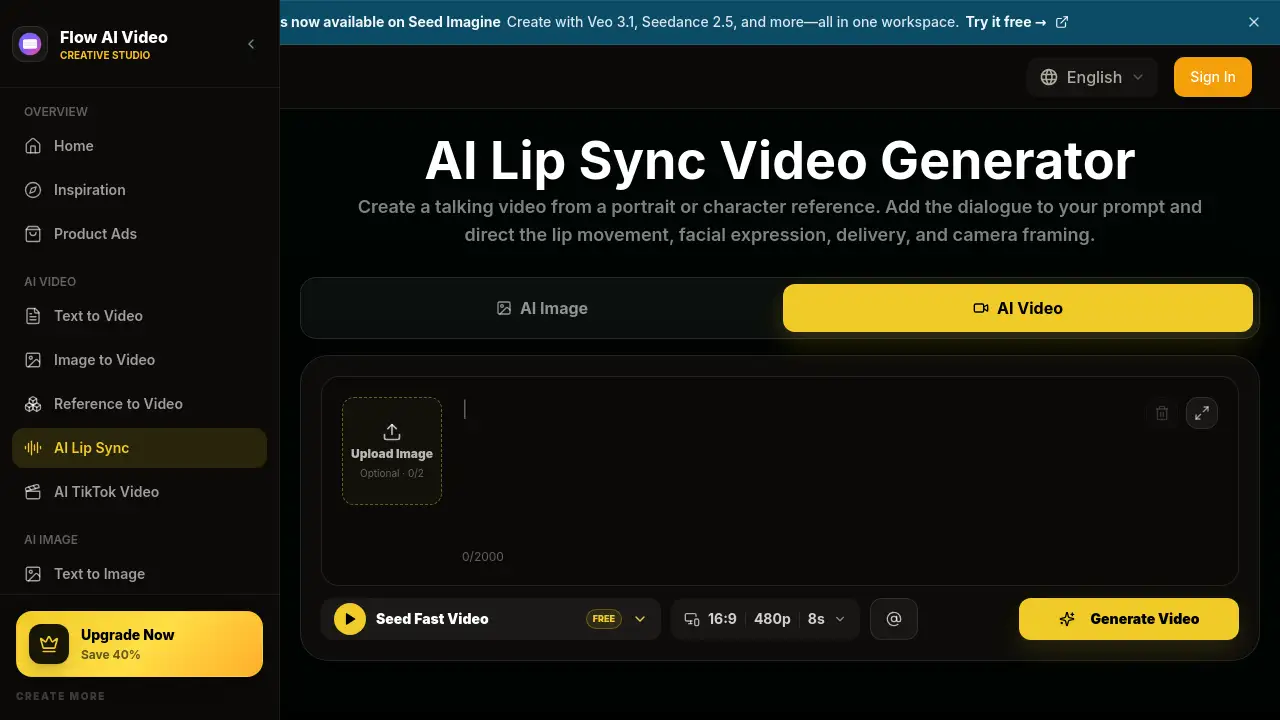
AI Lip Sync Video Generator is an online tool that creates talking videos from portraits, character images, and short dialogue prompts. It makes a still face speak naturally while controlling lip movement, expression, and delivery.
What is AI Lip Sync Video Generator?
The AI Lip Sync Video Generator is a web-based video creation tool offered through Flow AI Video. It solves a common content problem: how to make a still face speak naturally on camera without recording a new video. Users upload a portrait or character reference, add dialogue, and then describe how the speaker should deliver the line. The AI lip sync video generator matches lips, facial movement, expression, and head motion to the speech. This makes it useful for any person who needs a talking video clip quickly.
This AI lip sync video generator is suitable for social media managers, product marketers, educators, filmmakers, animators, and localization teams. It matters because it removes the need for cameras, actors, and reshoots. Instead, the AI lip sync video generator turns simple written prompts into a finished speaker clip. The result can be used for social posts, ad concepts, course videos, product explainers, or character-driven stories.
Key Features of AI Lip Sync Video Generator
Dialogue-First Lip Sync Control
The AI lip sync video generator lets users write the exact words a character should say. It then creates a talking video where the mouth aligns with the spoken line.
Performance Direction with Plain Prompts
Users can guide expression, eye contact, head movement, gestures, and camera framing. This feature helps the AI lip sync video generator feel less like a generic avatar tool and more like a directed presenter.
Talking Photo and Character Input
The AI lip sync video generator accepts a portrait, AI-generated image, illustrated character, or mascot. A clear face with visible lips gives the best results.
Model and Format Options
The tool includes multiple AI video models and settings for aspect ratio, quality, and duration. Users can choose a quick free setting or a higher-quality output depending on the talking video use case.
Smart Prompt Expansion
A “Smart Expansion” option helps extend short dialogue or prompt text. This is useful when users are not sure how much detail to give the AI lip sync video generator.
One-Place Workflow
From upload to prompt to preview, the AI lip sync video generator keeps all controls in one online workspace. Users can review mouth movement, face stability, timing, and framing before exporting the final lip sync video.
Use Cases for AI Lip Sync Video Generator
Talking Photos and AI Avatars
Turn a still portrait or avatar into a talking photo that introduces a person, announces a product, or reacts to a topic. This is one of the most direct uses for an AI lip sync video generator.
Spokesperson Product Videos
Marketing teams can create AI spokesperson clips for product launches, feature explainers, and campaign pages. The AI lip sync video generator produces a professional presenter segment without studio time.
TikTok, Reels, and YouTube Shorts
Short-form social teams can use the AI lip sync video generator to make vertical talking videos with a direct-to-camera hook. These clips can be generated quickly and tested with different scripts.
Training and Educational Videos
Educators and training teams can create talking-head lessons, onboarding clips, course introductions, and internal updates. The AI lip sync video generator keeps the speaker consistent across modules.
Animated Character and Brand Mascot Content
An AI lip sync video generator can give illustrated characters or brand mascots a speaking role in stories, ads, or explainer videos. This adds life to character animation without manual animation tools.
Multilingual Localization Content
When the selected AI model supports another language, the AI lip sync video generator can produce dialogue in that language. Users should review the speech and lip movement before publishing.
How to Use AI Lip Sync Video Generator
Using the AI lip sync video generator is straightforward:
- Upload a clear speaker image or generate one with the built-in image tool.
- Add a short dialogue line in the prompt box.
- Describe expression, delivery, head movement, and camera framing.
- Choose a video model, aspect ratio, and quality.
- Generate the video and review lip movement, face stability, timing, and framing.
This workflow lets users create a lip sync video quickly and then download the final talking video. The AI lip sync video generator is designed to fit into social, ad, and training pipelines.
Target Audience for AI Lip Sync Video Generator
- Content creators preparing talking videos for social channels.
- Social media teams making short-form presenter clips.
- Marketing teams building product spokesperson videos.
- Training and HR teams creating onboarding and internal updates.
- Animators and illustrators adding speech to character portraits.
- Localization teams adapting talking content into approved dialogue.
Is AI Lip Sync Video Generator Free?
The AI Lip Sync Video Generator offers a free tier that allows users to generate videos with limited credits. For example, image generation may use 10 credits and video generation may use 20 credits on the free setting. Paid plans are also available, and the official website currently mentions an upgrade offer with 40% savings. Exact pricing and plan details are listed on the Flow AI Video pricing page.
| Plan | Price | Features |
|---|---|---|
| Free | $0 | Limited credits for image and video generation, basic video settings |
| Pro | See official pricing | More credits, full model access, extra video settings, priority features |
AI Lip Sync Video Generator's Pros and Cons
| Aspect | Pros | Cons |
|---|---|---|
| Production speed | Creates talking videos without filming, actors, or reshoots | Generation time still depends on the AI model and length |
| Creative control | Prompts can guide expression, eye contact, and framing | Results depend on clear input images and well-written prompts |
| Workflow | Upload, prompt, generate, and review in one place | Some users may need time to learn model settings and quality options |
| Pricing | Free tier available for testing | Paid plans may not suit very high-volume production without budgeting |
Frequently Asked Questions about AI Lip Sync Video Generator
What is an AI lip sync video generator?
An AI lip sync video generator is a tool that creates talking videos from a still portrait or character image by matching mouth movements to dialogue. Users can also direct expression, head movement, and camera framing.
How do I get the best lip sync video results?
Use a clear face with visible lips and balanced lighting. Keep dialogue short and natural. Add simple performance details like “calm delivery” or “friendly eye contact” to help the AI lip sync video generator understand the desired output.
Do I need to record my own voice?
No, the AI lip sync video generator creates the spoken line from the text prompt. Users do not need a microphone, voice actor, or camera.
Can I use the AI lip sync video generator for TikTok and Reels?
Yes, the tool supports short-form vertical video formats and can create talking videos for TikTok, Reels, and YouTube Shorts. The final clip can be used for hooks, commentary, announcements, or product messages.
Can I create a talking photo from an illustrated character?
Yes. The AI lip sync video generator works with portraits, AI-generated images, stylized characters, and brand mascots. The face should be visible and the lips should be clear for best results.
Is a lip sync video generator free?
Free credits are available for testing. Users can generate initial videos with the free option, and paid plans are available when more credits or advanced features are needed.
AI Lip Sync Video Generator Tags
AI lip sync video generator, talking video, AI video generator, lip sync video, talking photo, AI avatar video, create talking video, online video generator, text to video, image to video, AI presenter video, character animation