Introduction
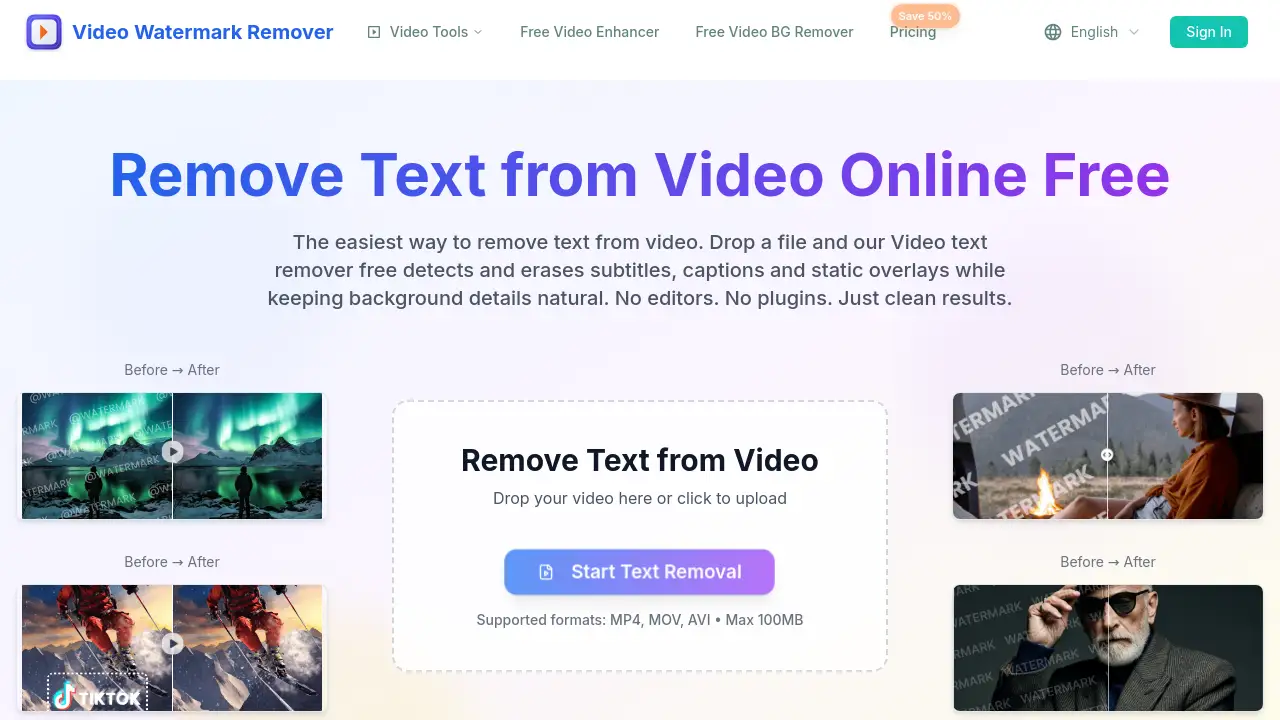
Need to remove text from video online without losing quality? The AI-powered Remove Text from Video tool can erase subtitles, captions, and watermarks in minutes. It is a simple web-based solution designed for creators who want clean footage without complex editing software.
What is Remove Text from Video?
Remove Text from Video is an online AI tool that automatically detects and deletes unwanted text from video files. It is part of the Video Watermark Remover platform, which offers several focused AI cleanup tools. The product solves a common problem: hardcoded text that cannot be deleted with basic video editors. Whether it is a burned-in subtitle, a channel logo, or a date stamp, the AI analyzes each frame, removes the text, and reconstructs the background naturally.
This tool is suitable for content creators, marketers, students, and anyone who repurposes video footage. It matters because manually editing text out of a video frame by frame takes hours. This video text remover free tool automates the entire process in just a few clicks. Users do not need any editing skills or software installations. The platform emphasizes no blur, no artifacts, and preserved original quality, making it a practical choice for both beginners and professionals.
Key Features of Remove Text from Video
AI Text Detection
The smart model automatically finds burnt-in subtitles, lower-thirds, and corner logos. Users do not need to mark the text area manually.
One-Click Processing
The workflow is instant. Simply upload a file and let the AI remove text from video without using complicated timeline editors.
No Blur or Quality Loss
Advanced inpainting technology reconstructs motion, gradients, and edges. This ensures clean frames without ghosting or distortion.
Multiple Format Support
The tool works with MP4, MOV, and AVI files. It also supports popular resolutions on both web and mobile browsers.
Private and Secure
All uploads are encrypted, and files are automatically deleted within 24 hours. This keeps user content safe.
Web-Based Access
There is no need to download or install software. Access the video text remover free from any device with an internet connection.
Use Cases for Remove Text from Video
Brand Watermark Removal
Eliminate corner logos and brand marks to create clean, distraction-free footage for personal or professional projects.
Subtitle and Caption Erasure
Delete hardcoded subtitles or open captions to repurpose videos for a different audience or language.
Price Tag and Sticker Cleanup
Remove outdated promotional overlays, pricing stickers, or sale tags from product videos and advertising content.
Timestamp Elimination
Erase camera timestamps and date overlays to achieve a more polished and professional appearance.
Title Card Removal
Delete large intro titles or text cards while preserving the background details and motion underneath.
Dynamic Text Pattern Cleaning
Automatically handle animated watermarks or scrolling text that move across multiple frames.
How to Use Remove Text from Video
Using this tool is very straightforward. Follow these simple steps to remove text from video in minutes:
-
Upload the Video
Go to the Remove Text from Video tool page. Drag and drop a video file or click to browse. The file should be MP4, MOV, or AVI and under 100MB. -
Let AI Process the File
Once uploaded, the AI model analyzes every frame. It detects the unwanted text, erases it, and reconstructs the background automatically. -
Download the Clean Result
After processing, preview the video to check the quality. Then, export and download the HD result without any watermarks.
The whole process is designed for speed. Processing typically takes only a couple of minutes, making this video text remover free tool extremely efficient.
Target Audience for Remove Text from Video
- Content Creators: YouTubers and TikTokers who need to remove text from video clips before publishing.
- Video Editors: Professionals who want a quick cleanup tool for repurposing stock footage.
- Marketers: Brand managers who need to remove old logos or promotional text from advertisements.
- Social Media Managers: People who recycle video content across different platforms and need clean versions.
- Business Owners: Entrepreneurs who edit product demos or training videos without hiring an editor.
- Students: Users who want to remove subtitles or text from educational video materials for presentations.
Is Remove Text from Video Free?
The platform offers a free tier that allows users to test the service. Based on the homepage information, the free version supports video files up to 100MB. For larger files or additional features, there is a paid subscription plan. The pricing page mentions a "Save 50%" promotion, suggesting a Pro plan is available. However, specific prices are not disclosed in the reference content.
| Plan | Price | Features |
|---|---|---|
| Free | $0 | Process videos up to 100MB, supported formats MP4/MOV/AVI, standard AI processing |
| Pro | See Website | Larger file limits, faster processing, priority support, more tools |
Users should visit the official pricing page for the most accurate and up-to-date details.
Remove Text from Video's Pros and Cons
| Aspect | Pros | Cons |
|---|---|---|
| Pricing | Free tier available for basic use | Paid plan needed for larger files |
| Ease of Use | No editing skills or software needed | Requires internet connection |
| Features | Advanced AI preserves quality | Limited to MP4, MOV, and AVI formats |
| Performance | Fast processing in about 2 minutes | Free version has a 100MB file size limit |
| Privacy | Encrypted uploads and auto-deletion in 24 hours | Not suitable for offline work |
Frequently Asked Questions about Remove Text from Video
Can I remove subtitles or captions?
Yes. The AI tool is specifically designed to erase hardcoded subtitles and open captions. It detects the text and reconstructs the background so it looks natural.
Will there be blur or artifacts after processing?
No. The advanced inpainting technology preserves motion, edges, and gradients. The goal is to produce clean frames without blur, halos, or ghosting.
Which video formats are supported?
The Remove Text from Video tool currently supports MP4, MOV, and AVI file formats. The free version allows uploads up to 100MB; larger files may require a paid plan.
Is the video text remover free to use?
Yes, there is a free tier available. It allows users to process videos up to 100MB. For unlimited access and faster processing, users can check the paid plans on the official website.
Is my data secure when I upload a video?
Yes. The platform uses encrypted processing and automatically deletes uploaded files within 24 hours. This ensures that user content remains private and secure.
Do I need to install any software?
No. This is a web-based tool. You can access it from any browser on your desktop or mobile device without downloading plugins or applications.
Remove Text from Video Tags
remove text from video, video text remover free, remove subtitles from video, remove watermark from video, remove captions from video, AI video tool, erase text from video online, delete text from MP4, remove logo from video, clean video footage, online video editor, AI object remover