Introduction
Qwen Image Layered is a free online AI tool for editing image layers, making complex graphics work simple.
What is Qwen Image Layered?
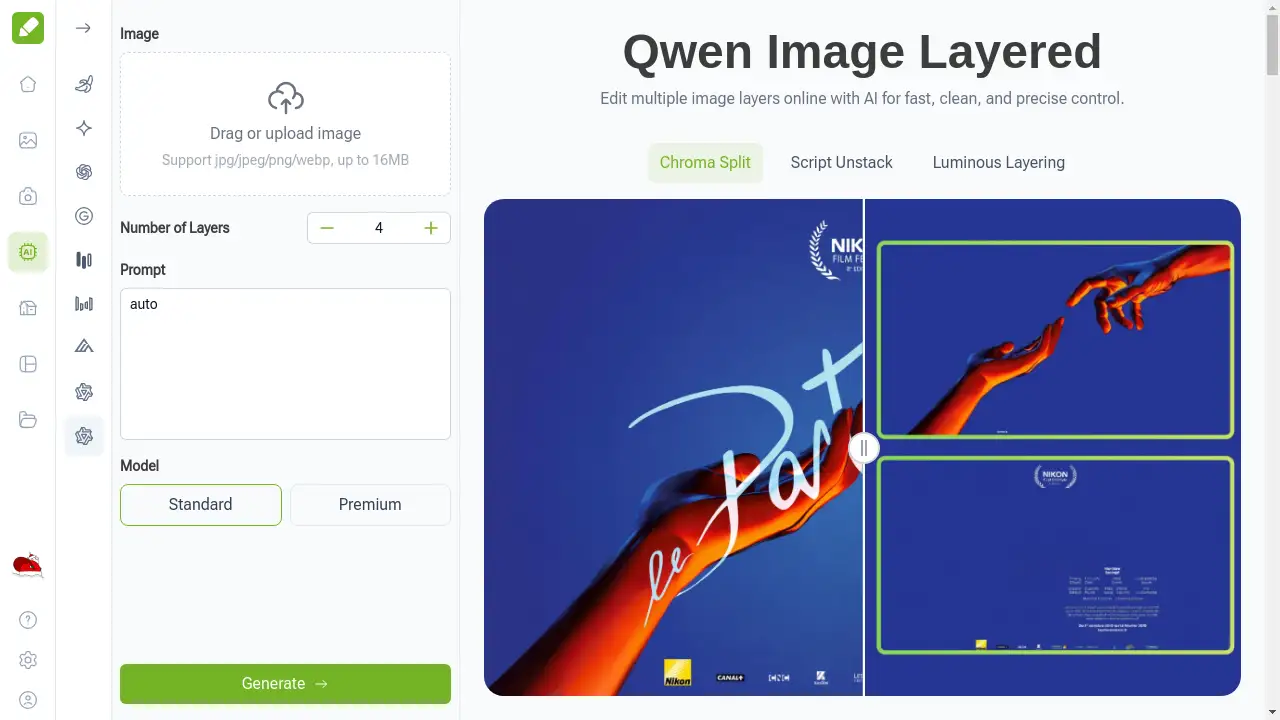
Qwen Image Layered is an AI-powered online tool that allows users to edit image layers with precision and ease. It solves the common problem of manually separating elements like backgrounds, text, and objects, a process that can be time-consuming and technically challenging, especially for those without professional software like Photoshop. This tool is particularly suitable for graphic designers, social media content creators, marketing specialists, and game developers who need flexible, fast, and free layer editing. By providing true RGBA layer separation, it enables a non-destructive workflow where each element can be moved, resized, or adjusted independently, streamlining the creative process for digital projects.
Key Features of Qwen Image Layered
True RGBA Layer Separation
The AI doesn't just make a flat edit; it intelligently separates an image into distinct RGBA layers for background, text, and objects, giving you clean, editable elements.
Prompt-Controlled Layer Count
Users have full control over the number of layers generated, from simple, coarse layouts to complex, detailed decompositions, tailoring the output to the specific needs of their project.
Recursive Layering
This advanced feature allows for layers within layers, enabling users to drill down into specific areas of an image for incredibly fine and detailed editing and adjustments.
Online and No-Installation Required
All layer editing happens directly in your web browser, offering a fast and convenient Photoshop-like experience without the need to download or install any software.
Clean and Intuitive Interface
The tool is designed with a simple, user-friendly interface that makes the process of uploading, separating, and downloading image layers straightforward and accessible for all skill levels.
Use Cases for Qwen Image Layered
Graphic Design and Illustration
Designers can quickly extract foreground elements, text, or objects from complex graphics to create new compositions, mockups, or marketing materials with ease.
Social Media Content Creation
Content creators can isolate and edit specific parts of an image—like changing a background or moving text—to produce multiple engaging posts quickly and efficiently.
UI/UX Design and Game Asset Creation
UI designers and game developers can separate interface components or game sprites into clean, individual layers for easy manipulation and integration into their projects.
Marketing and Presentation Material
Marketing specialists can deconstruct product shots or infographics to adjust individual elements, ensuring brand consistency and creating polished, professional visuals.
How to Use Qwen Image Layered
Using Qwen Image Layered for online AI image layer editing is a simple three-step process:
- Upload Your Image: Drag and drop or upload your JPG, JPEG, PNG, or WEBP image file (up to 16MB) to the platform.
- Configure Your Layers: Select the desired number of layers and specify the areas of interest (like background or objects) you want the AI to separate.
- Preview and Download: Review the generated layers in the preview panel. Once satisfied, download the individual, editable layer files for use in your design software.
Target Audience for Qwen Image Layered
- Graphic Designers and Illustrators
- Social Media Managers and Content Creators
- Marketing Specialists and Advertisers
- UI/UX Designers and Web Developers
- Game Artists and Asset Creators
- Hobbyists and small business owners needing quick image edits
Is Qwen Image Layered Free?
Yes, Qwen Image Layered offers a generous free plan that allows users to access its core AI-powered layer separation and editing features online at no cost. Users can upload images, separate them into layers, and download the results without any payment. For users requiring higher volume or advanced features, VisualGPT, the platform hosting the tool, may offer affordable premium options for its broader suite of AI models.
Frequently Asked Questions about Qwen Image Layered
How does Qwen Image Layered separate layers in my images?
Qwen Image Layered uses advanced AI to analyze your uploaded image and intelligently identify distinct elements like the background, foreground objects, and text. It then separates these elements into individual, transparent RGBA layers, allowing for independent editing.
Can I control the number of layers generated?
Absolutely. A key feature of Qwen Image Layered is prompt-controlled layer count. You can specify whether you need just a few basic layers or a more detailed decomposition with many layers, giving you flexibility based on your project's complexity.
Is it suitable for editing photographs?
Qwen Image Layered excels with graphics, illustrations, and designs where elements have clear boundaries. For complex natural photographs with subtle gradients and textures, the separation might be less precise compared to dedicated photo editing software.
Do I need Photoshop or other software to use it?
No software installation is required. Qwen Image Layered is a completely online tool. You perform all layer editing directly in your web browser and can download the results for use in other programs if needed.
How precise is the background removal?
The tool provides highly precise separation for defined graphics and objects. The accuracy depends on the complexity of the image, but for logos, UI elements, and illustrations, it delivers clean, editable layers suitable for professional work.
Are the downloaded layers editable in other software?
Yes, the layers are exported as standard image files (like PNG with transparency). You can import them into any design software that supports layers, such as Photoshop, GIMP, or Figma, for further manipulation.
Qwen Image Layered Tags
Qwen Image Layered, edit image layers online, AI layer editor, free layered image generation, separate background AI, remove background online, extract objects from image, graphic design tool, online Photoshop alternative, layer separation tool, RGBA layers, social media design, game asset creation