Introduction
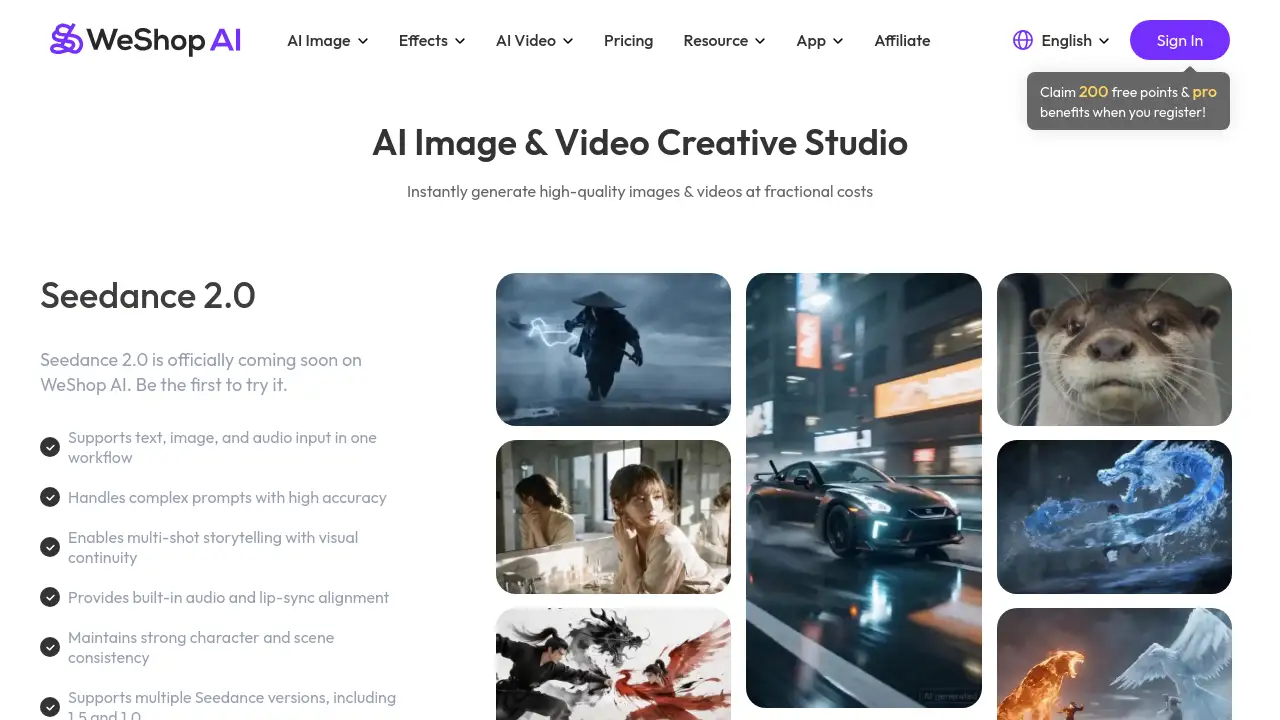
WeShop AI is an all-in-one AI image and video creative studio designed to accelerate visual content creation for e-commerce and marketing.
What is WeShop AI?
WeShop AI is a comprehensive online platform that serves as an AI creative studio, specializing in generating and editing images and videos. It solves the problem of time-consuming and expensive content creation, allowing users to produce high-quality visuals for product showcases, social media, and marketing campaigns much faster. This tool is particularly suitable for e-commerce sellers, digital marketers, designers, and content creators who need to produce professional visuals without extensive technical skills or large budgets. Its significance lies in democratizing access to advanced AI-powered editing and generation tools, streamlining workflows across various creative and commercial applications.
Key Features of WeShop AI
AI-Powered Virtual Try-On
This feature allows online retailers to let customers visualize clothing on different models, enhancing the shopping experience and potentially reducing returns.
AI Model and Background Swapping
Users can easily swap a model's face or change the entire background of a photo, creating diverse marketing assets from a single original image.
AI Product Photography Generator
Create professional-looking product images from simple photos or ideas, eliminating the need for expensive photoshoots and complex setups.
AI Video Generation Tools
The platform supports advanced AI video models like Seedance 2.0 and Kling 3.0, enabling users to generate videos from text, images, or audio inputs for dynamic marketing content.
Extensive Post-Production Toolkit
It includes practical tools like a background remover, magic eraser, AI photo enhancer, and a specific fixer for AI-generated hands and feet, ensuring polished final visuals.
Diverse AI Model Support
The AI creative studio integrates multiple cutting-edge models such as Seedream 5.0 for images and Sora 2 for video, offering users flexibility and access to the latest generative AI technology.
Use Cases for WeShop AI
E-commerce Product Listings
Online store owners can quickly generate multiple model shots, create virtual try-on experiences, and produce clean product flat lays to populate their catalogs.
Social Media Content Creation
Marketers and influencers can create trending visual content, generate unique character images, or transform photos into different artistic styles to engage their audience.
Marketing and Advertising Campaigns
Teams can produce a high volume of consistent ad creatives, promotional videos, and branded imagery for campaigns across different platforms without a full-scale production.
Creative Design Projects
Designers can use the platform for brainstorming, generating unique visual concepts, recoloring products, or creating composite images for various creative briefs.
How to Use WeShop AI
- Sign Up and Explore: Visit the WeShop AI website and register for an account to claim free trial points.
- Select a Tool: Navigate to the tool that fits your need, such as "Virtual Try-On," "AI Product Photography," or "AI Video Agent."
- Upload and Customize: Upload your base image or provide a text prompt. Select your desired model, pose, background, or other parameters from the available options.
- Generate and Edit: Initiate the AI generation process. Use the post-production tools to refine the output, like removing backgrounds or fixing details.
- Download and Use: Once satisfied, download the final high-quality image or video for use in your projects.
Target Audience for WeShop AI
- E-commerce business owners and Shopify sellers
- Digital marketing agencies and social media managers
- Graphic designers and content creators
- Small business owners handling their own marketing
- Entrepreneurs and startups needing cost-effective visual content
Is WeShop AI Free?
WeShop AI operates on a freemium model. New users can start with a free trial that includes 200 points. For continued and extensive use, paid subscription plans are required. Detailed pricing and feature breakdowns for different tiers are available on the official WeShop AI Pricing page.
WeShop AI's Pros and Cons
| Aspect | Pros | Cons |
|---|---|---|
| Features | Vast suite of specialized tools for both AI image and video editing. Access to multiple top-tier AI models in one platform. | The sheer number of tools might be overwhelming for absolute beginners. |
| Efficiency | Dramatically speeds up visual content creation, living up to its "10x faster" claim for many tasks. | Output quality can vary depending on the input image and the specific AI model used. |
| Accessibility | Lowers the barrier to creating professional visuals; no advanced photography or editing skills needed. | As a cloud-based service, it requires a stable internet connection. |
| Cost | Free trial allows for testing. Can be cost-effective compared to hiring photographers/videographers for high-volume work. | Can become expensive for individual users or small businesses with high-volume monthly needs. |
Frequently Asked Questions about WeShop AI
What kind of files can I upload to WeShop AI?
The platform supports common image file formats like JPG and PNG for its various AI image tools. For video generation, it accepts image or text inputs depending on the specific model.
Is the AI-generated content from WeShop AI copyright-free?
Generally, content generated using the platform's AI tools can be used for commercial purposes, such as in e-commerce listings or marketing. However, it is always advisable to review the platform's Terms of Service for the most current and detailed usage rights.
How accurate is the Virtual Try-On feature?
The Virtual Try-On technology provides a realistic simulation, but the accuracy can depend on the quality of the garment image and the base model photo. It is designed to give a good visual approximation for online shoppers.
Can I create a consistent brand model using WeShop AI?
Yes, the "Create Your Own AI Model" tool allows you to train an AI model based on a set of photos, enabling you to generate new images featuring a consistent character or brand representative for all your visuals.
What is the difference between the various AI models like Seedream and Midjourney?
Different AI models have unique strengths. Seedream 5.0 might excel at certain styles or prompt understanding, while a Midjourney integration could offer different aesthetic qualities. The platform allows you to choose the best model for your specific project.
Does WeShop AI have a mobile app?
Yes, WeShop AI offers a mobile app, allowing users to create and edit AI image and video content directly from their smartphones for greater flexibility.
WeShop AI Tags
WeShop AI, AI creative studio, AI image generator, AI video generator, virtual try-on, e-commerce visuals, product photography AI, background remover, AI model generator, Seedance 2.0, content creation tool, social media marketing