Introduction
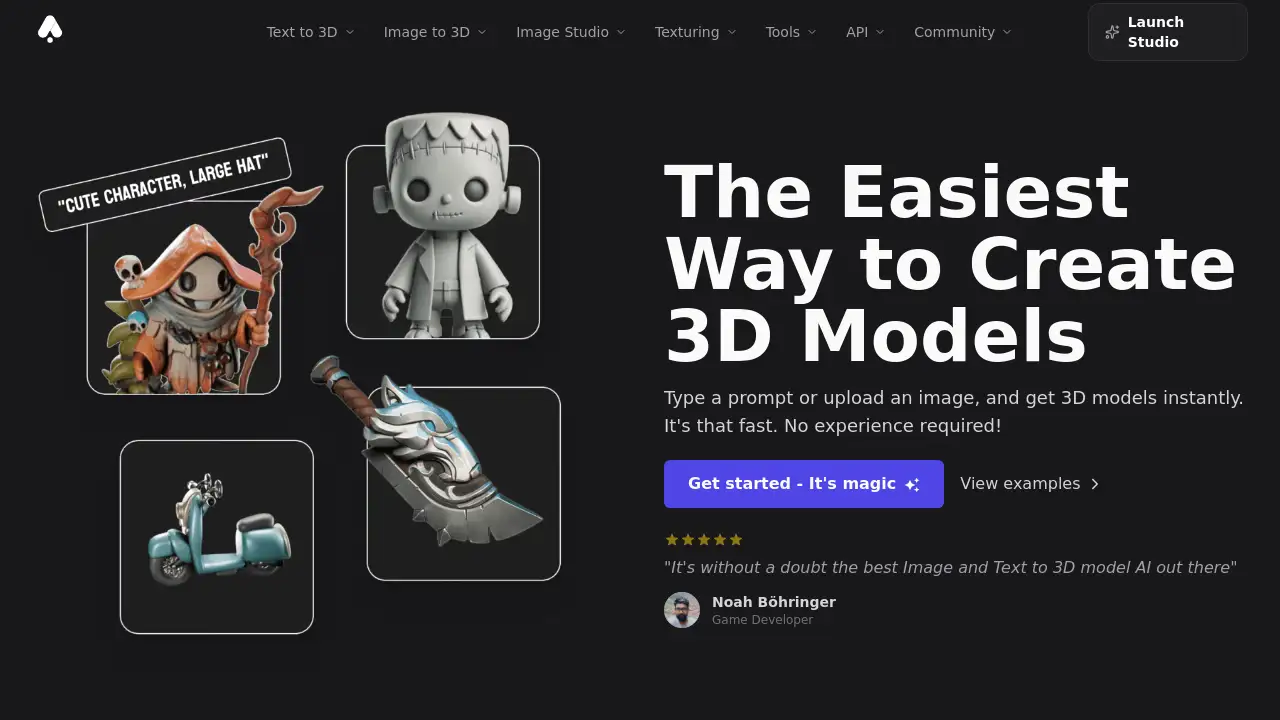
A powerful AI toolkit that enables anyone to effortlessly create high-quality 3D models from text or images.
What is 3DAIStudio?
3DAIStudio is an AI-powered platform designed to revolutionize 3D content creation by making it fast and accessible. It solves the traditional challenge of 3D modeling, which often requires specialized skills, expensive software, and days of manual work. By leveraging advanced AI technology, the tool allows users to generate production-ready 3D assets in minutes from a simple text prompt or uploaded image. This makes it suitable for a wide range of users, from complete beginners to seasoned professionals in industries like game development, animation, and product design who need to accelerate their workflow and create 3D models without a steep learning curve.
Key Features of 3DAIStudio
Text to 3D Model
Describe your vision in words, and the AI generates a fully textured 3D model ready for use in various applications, from game engines to 3D printing.
Image to 3D Model
Upload any 2D image, sketch, or photo, and the platform’s AI will convert it into a detailed, three-dimensional asset, preserving the original concept’s style and details.
AI Image Studio
This comprehensive toolkit goes beyond 3D, offering tools for AI image generation, editing, and even video creation, providing a complete creative suite.
AI Texturing and PBR Materials
Generate realistic Physically Based Rendering (PBR) materials from text prompts or paint custom textures directly onto your models for professional-grade results.
Quad Remeshing and Mesh Repair
Automatically clean up topology, reduce polygon counts, generate Levels of Detail (LODs), and fix common mesh issues to ensure models are optimized for their final use.
Wide Format Export
Export your AI-generated 3D models in all major industry-standard formats including GLB, FBX, OBJ, USDZ, and STL for seamless integration into any pipeline.
Use Cases for 3DAIStudio
Game Development
Rapidly prototype characters, props, and environments to accelerate pre-production and fill game worlds with unique 3D assets.
Concept Art and Visualization
Quickly bring 2D concepts and storyboards to life in 3D, allowing for better spatial understanding and client presentations.
3D Printing
Create custom figurines, prototypes, or design pieces by generating models optimized for physical printing and exporting them as STL or OBJ files.
Marketing and Advertising
Produce high-quality 3D product visualizations, animated social media content, and interactive AR experiences without a full 3D studio.
Education and Hobbyists
Lower the barrier to entry for learning 3D design, allowing students and enthusiasts to experiment and create without prior modeling experience.
How to Use 3DAIStudio
Using the platform to create 3D models is a straightforward process designed for simplicity.
- Sign Up and Access: Create an account on the 3DAIStudio website to access the web-based studio interface.
- Choose Your Input Method: Select either "Text to 3D" to type a descriptive prompt or "Image to 3D" to upload a reference image or sketch.
- Configure Settings (Optional): Adjust parameters like style, detail level, or output format based on your needs for the 3D model generation.
- Generate and Review: Initiate the AI processing. Within seconds to a few minutes, your 3D model will be ready to view and inspect in the browser viewer.
- Edit and Export: Use built-in tools for texturing or remeshing if needed, then download the final asset in your preferred format (e.g., FBX, GLB, OBJ).
Target Audience for 3DAIStudio
- Game Developers and Indie Studios: Needing to rapidly produce assets for games.
- 3D Artists and Animators: Seeking to speed up initial blocking or concept stages.
- Product Designers and Architects: Creating quick prototypes and visualizations.
- Marketing Professionals and Ad Agencies: Producing engaging 3D and AR content.
- Educators and Students: Teaching or learning the fundamentals of 3D design.
- Hobbyists and Digital Creators: Exploring 3D creation as a new creative outlet.
Is 3DAIStudio Free?
The reference information does not specify exact pricing plans or a free tier. It operates on a credit-based system where tasks like 3D generation or image creation consume a set number of credits. The platform mentions a transparent system where credit costs are displayed before generation. For detailed information on credit packs, subscriptions, or any free trial offerings, users should visit the official 3DAIStudio website or contact their sales team.
3DAIStudio's Pros and Cons
| Aspect | Pros | Cons |
|---|---|---|
| Ease of Use | Extremely intuitive; no prior 3D modeling experience required. | Advanced control over the AI's output may be limited compared to manual software. |
| Speed | Dramatically reduces creation time from days/weeks to minutes/seconds. | Highest quality settings can take 2-4 minutes per generation, which may slow batch processing. |
| Workflow Integration | Exports in all major 3D formats (FBX, OBJ, GLB, etc.) for easy pipeline integration. | As an online service, it requires a stable internet connection for all functions. |
| Toolset | Offers a broad suite beyond core 3D gen, including AI image editing and video tools. | The wide array of tools might have a learning curve to master completely. |
| Accessibility | Makes professional-grade 3D asset creation accessible to non-specialists. | Cost for high-volume users could be a factor compared to a one-time software purchase. |
Frequently Asked Questions about 3DAIStudio
How long does it take to generate a 3D model?
Generation time varies by model and quality settings. Faster models can complete in 20-30 seconds, while the highest quality generations with detailed textures may take 2-4 minutes.
What file formats can I export my 3D models in?
3DAIStudio supports exports in all major industry formats, including GLB for web/AR, FBX for game engines like Unity and Unreal, OBJ, USDZ for Apple AR, STL for 3D printing, DAE, and BLEND for Blender.
Can I use the models I create for commercial projects?
Yes. You retain full rights to all 3D assets you generate on the platform. They can be used commercially in games, applications, marketing materials, and other projects without restriction.
Is there an API available for developers?
Yes. 3DAIStudio offers a comprehensive REST API that provides programmatic access to its full suite of tools, including 3D model generation, texturing, and remeshing, allowing for integration into custom applications and workflows.
What are the costs involved?
The platform uses a credit system. Tasks have specific credit costs (e.g., 25-35 credits for a 3D model, 2-4 for an image). The exact cost is always displayed before you confirm a generation.
Are the models suitable for 3D printing?
Yes, models can be optimized and exported for 3D printing. It is recommended to use high-quality settings and the remesh tool to ensure manifold geometry, then export as an STL or OBJ file compatible with most slicer software.
3DAIStudio Tags
AI 3D model generator, text to 3D, image to 3D, create 3D models online, 3D AI Studio, AI-powered 3D assets, game asset creator, 3D modeling for beginners, export FBX GLB OBJ, 3D printing models, AI texturing, PBR materials, remesh tool, 3D design software