Introduction
AgentGuard is a local desktop application that provides essential guardrails for AI coding agents.
What is AgentGuard?
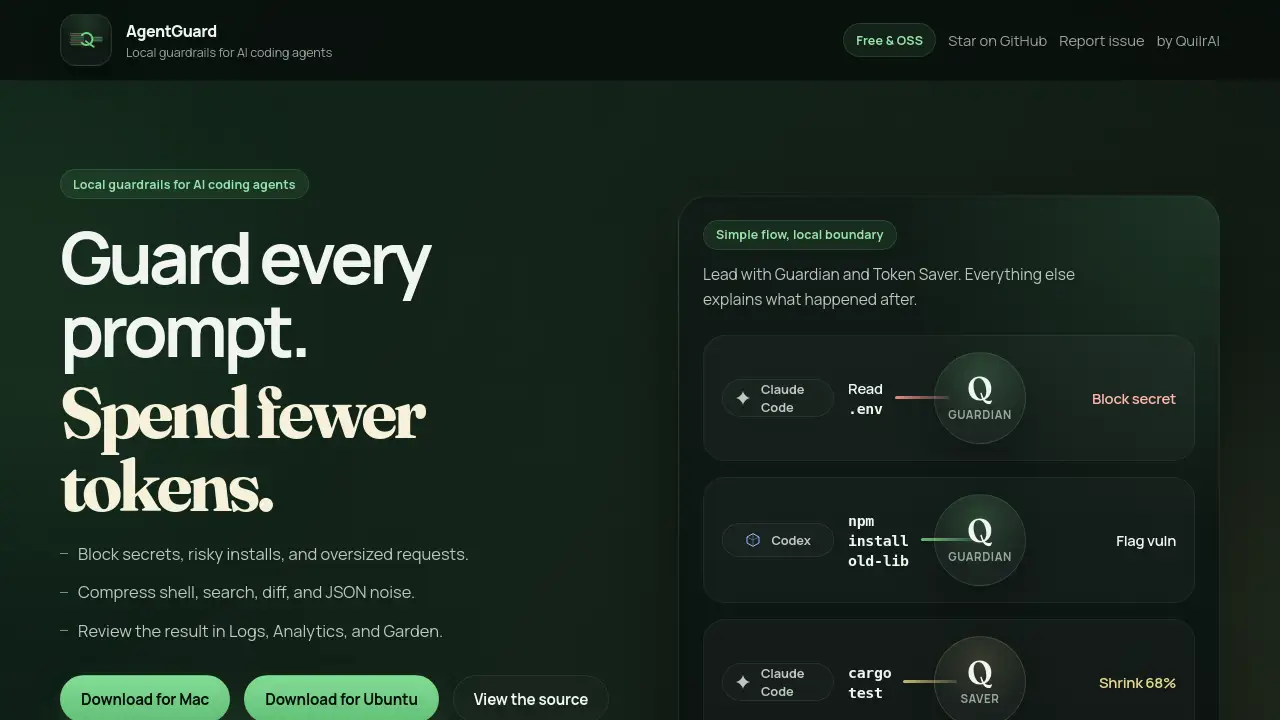
AgentGuard is a security and efficiency tool designed specifically for AI-powered coding assistants like Claude Code, Codex CLI, and Cursor. It operates as a local desktop app, meaning all data processing happens on the user's machine, ensuring privacy. The core problem it solves is the dual challenge of security risks and token inefficiency when using AI coding agents. It provides local guardrails for AI coding agents through its two main features: the Guardian Agent, which blocks secrets and dangerous commands, and the Token Saver, which compresses verbose outputs to reduce costs. This makes it suitable for developers who want to safely and cost-effectively integrate powerful AI assistants into their daily workflow without exposing sensitive data or wasting resources.
Key Features of AgentGuard
Guardian Agent
This feature acts as a security checkpoint, analyzing prompts and tool commands before they are sent to the AI model to block secrets, flag risky dependency installs, and enforce token caps on oversized requests.
Token Saver
The Token Saver feature compresses noisy, repetitive outputs like verbose shell commands, search results, and JSON data before they are added to the AI's context, significantly reducing token usage and cost.
Logs
AgentGuard maintains a compact, exportable event history that records all Guardian decisions and Token Saver reductions, providing a clear audit trail for every session.
Analytics
The app includes dashboard charts that visualize key metrics such as total tokens used, tokens saved by the shell and context compression, model usage trends, and latency, helping users quantify the tool's impact.
Garden
This unique feature turns project activity into a visual map, displaying files as trees and modules as groves with symbol and import edges, offering an intuitive overview of the codebase the AI is working on.
Use Cases for AgentGuard
Securing AI-Assisted Development
Developers can use the Guardian Agent for secrets and dependency protection to safely run AI agents on private codebases, preventing accidental leaks of API keys or environment variables.
Optimizing AI Agent Budgets
Teams employing AI coding assistants across projects can use the Token Saver's context compression to cut down on wasteful token consumption, directly lowering their monthly AI service costs.
Auditing AI Agent Activity
Engineering leads can review the Logs and Analytics surfaces to understand how their team is using AI tools, track potential security events, and verify the efficiency gains from token savings.
Onboarding to New Codebases
The visual Garden map helps developers and AI agents alike quickly grasp the structure and relationships within an unfamiliar project, accelerating the onboarding process.
How to Use AgentGuard
- Download and Install: Visit the official product page to download the AgentGuard desktop app for your operating system (Windows, macOS, or Linux). For unsupported OSs, you can clone the GitHub repository and build it locally using
npm install && npm run tauri build. - Connect Your AI Agent: Configure AgentGuard to work with your supported AI coding agent (Claude Code, Codex CLI, or Cursor). The setup integrates at the agent level to monitor prompts and outputs.
- Activate Guardrails: As you code, the Guardian Agent will automatically scan for and block secrets or risky commands. The Token Saver will concurrently compress lengthy outputs in the background.
- Review Results: Use the one-click access to Logs, Analytics, and Garden to inspect the decisions made, view token savings charts, and see a visual map of the project activity.
Target Audience for AgentGuard
- Software developers and engineers who regularly use AI coding assistants.
- Development teams and engineering managers concerned with code security and AI tool costs.
- Security-conscious professionals working with sensitive or proprietary codebases.
- Developers looking to optimize the performance and context management of tools like Claude Code.
Is AgentGuard Free?
Based on the available reference information, the pricing model for AgentGuard is not explicitly stated on the provided homepage content. Users should visit the official website at https://agentguard.quilrai.dev/ for the most current information regarding free trials, pricing plans, or subscription details.
AgentGuard's Pros and Cons
| Aspect | Pros | Cons |
|---|---|---|
| Security & Privacy | Operates locally, ensuring data never leaves your machine. Guardian Agent provides proactive secrets and dependency protection. | Coverage depth varies by supported agent (e.g., Token Saver is deepest on Claude Code). |
| Efficiency | Token Saver feature can lead to significant cost savings by compressing shell output and other noise. | Requires initial setup and integration with your specific AI coding agent. |
| Usability | Clean, simple interface with clear review surfaces (Logs, Analytics, Garden). | The visual Garden feature might have a learning curve for some users. |
| Compatibility | Supports popular agents like Claude Code, Codex CLI, and Cursor. | For less common operating systems, users must build the app from source. |
Frequently Asked Questions about AgentGuard
What AI coding agents does AgentGuard support?
AgentGuard currently offers integrations with Claude Code, Codex CLI, and Cursor. The level of support varies: Claude Code has the most complete coverage including Garden, while Cursor integration is focused on Guardian-style outbound control.
How does the Token Saver reduce my costs?
The Token Saver applies shell and context compression to verbose outputs like terminal commands, search results, and diffs before they are sent to the AI model. By shrinking this "noise," it reduces the number of tokens consumed per session, which directly lowers your usage costs with AI service providers.
Is my code data sent to a remote server?
No. A key principle of AgentGuard is the local boundary. All processing for the Guardian Agent and Token Saver happens directly on your desktop. Your prompts, code, and the AI's responses are not sent to any external server for analysis.
Can I use AgentGuard on Linux?
Yes. The official download may support major Linux distributions. If a pre-built package isn't available for your specific OS, the project is open-source, and you can build it yourself from the repository using the provided npm commands.
What kind of secrets does the Guardian Agent block?
The Guardian Agent uses Data Loss Prevention (DLP) techniques to scan prompts, tool inputs, and file reads for common secret patterns like API keys, passwords, and credentials typically found in files like .env, preventing them from being sent to the AI.
What is the Garden feature?
Garden is a visual review surface that turns your project's activity into an interactive map. It represents modules as "groves," files as "trees," and shows relationships through symbols and import edges, helping you visualize how the AI agent is navigating and interacting with your codebase.
AgentGuard Tags
AgentGuard, AI coding agents, local guardrails, desktop app for developers, Guardian Agent, Token Saver, secrets protection, dependency security, context compression, shell output compression, Claude Code tool, Codex CLI, Cursor AI, developer security, AI token savings