Introduction
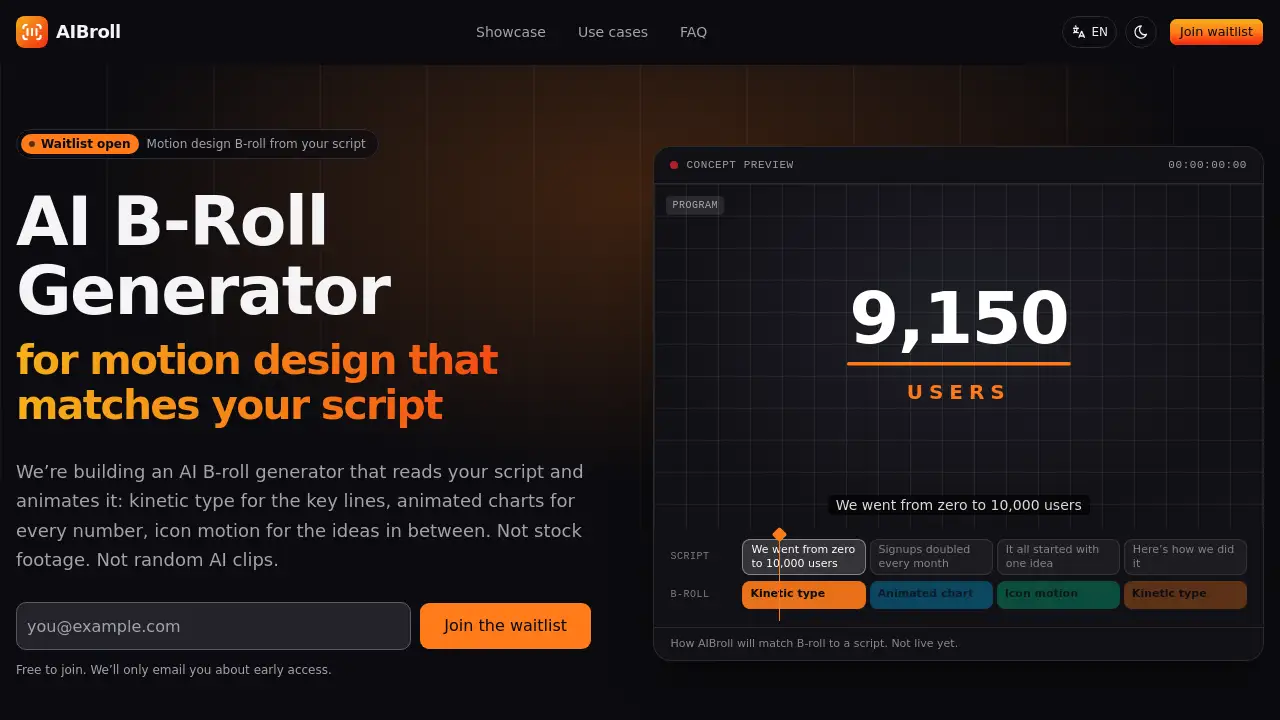
AIBroll is an AI B-roll generator in development that turns a script into motion design B-roll. Instead of stock footage or random AI video clips, it aims to create kinetic type, animated charts, and icon motion that match each line. The waitlist is open for early access.
What is AIBroll?
AIBroll is a planned AI B-roll generator built for creators who need animated visuals that follow a script. The idea is simple: paste a voiceover script, video outline, or transcript, and the tool will read each line. Numbers can become animated charts, key phrases can become kinetic type, and broader ideas can become icon motion. This is different from a typical AI B-roll tool that searches stock libraries or generates loose AI video clips from a keyword.
AIBroll focuses on motion design B-roll: clean graphics, readable text, and data-driven animation that matches the exact words in a script. The product is not live yet. The waitlist is open, and early access will be offered first to people who join. For creators who make explainers, product videos, ads, or faceless YouTube content, AI B-roll from a script could remove a slow editing step.
Key Features of AIBroll
Script-to-B-roll matching
AIBroll is being designed to turn every sentence into a timeline slot and generate a clip that reflects what the line says. This script to B-roll approach aims to reduce manual searching for each edit.
Kinetic type for key lines
For important phrases, the AI B-roll generator plans to create kinetic type that animates on screen. This helps a key claim, quote, or call to action stand out without filming extra footage.
Animated charts for numbers
When a script mentions growth, percentages, dates, or statistics, AIBroll aims to build animated charts and counters. This makes data easier to understand and keeps motion design B-roll tied to the spoken content.
Icon motion for ideas
For concepts that are not numbers or direct quotes, the tool is planned to use icon motion. Simple animated icons can explain a process, feature, or list in a visual way.
Multiple aspect ratios
The planned export options include 16:9, 9:16, and 1:1 MP4 clips. These formats are intended for YouTube, TikTok, Instagram, presentations, and other platforms.
Editor-friendly files
AIBroll is not planned as a closed editing suite. Clips are meant to be downloaded and dropped into Premiere Pro, Final Cut Pro, DaVinci Resolve, CapCut, or another editor.
Use Cases for AIBroll
Explainer videos
Motion design B-roll can carry an explainer when there is no camera footage. AIBroll is being built to animate definitions, steps, and numbers as the voiceover explains them.
SaaS and product videos
Product teams can use an AI B-roll generator to show features, workflows, and results with UI motion and charts. This can make a demo or launch video clearer without generic office footage.
Social ads and short-form content
Short videos need fast visual beats. AIBroll plans to turn lines like “Save two hours every week” into kinetic type and icon motion that fit vertical formats.
Educational content
Teachers and course creators can turn timelines, processes, and statistics into animated charts. This type of motion design B-roll can support a lesson and improve retention.
Faceless YouTube channels
For voiceover-only channels, AIBroll aims to provide script to B-roll visuals that fill the screen and keep viewers engaged between narration beats.
How to Use AIBroll
AIBroll is still in development, so the workflow below is the intended process. It may change before launch.
- Join the waitlist on the official AIBroll site to get early access updates.
- Paste a script, outline, or transcript into the planned script editor.
- Review the line-by-line suggestions, where numbers become animated charts, key phrases become kinetic type, and ideas become icon motion.
- Choose an aspect ratio such as 16:9, 9:16, or 1:1, then export MP4 clips.
- Drop the AI B-roll clips into an editor like Premiere Pro, Final Cut Pro, DaVinci Resolve, or CapCut.
Target Audience for AIBroll
- YouTubers and faceless channel creators
- Marketers and social media managers
- SaaS product marketers and demo creators
- Educators and online course creators
- Agencies and freelance video editors
- Founders making explainer or pitch videos
Is AIBroll Free?
AIBroll is not launched, and pricing has not been announced. Joining the waitlist is free. The official site does not currently list paid plans, so pricing details are expected before launch. Anyone interested in the AI B-roll generator can join the waitlist to receive early access information. There is no public pricing page at this time.
| Plan | Price | Features |
|---|---|---|
| Waitlist | $0 | Join for early access updates |
| Paid plans | Not announced | Pricing to be published before launch |
AIBroll's Pros and Cons
| Aspect | Pros | Cons |
|---|---|---|
| Availability | Waitlist is open | Product is not live yet |
| Output style | Focuses on motion design B-roll from a script | Does not create real people or real places |
| Workflow | Aims to match clips line by line | First version is planned around scripts, not existing timelines |
| Export | Planned 16:9, 9:16, and 1:1 MP4 clips | No confirmed editor plugin or direct timeline integration |
| Branding | Planned brand colors and fonts | Not yet confirmed in a live product |
| Use cases | Strong for data, lists, explainers, and product points | Less useful for travel, lifestyle, or cinematic scenes |
Frequently Asked Questions about AIBroll
What is an AI B-roll generator?
An AI B-roll generator uses AI to create supporting visuals for a video. AIBroll focuses on motion design B-roll such as kinetic type, animated charts, and icon motion rather than stock footage or photoreal AI video.
How is AIBroll different from other AI B-roll tools?
Many AI B-roll tools search stock clips or generate short video from a keyword. AIBroll is being built to read each line of a script and animate what the line actually says. For example, “revenue grew 40%” is intended to become a chart that climbs to 40%.
When will AIBroll launch?
There is no public launch date yet. The product is in development, and the waitlist is open. People who join are expected to get early access first.
Is AIBroll free to join?
Yes, joining the waitlist is free. Pricing for the AI B-roll generator has not been decided, and no paid plans are listed on the official site.
Can AIBroll use a video that is already recorded?
The first version is planned to work from a script. If a video already exists, its transcript can be used as the script. Direct timeline placement is described as a possible later feature.
Which video editors work with AIBroll?
The plan is to export standard MP4 clips in 16:9, 9:16, and 1:1. These files are intended to work in Premiere Pro, Final Cut Pro, DaVinci Resolve, CapCut, and other editors.
AIBroll Tags
AI B-roll generator, AIBroll, motion design B-roll, script to B-roll, AI B-roll, kinetic type, animated charts, icon motion, AI video editing, B-roll automation, explainer video B-roll, waitlist