Introduction
A free online AI photo editor that enhances, transforms, and edits images instantly using simple text prompts.
What is AI Photo Editor?
AI Photo Editor is a web-based application that leverages artificial intelligence to simplify complex photo editing tasks. It solves the problem of time-consuming, skill-intensive image manipulation by allowing users to make precise edits through descriptive text commands. This AI photo editor is suitable for non-designers, marketers, e-commerce sellers, content creators, and anyone needing quick, professional-looking image adjustments without mastering traditional software like Photoshop. Its significance lies in democratizing photo editing, making advanced visual enhancements accessible through a user-friendly, free online AI photo editor interface that streamlines the entire workflow on a single page.
Key Features of AI Photo Editor
Precise Local Content Control
This AI photo editor allows for targeted adjustments to specific people, objects, or small details within an image, enabling users to achieve their exact editing goals, such as improving subject focus or reorganizing visual elements.
Intelligent Background Replacement
Users can transform ordinary settings into cleaner, premium, or brand-aligned backgrounds using simple prompts, making it an ideal AI image editor free tool for e-commerce product photos and social media assets while maintaining natural subject edges.
Portrait and Product Detail Enhancement
The tool automatically improves lighting, refines skin texture, strengthens product details, and increases overall image clarity, resulting in polished visuals ready for professional use, from headshots to online store listings.
Multi-Image Reference Styling
This free online AI photo editor supports uploading multiple reference images, allowing users to unify styles, borrow composition ideas, or merge elements for greater visual consistency across brand projects and design iterations.
Fast Photo Stylization
It can quickly transform original photos into defined aesthetic styles, such as Ghibli-inspired art, Polaroid, film texture, or vintage looks, which is perfect for social content creators seeking a best AI photo editor for rapid creative experiments.
Use Cases for AI Photo Editor
E-commerce Product Photo Enhancement
This AI photo editor online free is useful for store operators and independent sellers who need to quickly improve hero images and product detail shots, ensuring a consistent and professional look for their online listings without reshooting.
Personal Portrait and Headshot Polish
It is ideal for individuals and professionals looking to refine profile photos, team portraits, and social media images, making personal branding visuals more consistent and polished with minimal effort.
Marketing Asset Rapid Iteration
Marketing and content teams can use this free online AI photo editor to swiftly test multiple visual versions for ads, banners, and campaign pages, enabling faster creative cycles and performance optimization.
Travel and Everyday Photo Cleanup
Casual users can clean up travel photos or daily captures by removing unwanted background elements or people, making images easier to share and reuse without advanced editing skills.
How to Use AI Photo Editor
The process for using this AI photo editor is straightforward and designed for speed.
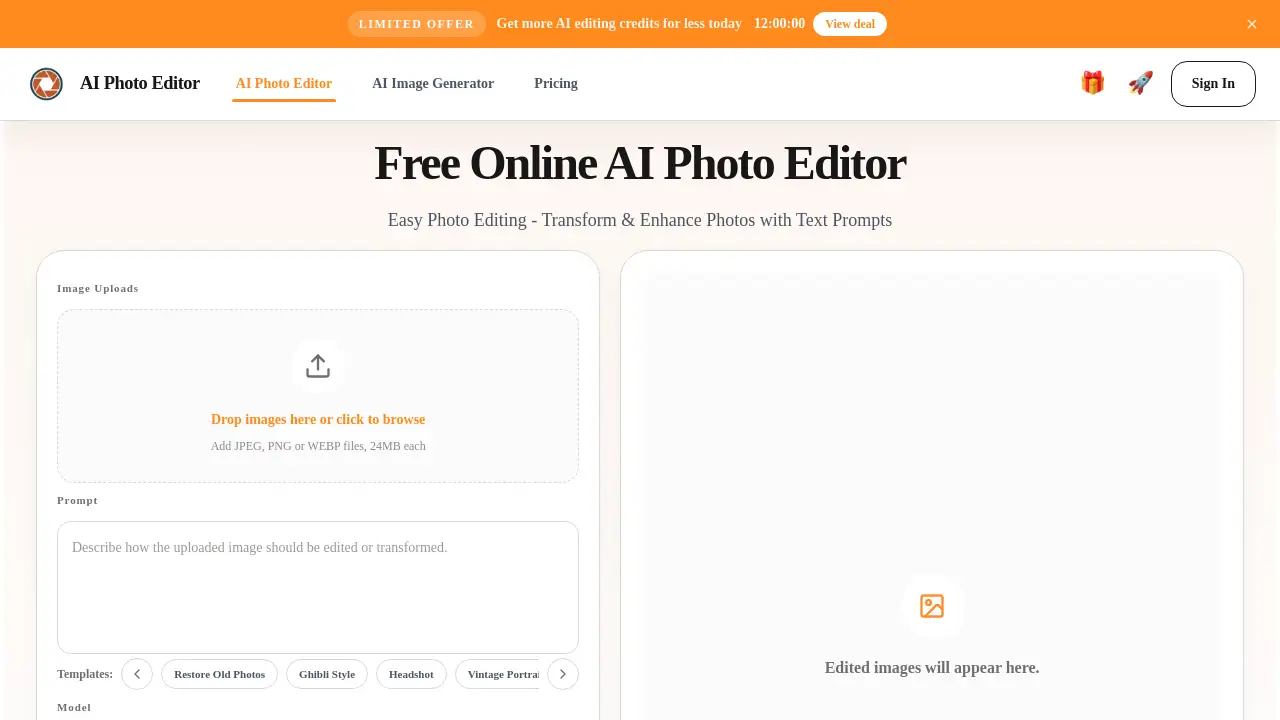
- Upload Your Image: Navigate to the AI Photo Editor website and upload a JPG, PNG, or WebP file by dragging and dropping or browsing your computer.
- Describe Your Edit: In the prompt box, clearly describe the change you want, such as "remove background person," "replace sky with sunset," or "enhance skin smoothness."
- Generate and Review: Click the generate button. The AI will process your request and display the edited image in the preview window.
- Refine or Download: If satisfied, download the high-quality result. If not, adjust your prompt and generate again until the edit meets your expectations.
Target Audience for AI Photo Editor
- E-commerce store owners and online sellers
- Marketing professionals and social media managers
- Content creators, bloggers, and influencers
- Small business owners and startup teams
- Freelance designers seeking faster iteration
- Casual photographers and non-designers
Is AI Photo Editor Free?
AI Photo Editor operates on a credit-based system. A free tier is available, providing users with a daily allowance of credits to perform edits.
| Plan | Price | Key Features |
|---|---|---|
| Free | $0 | Claim 20 free credits every 24 hours for image editing and generation. |
| Paid Credits | Variable | Purchase additional credit packs as needed for higher-volume editing. |
For the most current pricing and detailed credit packages, users should refer to the official AI Photo Editor website.
AI Photo Editor's Pros and Cons
| Aspect | Pros | Cons |
|---|---|---|
| Ease of Use | Extremely low learning curve; no design skills required. | Limited control compared to professional pixel-editing software. |
| Speed & Workflow | Faster than traditional editing; integrates upload, edit, and export on one page. | Processing time depends on server load and internet speed. |
| Cost | Offers a generous free online AI photo editor tier for casual use. | High-volume professional users will need to purchase credits. |
| Output Quality | Delivers impressive, context-aware edits suitable for web and social media. | Results may occasionally require refinement or multiple prompt attempts. |
Frequently Asked Questions about AI Photo Editor
Do I need an account to use the AI Photo Editor?
Yes, you need to sign in to use the editor. You can quickly authorize your account using Google for one-click login access.
Is this AI photo editor free to use?
Yes, it offers a free tier. Users can manually claim 20 free credits every 24 hours for editing. Additional credits are available for purchase.
How does the AI photo editor work?
You upload an image, enter a text prompt describing the changes you want, and click generate. After a short processing time, the AI-edited result appears for you to review and download.
Why is this tool good for beginners?
This free online AI photo editor is built for simplicity. It eliminates the need to learn layers, masks, or complex tools. Beginners can achieve polished results just by describing what they want changed.
Which file formats does the AI photo editor support?
It supports common formats like JPG, PNG, and WebP for upload. Edited images can be downloaded in high quality suitable for various uses.
What are the main use cases for this editor?
Primary uses include enhancing e-commerce product photos, polishing portraits and headshots, quickly iterating marketing visuals, and cleaning up everyday or travel photography.
AI Photo Editor Tags
AI photo editor, free online AI photo editor, AI image editor free, best AI photo editor, AI photo editor online free, edit photos with AI, remove background AI, enhance photos online, product photo editor, portrait editor, marketing asset creator, image stylization tool