Introduction
CADCraft is a free online CAD tool for 2D drawing.
What is CADCraft?
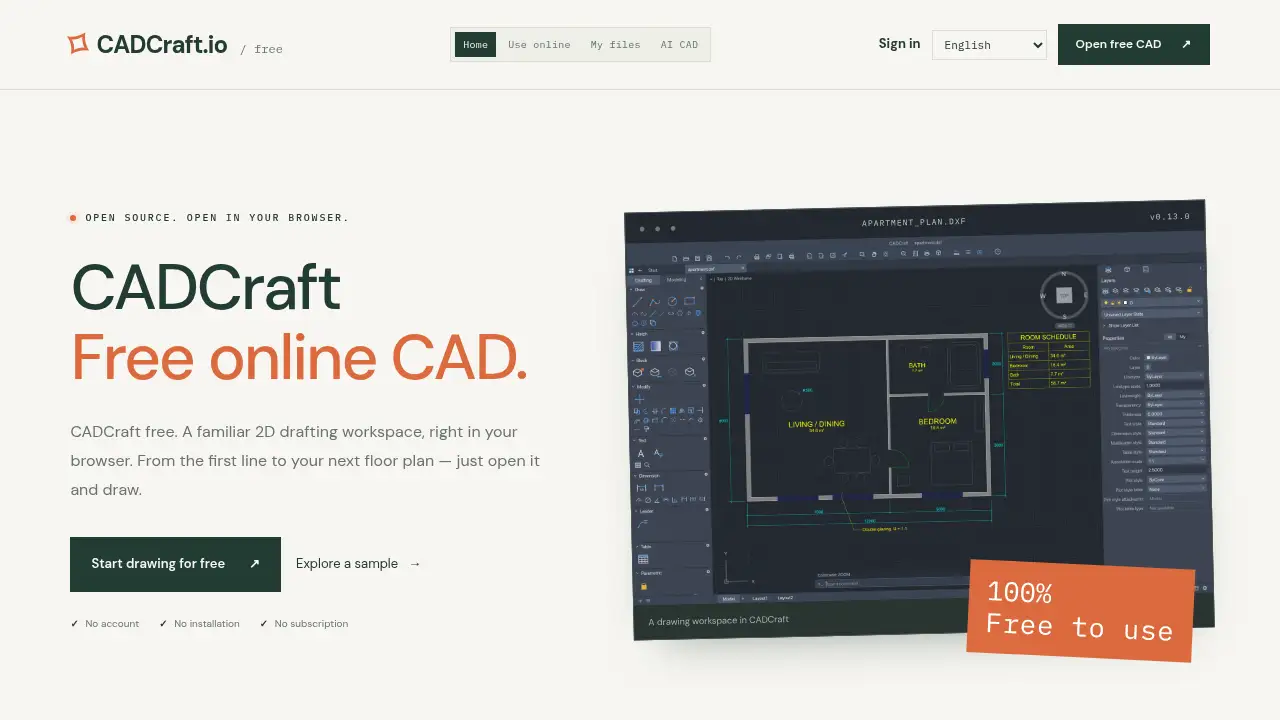
CADCraft is a browser-based CAD workspace for creating and editing precise 2D designs. It runs in a current desktop browser and is designed for users who want to open a drawing tool without installing software or creating an account. The editor supports common drafting tasks such as lines, circles, polylines, arcs, layers, dimensions, blocks, and hatching. It also works with DXF and DWG drawing workflows, which makes it useful for viewing and editing existing CAD files.
The product is positioned as a free online CAD option with a local-first approach. The CAD engine runs locally, and guest drawings are not uploaded automatically. Signed-in users can choose to save drawings to private cloud storage, but local save and export options are available. CADCraft is open-source software under MIT or Apache-2.0, and cadcraft.io independently hosts a customized CADCraft v0.13.0 web build. It is not the official CADCraft website, so users should keep that distinction in mind.
For people searching for an online CAD editor, CADCraft offers a familiar 2D drafting workspace with no subscription requirement. It is especially relevant for quick drawing work, DXF viewing, and lightweight technical drafting in the browser.
Key Features of CADCraft
Browser-Based 2D Drafting
Open CADCraft in a modern browser and start drawing without installation. The workspace supports precise 2D drafting with familiar commands, object snaps, and coordinate input.
DXF and DWG Workflows
Open DXF or DWG drawings and continue working on compatible files. File compatibility can vary by version and content, so keep the original file and check important drawings after import.
Local File Control
Save and export drawings to your computer, and keep local backups of important work. The CAD engine runs locally, which supports a more private workflow for guest users who do not sign in.
Familiar CAD Commands
Use a command line for actions such as drawing rectangles, circles, and zooming to extents. This helps users who are used to traditional CAD tools move into a free online CAD environment with less friction.
Layers, Dimensions, Blocks, and Hatching
Organize drawings with layers, add dimensions, reuse blocks, and apply hatching. These tools help create clearer technical drawings in an online CAD editor.
Open-Source Foundation
CADCraft is open-source software under MIT or Apache-2.0. The hosted editor is a customized web build, and the open-source model can appeal to users who value transparency and local-first tools.
Use Cases for CADCraft
Quick Floor Plans and Apartment Layouts
Draw simple apartment plans, room layouts, and spatial sketches in a browser-based CAD workspace. CADCraft can be useful when a full desktop CAD installation is unnecessary.
Editing DXF Drawings
Open DXF files, review geometry, and make small edits in a free online CAD tool. This is helpful for users who need a lightweight DXF editor without a complex setup.
Learning 2D Drafting Basics
Practice lines, circles, coordinate input, layers, and dimensions in an online CAD editor. Students and beginners can explore 2D drafting commands in a simple browser environment.
Lightweight Technical Drafting
Create simple technical drawings, diagrams, and part layouts when a local CAD tool is not available. The browser-based CAD model supports quick access from a desktop browser.
How to Use CADCraft
- Open the CADCraft workspace in a current desktop browser such as Chrome, Edge, Firefox, or Safari. A mouse or trackpad works best.
- Choose a blank drawing or explore the built-in sample to understand the workspace.
- Use the command line or drawing tools to create lines, rectangles, circles, polylines, and arcs. Object snaps and coordinate input help with precision.
- Organize the drawing with layers, dimensions, blocks, and hatching as needed.
- Save or export the drawing to your computer before refreshing or closing the tab. Signed-in users can optionally save to private cloud storage.
Target Audience for CADCraft
- Students learning 2D drafting and CAD basics
- Hobbyists who need a free online CAD tool
- Drafters and engineers working with DXF or DWG files
- Makers and DIY users creating simple technical drawings
- Open-source software supporters
- Small teams that need lightweight browser-based CAD access
- Users who prefer local file control and no installation
Is CADCraft Free?
CADCraft is free to use. The hosted editor has no subscription, sign-in, or payment requirement for local drawing and saving. Optional cloud save is available for signed-in users, with limits noted on the site.
| Plan | Price | Features |
|---|---|---|
| Free | $0 | Browser-based 2D drafting, DXF/DWG workflows, local save and export, no account required for guest use, optional private cloud save for signed-in users with storage limits |
CADCraft's Pros and Cons
| Aspect | Pros | Cons |
|---|---|---|
| Pricing | Free to use with no subscription requirement | No paid support plan is described in the reference content |
| Features | Supports 2D drafting, DXF/DWG files, layers, dimensions, blocks, and hatching | CADCraft is still in early development, and file compatibility can vary |
| Access | No installation or account required for local use | Requires a current browser with WebGPU or WebGL2 support |
| Privacy | CAD engine runs locally, and guest drawings are not uploaded automatically | Optional cloud save has storage limits of 10 MB per drawing and 100 MB per account |
| Transparency | Open-source under MIT or Apache-2.0 | cadcraft.io is an independently hosted build, not the official website |
Frequently Asked Questions about CADCraft
Is CADCraft really free?
Yes. CADCraft is free to use in the browser. The hosted editor has no subscription, sign-in, or payment requirement for local drawing and saving. Optional cloud save is available for signed-in users.
Does CADCraft work with DXF and DWG files?
CADCraft supports DXF and DWG drawing workflows, but compatibility varies by file version and content. Keep the original file and check important drawings after import, especially because the product is still in early development.
Do I need an account to use CADCraft?
No account is required for guest use. Users can open the free online CAD workspace, draw, and save locally. An account is only needed if someone chooses to use optional private cloud save.
Where are my drawings saved?
Save and export options download files to your computer. Signed-in users can also choose private cloud save, with limits of 10 MB per drawing and 100 MB per account. Keeping a local backup is recommended.
What browser do I need for CADCraft?
Use a current Chrome, Edge, Firefox, or Safari browser with WebGPU or WebGL2 support. If the drawing area has rendering problems, try WebGL mode. The compatibility option uses a CPU drawing path but still needs WebGPU or WebGL2 for the interface.
Is cadcraft.io the official CADCraft website?
No. cadcraft.io is independently operated and hosts a customized CADCraft web build. It is not the original software’s official website.
CADCraft Tags
free online CAD, CADCraft, online CAD editor, 2D drafting, DXF editor, DWG viewer, browser CAD, open-source CAD, local CAD, no installation CAD, online drafting tool, 2D CAD software