Introduction
Capafy AI: a simple AI video and image creator.
What is Capafy AI?
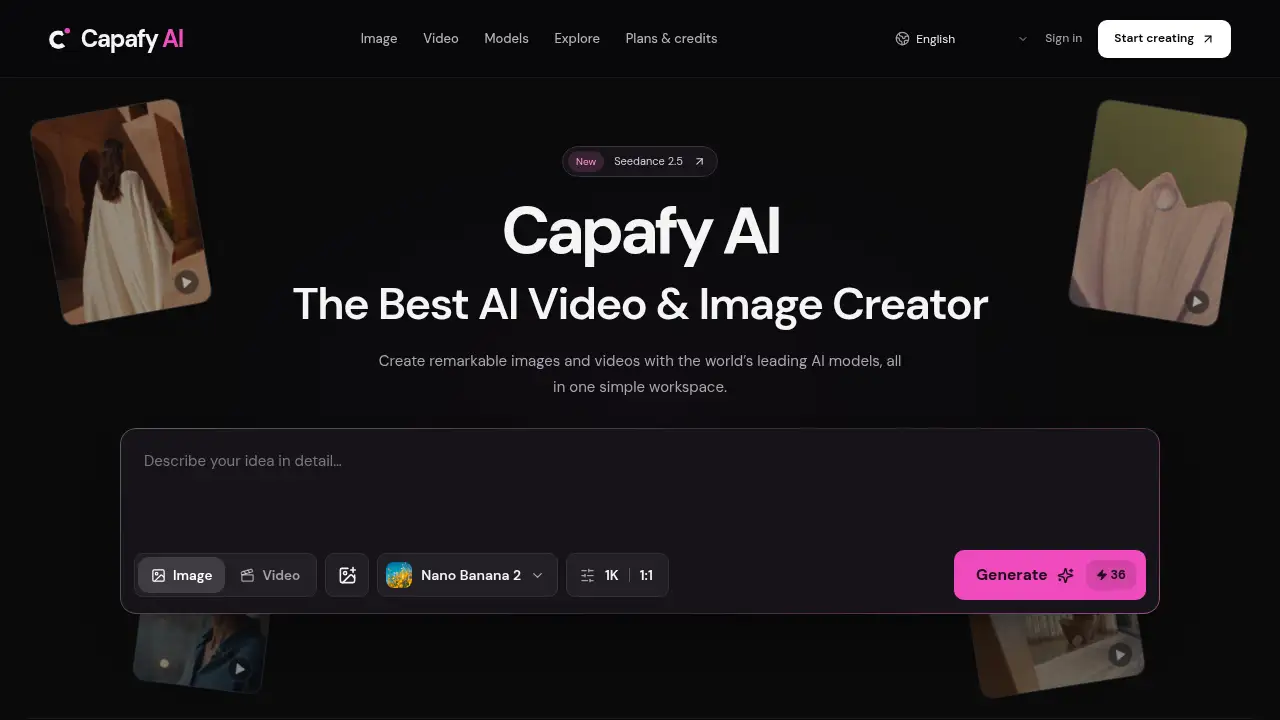
Capafy AI is a web-based creative workspace that combines an AI video generator and an AI image generator in one place. It is built for people who want to turn text prompts or reference photos into visuals without switching between several separate tools. The platform brings together multiple leading AI models, clear credit pricing, and a private creative library for finished work.
The problem it solves is fragmentation. Instead of learning a different interface for every model, users can write a brief, choose a model, review the credit quote, and generate a visual inside the same workspace. Capafy AI matters because it makes AI video and image creation more transparent: the selected model determines the available controls, the credit cost appears before submission, and each output stays linked to its prompt for later review.
Key Features of Capafy AI
All-in-One Video and Image Studios
Capafy AI includes a Video Studio and an Image Studio, so users can move from a still concept to a moving scene without leaving the platform. Both studios offer adjustable settings for different output needs.
Multiple Leading AI Models
Access supported models such as Seedance, Kling, Veo, and Nano Banana in one workspace. This helps users compare how different AI models handle the same brief and choose the one that fits the task.
Text-to-Image and Reference Image Workflows
Create an image from a written prompt or add a reference image where the selected model supports it. The AI image generator accepts ordinary language, and the reference input can guide visual direction without promising an exact copy.
Adjustable Video Settings
Use the AI video creator to set duration and resolution before generating a clip. Users can describe one clear action or camera movement and pair it with a compatible reference input for more controlled motion.
Transparent Credit Pricing
Capafy AI shows a credit quote before each generation, helping users weigh a small test against a more demanding attempt. The pricing page explains subscription plans and prepaid packs, and credits reserved for failed tasks are returned automatically.
Private Creative Library
Every completed asset and its prompt are stored in a private creative library. Users can mark useful takes as favorites, reopen details, and download the version they want to develop further.
Use Cases for Capafy AI
Early Concept Exploration
Designers can use Capafy AI to turn a rough brief into several visual directions. A fast AI image generator makes it easier to explore mood, color, and composition before committing to a final design.
Social Media Visuals
Marketers and content creators can generate vertical posts, square product tiles, and short video clips for social channels. The AI video and image creator supports different aspect ratios and resolutions to match the destination format.
Presentation and Pitch Assets
A launch deck often needs a striking hero image or an opening shot. Capafy AI helps produce presentation-ready visuals from a short text prompt, while the private creative library keeps versions organized for review.
Storyboard and Motion Tests
Filmmakers and animators can test a single action, such as a slow camera push or a turning face, with the AI video generator. Short clips can communicate a sequence idea before full production begins.
Team Collaboration
Larger plans include shared credits and multiple seats, giving teams a shared project context for assets and comments. This supports review cycles without automatically publishing work to a public gallery.
How to Use Capafy AI
- Write a short brief. Name the subject, audience, mood, and framing. For motion, add one clear action or camera direction.
- Choose a studio and model. Open the Video Studio or Image Studio, then select a compatible AI model for the task.
- Add a reference if supported. Upload an image you have permission to use, and describe which qualities should be retained or changed.
- Review the credit quote. Adjust duration, resolution, or aspect ratio, then check the cost before pressing generate.
- Save and revisit the result. Find the output in your private library, compare it against the brief, mark favorites, and download the asset you need.
Target Audience for Capafy AI
- Individual creators who need AI video and image generation in one workspace
- Designers and marketers producing concept visuals or social content
- Filmmakers and animators testing short motion ideas
- Small teams and studios that need shared credits and multiple seats
- Agencies looking for clear credit pricing across several AI models
Is Capafy AI Free?
Capafy AI does not list a free plan in the provided information. It offers paid subscriptions billed annually, with credits that refresh each month. Prices below reflect the displayed annual billing rate; monthly renewal terms and current offers should be checked on the official pricing page.
| Plan | Price | Features |
|---|---|---|
| Starter | $11.94/month (billed yearly) | 27,000 credits/month, all models, private creations, failed-task credit returns |
| Creator | $23.94/month (billed yearly) | 54,500 credits/month, all models, private creations, failed-task credit returns |
| Plus | $47.94/month (billed yearly) | 109,500 credits/month, all models, private creations, failed-task credit returns |
| Pro | $89.94/month (billed yearly) | 206,000 credits/month, 4 seats, shared credits |
| Power | $179.94/month (billed yearly) | 414,000 credits/month, 12 seats, shared credits |
| Studio | $299.94/month (billed yearly) | 692,000 credits/month, 28 seats, shared credits |
Unused subscription credits do not roll over. One-time prepaid packs are also mentioned and do not renew.
Capafy AI's Pros and Cons
| Aspect | Pros | Cons |
|---|---|---|
| Pricing | Clear credit quotes and credits returned for failed tasks | No free plan listed; larger video jobs can consume credits quickly |
| Features | Multiple AI models, video and image studios in one place | Output quality varies by model and prompt |
| Workflow | Private library keeps prompts and results together | Cannot guarantee fixed turnaround times |
| Team Use | Shared credits and seats on higher plans | Collaboration features are limited to team plans |
Frequently Asked Questions about Capafy AI
What is Capafy AI best used for?
Capafy AI is best used for turning short creative briefs into images and short videos. It suits concept exploration, social content, presentation assets, and motion tests where users want several AI models in one workspace.
Does Capafy AI offer a free plan?
The provided pricing information does not show a free plan. Users need a funded balance to generate outputs, and public examples do not supply generation credits. Current plans and prepaid packs are listed on the pricing page.
Which AI models are available in Capafy AI?
Capafy AI lists supported models including Seedance, Kling, Veo, and Nano Banana. Each model may offer different inputs, durations, dimensions, and reference features, so users should select based on the task.
Do failed generations use credits?
If a generation task fails, the credits reserved for that task are returned automatically. A successfully completed output still uses credits even if it is not the version the user hoped for.
Can I use reference images in Capafy AI?
Yes, where the selected model supports reference inputs. Users should check accepted file types and limits, describe the qualities they want to keep or change, and only upload images they have permission to use.
Are my Capafy AI creations private?
Assets in an account are not automatically submitted to the public inspiration gallery. Team projects follow their own roles and permissions, so users should review what they share and with whom.
Capafy AI Tags
Capafy AI, AI video generator, AI image generator, AI video and image creator, AI video creator, AI image creator, text to image, text to video, AI models, credit pricing, private creative library, Seedance