Introduction
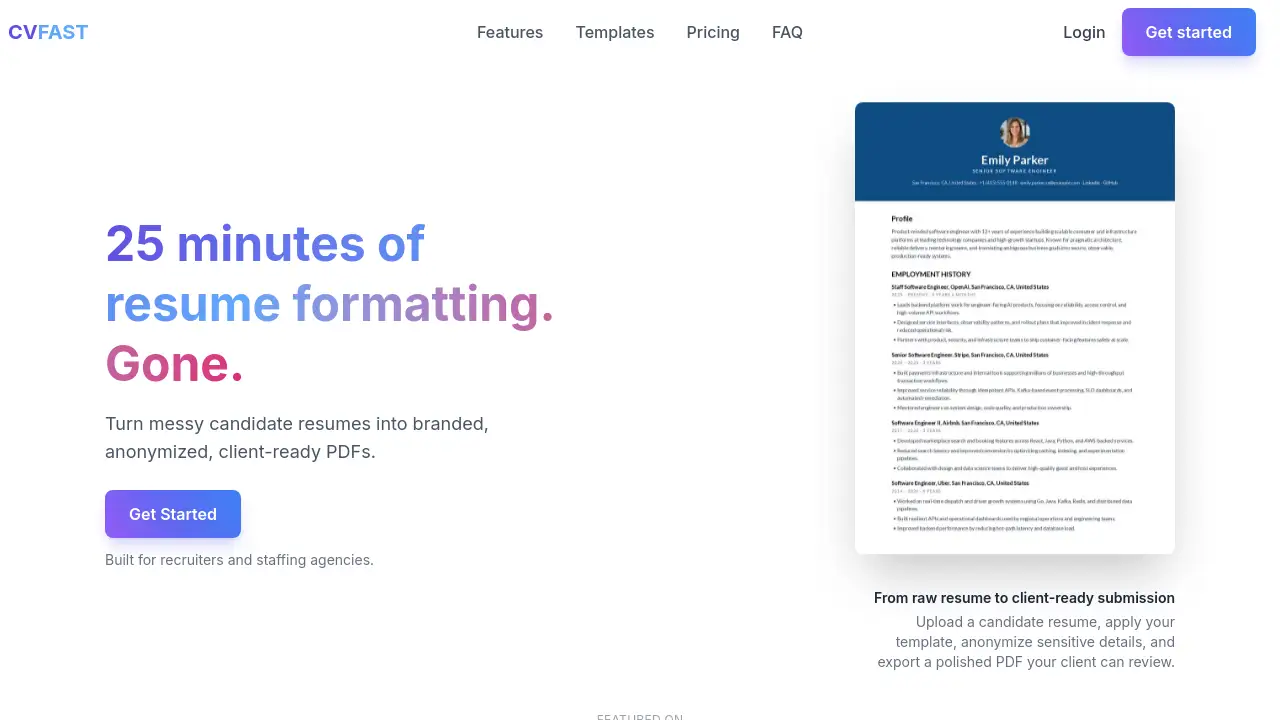
An AI resume builder designed for recruiters and staffing agencies, CVFAST turns messy candidate PDFs into branded, ATS-ready resumes in under a minute. This tool eliminates manual formatting, letting teams send consistent, client-ready profiles faster.
What is CVFAST?
CVFAST is an AI resume builder tailored specifically for recruiters, staffing agencies, and hiring teams. Instead of spending 20–30 minutes fixing fonts, adjusting spacing, or deleting personal details from a raw resume, users upload a PDF or Word document and receive a clean, branded, anonymized profile in seconds. The platform uses artificial intelligence to restructure content, polish grammar, and generate professional candidate summaries. It also supports agency branding – adding logos, headers, and layout preferences – and hides sensitive information before sharing with clients. CVFAST focuses on the submission workflow, not on helping individual job seekers build resumes. For anyone who regularly prepares candidate resumes for external review, this resume builder for recruiters saves hours each week while ensuring every submission looks polished and consistent.
Key Features of CVFAST
AI Formatting
Automatically converts raw candidate resumes – whether a scanned PDF, a Google Doc, or a poorly formatted Word file – into structured, readable profiles without manual retyping.
Agency Branding
Apply your logo, header, color scheme, and preferred layout to every resume. This keeps all candidate submissions visually consistent and reinforces your agency’s identity.
Anonymization
Hide names, phone numbers, email addresses, photos, or any other identifying details with one click. Protects candidate privacy and helps meet compliance requirements (GDPR, CCPA, PDPA).
AI Polish
Fixes grammar, spelling, tone, and formatting issues throughout the resume. The AI enhances clarity without rewriting the candidate’s original experience.
Candidate Summaries
Generates concise, professional profile summaries that highlight each candidate’s strengths, experience, and fit for the role – ready to include in client submissions.
Editable Output
After AI processing, users can review and adjust every section before export. Full control remains with the recruiter.
PDF Export
Exports polished, client-ready PDFs that maintain consistent headings, fonts, and spacing across all submitted profiles.
Browser Extension
Import candidate resumes directly from LinkedIn, an ATS, or other sourcing tools without switching tabs or downloading files first.
Use Cases for CVFAST
High-Volume Recruitment
Staffing agencies handling dozens of resumes weekly can process each one in 60 seconds, applying consistent formatting and branding without manual effort.
Client Submission Preparation
Before sending a candidate to a hiring manager, recruiters can quickly anonymize contact details and generate a polished, branded PDF that presents the candidate professionally.
Compliance and Privacy
When working with sensitive candidate data, CVFAST’s anonymization feature ensures no personal details are accidentally shared, meeting data protection standards required in many contracts.
How to Use CVFAST
- Upload a candidate resume – Drag and drop a PDF or Word document into the tool.
- Apply your format – Choose a professional template or your agency’s custom layout.
- Anonymize and polish – Hide sensitive details and let the AI fix grammar and structure.
- Review and adjust – Edit the final resume if needed. All changes are under your control.
- Export a branded PDF – Download the client-ready file and send it directly.
The entire process takes about 60 seconds, making this AI resume builder a practical solution for busy recruiting teams.
Target Audience for CVFAST
- Recruiters – both in-house and agency, who need to prepare resumes quickly for client submission.
- Staffing agencies – handling high volumes of candidate profiles across various industries.
- Executive search firms – requiring polished, consistent submissions for senior-level candidates.
- Specialist talent agencies – working with performers, creatives, consultants, or temporary workers.
- Outsourcing firms – turning developer, contractor, and temporary worker resumes into standardized formats.
Is CVFAST Free?
CVFAST offers a free tier to get started, allowing users to try the core features – such as AI formatting and PDF export – without upfront payment. For advanced capabilities like custom agency branding, unlimited exports, and dedicated support, users can upgrade to a paid plan. Pricing details are available on the official website.
| Plan | Price | Features |
|---|---|---|
| Free | $0 | Basic AI formatting, limited exports, standard templates. |
| Pro | Varies | Custom branding, unlimited exports, priority support. |
Visit cvfast.com/pricing for current rates.
CVFAST's Pros and Cons
| Aspect | Pros | Cons |
|---|---|---|
| Efficiency | Reduces resume formatting time from 20 minutes to under 1 minute. | Only useful for recruiters, not job seekers. |
| Branding | Consistent, branded output across all candidate submissions. | Custom templates may require additional setup or subscription. |
| AI Features | AI polish and summary generation save manual rewriting effort. | AI may not capture every nuance of a candidate’s experience. |
| Privacy | Built-in anonymization and GDPR/CCPA/PDPA compliance. | Users must still verify that all sensitive data is removed. |
| Learning Curve | Simple three-step workflow; no special training needed. | Advanced features (browser extension, custom templates) take a moment to learn. |
Frequently Asked Questions about CVFAST
Who is CVFAST designed for?
CVFAST is built for recruiters, staffing agencies, executive search firms, and hiring teams who regularly prepare candidate resumes for client submission. It is not meant for individual job seekers building their own resumes.
Can I use my agency’s logo and colors?
Yes. CVFAST allows you to apply your logo, header, layout, and preferred template style to every resume, ensuring consistent branding across all client submissions.
Does CVFAST remove candidate contact details automatically?
Yes. The anonymization feature can hide names, phone numbers, email addresses, and photos with one click, helping you meet privacy requirements before sending profiles to clients.
What file formats can I upload?
You can upload PDF and Word documents. The tool also accepts profiles imported via its browser extension from LinkedIn or other sourcing tools.
Is CVFAST compliant with data protection laws?
CVFAST is designed to align with GDPR, CCPA, and PDPA standards. The platform takes privacy seriously and includes features that help users handle candidate data responsibly.
How does the AI polish work?
The AI checks for grammar, spelling, tone, and formatting issues throughout the resume. It improves clarity and professionalism without altering the core content of the candidate’s experience.
CVFAST Tags
AI resume builder, resume builder for recruiters, staffing agency resume tool, ATS-ready resume, branded resume, candidate resume formatting, recruiter productivity tool, AI resume polisher, anonymize resume, PDF resume export, agency branding, recruiter workflow automation