Introduction
Nano Banana 2.5 is an AI image generator.
What is Nano Banana 2.5?
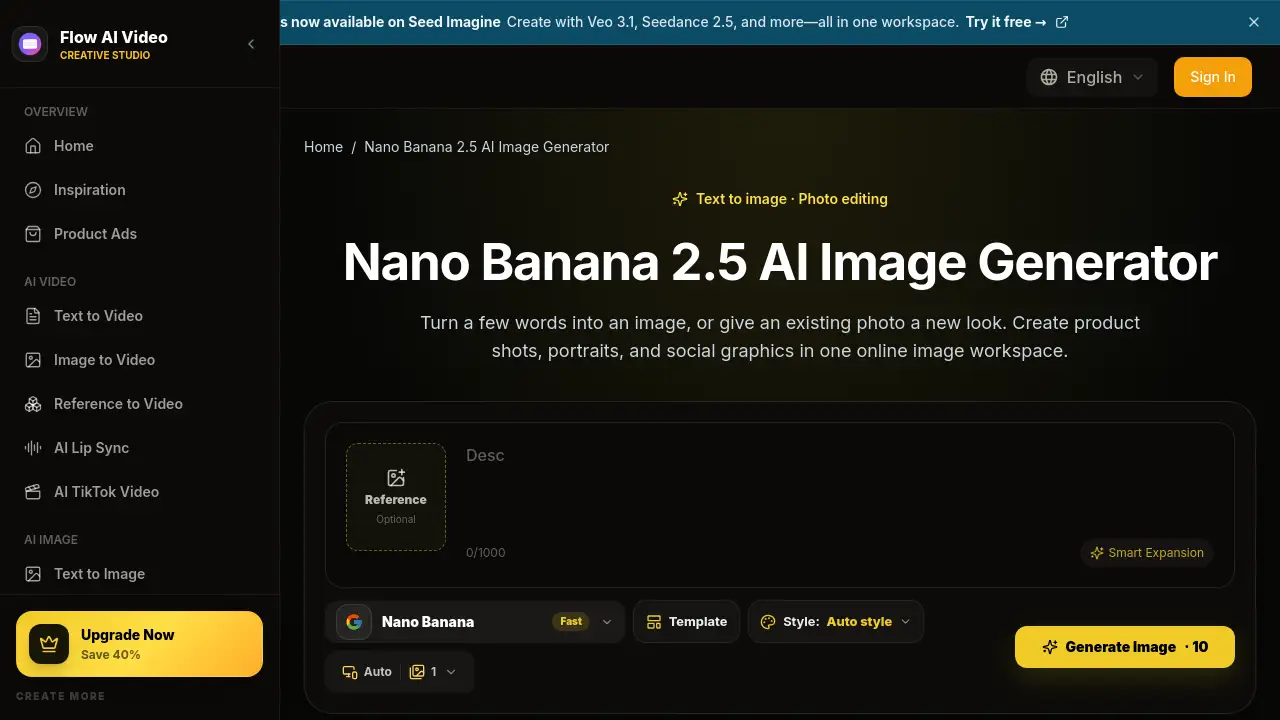
Nano Banana 2.5 is a browser-based AI image generator and photo editing tool. It helps users create images from text and edit photos with reference images and simple prompts. Instead of learning layers, masks, or complex software, users can describe changes in plain words. The product is designed for product photos, portraits, social graphics, and brand concepts. It solves the problem of turning a rough idea into a usable visual quickly. Nano Banana 2.5 matters because it gives small teams and solo creators a simple way to explore visual directions before final design. With Nano Banana 2.5, users can start from a prompt or an existing photo. It also supports text to image generation, reference image guidance, and online image workspace access.
Key Features of Nano Banana 2.5
Text to Image with Simple Prompts
Nano Banana 2.5 lets users turn a short description into an image. A prompt can name the subject, setting, and style for text to image creation.
Reference Image Guided Photo Editing
Users can upload a reference photo and describe what should change. This makes photo editing with Nano Banana 2.5 useful for background swaps, lighting changes, or outfit adjustments.
Multiple Output Counts and Aspect Ratios
Nano Banana 2.5 allows users to choose how many images to generate and select square, portrait, or landscape formats. This helps compare looks for social graphics or product photos.
Browser-Based Online Image Workspace
Nano Banana 2.5 runs in a browser on phone or computer. Users can type a prompt, add a reference image, and download a result without installing an image editor.
Model Selection and Credit Review
Before generating, users can choose an available model and review the displayed credit cost. Nano Banana 2.5 shows the settings and credits so users can plan their image generation.
Use Cases for Nano Banana 2.5
Product Photos for Online Stores
Online store owners can use Nano Banana 2.5 to explore studio or lifestyle backgrounds for skincare, accessories, and other products.
Portraits and Character Art
Creators can try new outfits, illustrated styles, or scenes for portraits. Nano Banana 2.5 can use a reference image to guide the look and details.
Social Posts and YouTube Thumbnails
Nano Banana 2.5 helps make eye-catching subjects for Instagram posts, Pinterest images, or YouTube thumbnails. Users can leave room for a headline in an editor.
Brand and Design Concepts
Marketers and designers can use Nano Banana 2.5 to explore a color palette, campaign mood, or logo direction. This supports early visual conversations with clients or teams.
Lifestyle Product Scenes
Nano Banana 2.5 can place a product in a realistic setting, such as headphones on a desk with morning light. This helps create lifestyle images for campaigns or listings.
How to Use Nano Banana 2.5
Using Nano Banana 2.5 follows a simple workflow:
- Write your idea. Describe the main subject, background, and style. For example, ask for a ceramic mug on a wooden table in soft morning light.
- Add a reference photo. Upload an image if you want to edit a photo or guide the result. Say what should change and which details to keep.
- Choose settings and generate. Select a model, image shape, and output count. Check the displayed credits, then select Generate Image. Sign in when prompted.
- Review and download. Open the result and check the details. Download the image you like, or adjust the prompt and generate another version.
- Try one change at a time. If the result needs work, change one part of the prompt and compare the next image.
Target Audience for Nano Banana 2.5
- Online store owners who need product photos and promotional images.
- YouTube and social creators who build thumbnails and fresh social graphics.
- Marketers and small teams who compare visual directions for campaigns.
- Designers and hobby artists who explore characters, compositions, and illustration styles.
- Mobile users who want an online image workspace without desktop software.
Is Nano Banana 2.5 Free?
Nano Banana 2.5 is not presented as a completely free tool. It uses a credit system, and the generator shows a credit cost before an image is created. The reference content does not list exact plan prices. Users should check the official pricing page for current plans, credit bundles, and any free or trial credits. This makes Nano Banana 2.5 a pay-as-you-go option for occasional image generation and photo editing.
Nano Banana 2.5's Pros and Cons
| Aspect | Pros | Cons |
|---|---|---|
| Pricing | Credits are shown before generation; pay-as-you-go use is possible. | Exact costs are not listed in the reference content; credits are required. |
| Features | Text to image, photo editing, reference images, model selection, and aspect ratios. | It is not a full manual design suite with layers or masks. |
| Access | Browser-based on phone or computer; no desktop install required. | Requires an internet connection and sign-in. |
| Ease of use | Plain-language prompts; no complex editing tools needed. | Better results often need careful prompt tuning and review. |
Frequently Asked Questions about Nano Banana 2.5
What can I do with Nano Banana 2.5?
Nano Banana 2.5 can create images from a text prompt or use a reference image to guide a new result. It supports product photos, portraits, social graphics, and brand concepts.
Can I edit an existing photo with Nano Banana 2.5?
Yes. Upload a reference photo and describe the changes you want, such as a plain background or warmer lighting. Mention any details you want to keep, then review the generated result.
Do I need a reference image to use Nano Banana 2.5?
No. Users can start with a text prompt alone. Adding a reference image can help when appearance, colors, or style matter more.
Does Nano Banana 2.5 use credits?
Yes. Check the cost shown in the generator before starting. The balance and pricing page show available credits and plans.
Can I use Nano Banana 2.5 on my phone?
Yes. Open the workspace in a mobile browser, upload a photo or type a prompt, and download the result. No desktop application is required.
How can I get better results from Nano Banana 2.5?
Describe one clear subject, the setting, and the style. Add a reference when appearance matters. If the result needs work, change one part of the prompt and compare the next image.
Nano Banana 2.5 Tags
Nano Banana 2.5, Nano Banana 2.5 AI image generator, AI image generator, text to image, photo editing, reference image, simple prompts, product photos, portraits, social graphics, online image workspace, image generation