Introduction
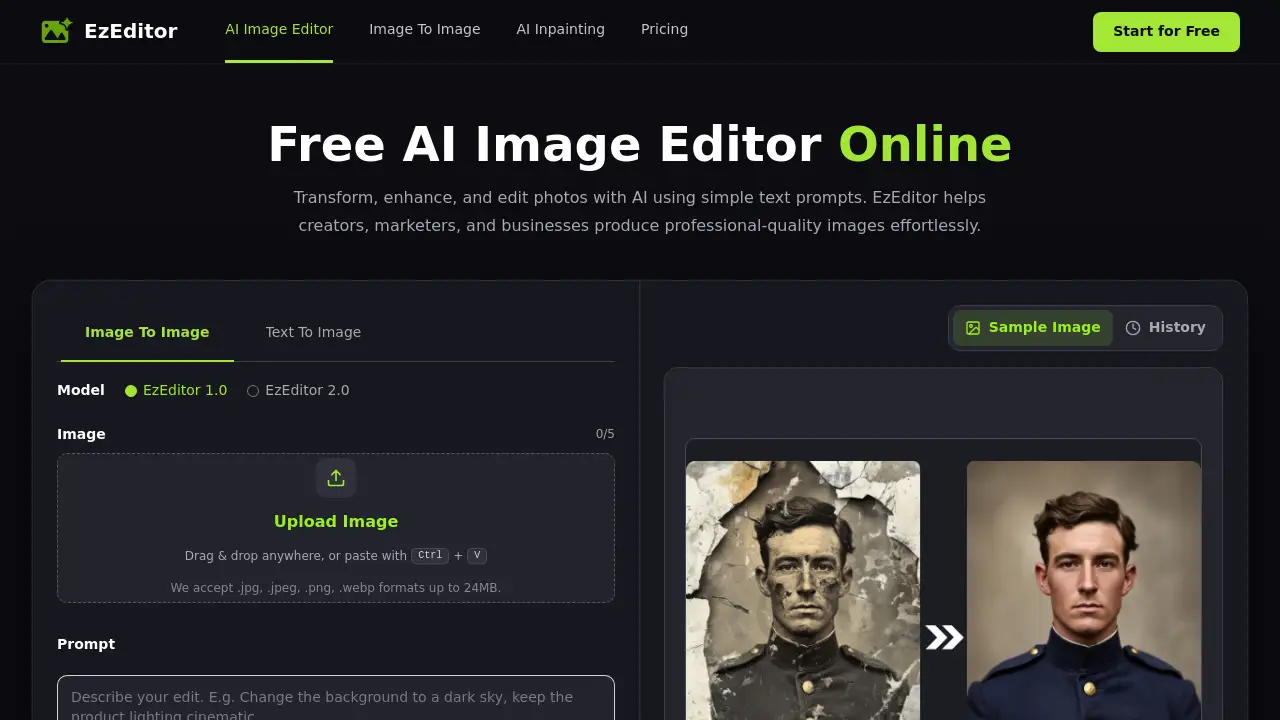
EzEditor is a practical AI image editor for anyone who wants to change photos quickly without mastering complex software. This online tool lets users transform, enhance, and edit images in seconds with simple text prompts. It was built for creators, designers, marketers, and business teams. The browser-based workflow is straightforward: upload an image, describe the change, and download a clean result. EzEditor aims to make professional-quality image editing accessible to everyone.
What is EzEditor?
EzEditor is an AI-powered photo editing platform that turns natural language instructions into polished visual changes. Instead of opening a desktop application and working with layers or masks, users simply type what they want to modify. The AI handles background replacement, object removal, style transfer, photo restoration, and other common editing tasks.
The tool solves a real problem for people who need fast visuals but do not have time to learn traditional editing. It also helps experienced designers speed up repetitive work. The homepage describes EzEditor as a free AI image editor online with no signup, and every user receives 5 free credits each day. This makes it easy to test the service before committing to any paid plan.
For creators, marketers, ecommerce sellers, and photographers, this kind of AI Photo Editor can reduce the time spent on routine image work. The output is designed for social media, online stores, marketing campaigns, and professional creative projects. Because the entire process takes place in a browser, there is no software to install.
Key Features of EzEditor
Multi-Model AI Engine
EzEditor includes a multi-model AI engine that lets users choose between different models for different image styles and creative tasks. This is useful when a prompt needs a realistic result or a more artistic look.
Style Transfer & Blending
The style transfer feature can turn an ordinary photo into a new artistic style. It can also blend multiple visual elements together in a natural way. This helps users create original visuals without manual masking.
Privacy Protection
Uploaded images are processed securely and are not shared with third parties. Privacy protection matters for businesses and professionals who handle sensitive creative assets.
Fast AI Generation
The optimized AI models are built to generate high-quality image edits in seconds. Fast generation keeps creative workflows moving without long export waits.
Prompt-Powered Editing
Users can edit photos with AI using simple text prompts. Natural language control removes the need for manual selection tools. Simply type a change like "replace the background with a modern office" or "remove the person on the left," and let the AI image editor finish the task.
High-Resolution Watermark-Free Output
Every generated edit is high resolution, so fine details and colors remain sharp. Downloads are also free of watermarks, which makes images ready for ecommerce, social media, or professional portfolios.
Use Cases for EzEditor
Product Photo Enhancement
Ecommerce store owners can improve product photos by changing backgrounds, cleaning clutter, or adding consistent colors. An AI image editor can make each product image look polished without retaking photos.
Social Media Content Creation
Marketers and social media managers can create engaging visuals by feeding existing photos into EzEditor and asking for new backgrounds, style changes, or minor adjustments. This speeds up content production.
Portraits and Concept Art
Photographers can remove unwanted objects, repair old photos, or add realistic colors to damaged images. Illustrators can use the AI Photo Editor to explore concept art variations without masking layers manually.
Marketing and Print Materials
Restaurant menus, posters, and promotional assets require clean, high-resolution images. EzEditor's watermark-free downloads and stable output make it possible to prepare files for print or digital distribution.
How to Use EzEditor
Using EzEditor is simple:
- Upload a JPG, JPEG, PNG, or WEBP image. The file size can be up to 24 MB.
- Type a text prompt that describes the change you want. Choose an output ratio if needed.
- Generate the edit and preview the result.
- Download the image or continue refining it with a new prompt until it matches your vision.
The entire workflow is browser-based and does not require an account. For anyone searching for an online AI image editor, this process offers a fast entry point.
Target Audience for EzEditor
- Content Creators
- Graphic Designers
- Digital Marketers
- Ecommerce Sellers
- Photographers
- Freelance Illustrators
- Small Business Owners
- Social Media Managers
Is EzEditor Free?
EzEditor currently offers a free plan. Based on the product page, every user receives 5 free credits each day, and those credits refresh automatically. No signup is required to start editing, and no credit card is needed. Paid plan details are not listed in the public reference material, so users should check the official website for the latest pricing.
| Plan | Price | Features |
|---|---|---|
| Free | $0 | 5 free credits daily, no signup, online AI image editing, high-resolution results, watermark-free downloads, privacy protection |
EzEditor's Pros and Cons
| Aspect | Pros | Cons |
|---|---|---|
| Pricing | Free to start; daily credits; no signup | Heavy users may need more than 5 credits per day |
| Ease of Use | Simple text prompts; no manual editing skills required | Final results depend on prompt clarity |
| Output | High-resolution, watermark-free downloads | Limited to supported image formats and file size |
| Privacy | Images processed securely and not shared | Online-only editing requires an internet connection |
Frequently Asked Questions about EzEditor
What is an AI image editor?
An AI image editor is a tool that uses artificial intelligence to edit photos based on text prompts or automated recognition. Instead of selecting objects or adjusting layers manually, users describe the change and the AI generates an edited result.
Do I need to sign up for EzEditor?
No. EzEditor is a free AI image editor online with no signup required. Users can upload an image and start editing immediately in the browser.
Is EzEditor really free?
Yes. EzEditor gives every user 5 free credits each day, and the credits refresh automatically. No credit card is required for the free plan.
What image formats and size limits does EzEditor support?
EzEditor supports JPG, JPEG, PNG, and WEBP formats up to 24 MB. This covers most common photo files used on websites and social media.
Are uploaded images safe?
According to the product page, uploaded images are processed securely and are not shared with third parties. Privacy protection is part of the AI editing session.
Can I use EzEditor for business projects?
Yes. As an AI Photo Editor, EzEditor can prepare high-resolution images for social media, ecommerce, marketing, and professional creative work. The product page states that watermark-free downloads are ready for commercial use.
EzEditor Tags
AI image editor, AI Photo Editor, free AI image editor online, edit photos with AI, text prompt image editor, EzEditor review, online AI image editor, no signup image editor, watermark-free image editing, high-resolution AI editing, image editing with text prompts